Add a button to 'send message' via the request page

Hello there!

We’d like to add a Send Message button on the request page - for example below the Make an Offer button - Need a few electrical repairs – ExpertHive

As I can see this topic was already discussed some time ago here and from what I understand it was on the road map.

Would like to find out if this feature was implemented because even though I have the lates version on the theme and plugins, I can’t find it.

And if it was not implemented, can you give an advice about the best approach to implement that in a child theme?
We have a developer who can try implementing that, but needs some help to get started.

This feature is really important for us, because vendors often have questions which need clarification before making an offer.

Hope you can help us :pray:

Thank you.

Hi,

Please check the solution in this topic: Adding button "Send a message" on the Request page

​I hope this is helpful to you.

Hi Andrii!

Thank you for the reply.
I’ve tried the proposed solution, but I run into a few issues.

First of all a vendor could not see the new button I’m trying to add, and while debuging, I figured out that this happens due to the incorrect user ID on this line

$vendor = \HivePress\Models\Vendor::query()->filter(['user' => $user->get_id()])->get_first();

So, in order to fix that, i’ve replaced it with the $current_user->ID like so:

$current_user = wp_get_current_user();
   if ( ! ( $current_user instanceof WP_User ) ) {
          return;
   }
$vendor = \HivePress\Models\Vendor::query()->filter(['user' => $current_user->ID])->get_first();

This makes the button show up correctly. But When I try to send a message as a Vendor, it tells me “You can’t send messages to yourself.”

Could you help me figure out where the user IDs are being messed up in this situation?

The entire custom code I’m using is the following:

add_filter(
    'hivepress/v1/templates/request_view_page/blocks',
    function ( $blocks, $template ) {
      if(hivepress()->get_version( 'messages' )){
        $request = $template->get_context('request');
        
        if(!$request){
          return $blocks;
        }
        
        $user = $request->get_user();
        
        if(!$user){
          return $blocks;
        }

        $current_user = wp_get_current_user();
        if ( ! ( $current_user instanceof WP_User ) ) {
          return;
        }

        $vendor = \HivePress\Models\Vendor::query()->filter(['user' => $current_user->ID])->get_first();

        if(!$vendor){
          return $blocks;
        }
        
        $template->set_context('vendor', $vendor);
        
        return hivepress()->template->merge_blocks(
        $blocks,
        [
          'request_actions_primary' => [
            'blocks' => [
                'message_send_modal' => [
                  'type'        => 'modal',
                  'model'       => 'vendor',
                  'title'       => hivepress()->translator->get_string( 'send_message' ),
                  '_capability' => 'read',
                  '_order'      => 5,
  
                  'blocks'      => [
                    'message_send_form' => [
                      'type'       => 'message_send_form',
                      '_order'     => 10,
  
                      'attributes' => [
                        'class' => [ 'hp-form--narrow' ],
                      ],
                    ],
                  ],
                ],
  
                'message_send_link'  => [
                  'type'   => 'part',
                  'path'   => 'vendor/view/page/message-send-link',
                  '_order' => 10,
                ],
              ],
          ],
        ]
      );	
      }
      
      return $blocks;
    },
    1000,
    2
  );

Thanks

Please make sure that the current user is not the author of the request, you can debug this using error_log or var_dump, to make sure that the sender/recipient user IDs are different.

Hi @ihor.

Thank you for getting back to me.

Yes, I’ve already made sure the current user is not the author of the request.
I know how to debug, but the behaviour is weird.

With the same logged in user (a vendor user), I’m trying to send messages to requests created by different users. And the result is the same.

When I inspect the request Payload, no matter which Request page the vendor is visiting, when it tries to send the message, the recipient's value is the same - equal to the Vendor’s ID (which is wrong).

And I’m not sure how to change the recipient ID.

As mentioned earlier, the only changes I’ve made to the solution proposed here, was to fix the user ID by passing the ID of the currently logged in user. Before making that change, the Send message button would not even show up.

So basically I’ve change this line:

$vendor = \HivePress\Models\Vendor::query()->filter(['user' => $user->get_id()])->get_first();

into this one:

$current_user = wp_get_current_user();
   if ( ! ( $current_user instanceof WP_User ) ) {
          return;
   }
$vendor = \HivePress\Models\Vendor::query()->filter(['user' => $current_user->ID])->get_first();

I’m using the ExpertHive theme with a child theme and the following plugins:

Let me know if I have to provide more details. Or if you can give me a hint where to look in order to fix the recipient ID.

Thank you.

Sorry for the delay.

I assume the reason is here hivepress-messages/includes/blocks/class-message-send-form.php at master · hivepress/hivepress-messages · GitHub The message form in the Request template context always sets the current request user as the recipient and possibly overrides any code snippets.

You can try filtering the form itself to override this behavior.

Hi @ihor
Thank you for the advice.
You are write, in the class you have pointed out, the recipient ID is set and collides with my custom work.

I’ve tried several ways of filtering the form, but I can’t get it.

Basically I’m creating a new class which inherits from Message_Send_Form and want to override the boot() method to work for my purpose.

I’ve tried to create a custom plugin based on GitHub - hivepress/foo-followers: A sample extension created for the HivePress developer docs., with the custom class available in includes/blocks/message-send-vendor-request-form.php.
And I have removed all the files but the main file, and my file above.

And the code inside that class is something like this:

<?php

namespace HivePress\Blocks;

// Exit if accessed directly.
defined( 'ABSPATH' ) || exit;

class Message_Send_Vendor_Request_Form extends Message_Send_Form {
  
	/**
	 * Bootstraps block properties.
	 */
	protected function boot() {
            /// the custom code goes here:


           parent::boot();
        }
}

And then in the blocks section I’m trying to use that custom form like

'blocks'      => [
                  'message_send_vendor_request_form' => [
                    'type'       => 'form',
                    'form' => 'message_send_vendor_request_form',
                    '_order'     => 10,

                    'attributes' => [
                      'class' => [ 'hp-form--narrow' ],
                    ],
                  ],
                ],

But my custom class does not seem to get loaded.
I have activated the custom plugin.

Can you notice if I’m doing anything wrong?
Or what is the recommended way of filtering the form?

Thank you!

Hi,

You don’t need to inherit the form, but at the hook level of the hivepress/v1/forms/message_send form itself, try to declare if the page is a request, then specify the value.

Hi Andrii.
Thank you for the hint.

However I’ve tried that and it does not change the ‘recipient’ id.

For example I’m using the code below:

add_filter(
	'hivepress/v1/forms/message_send',
	function( $form ) {
                 // for debugging purposes  I'm hardcoding the ID 
                 $form['fields']['recipient']['value'] = 33;

		return $form;
	},
	1000 // I've tried different priority values here
);

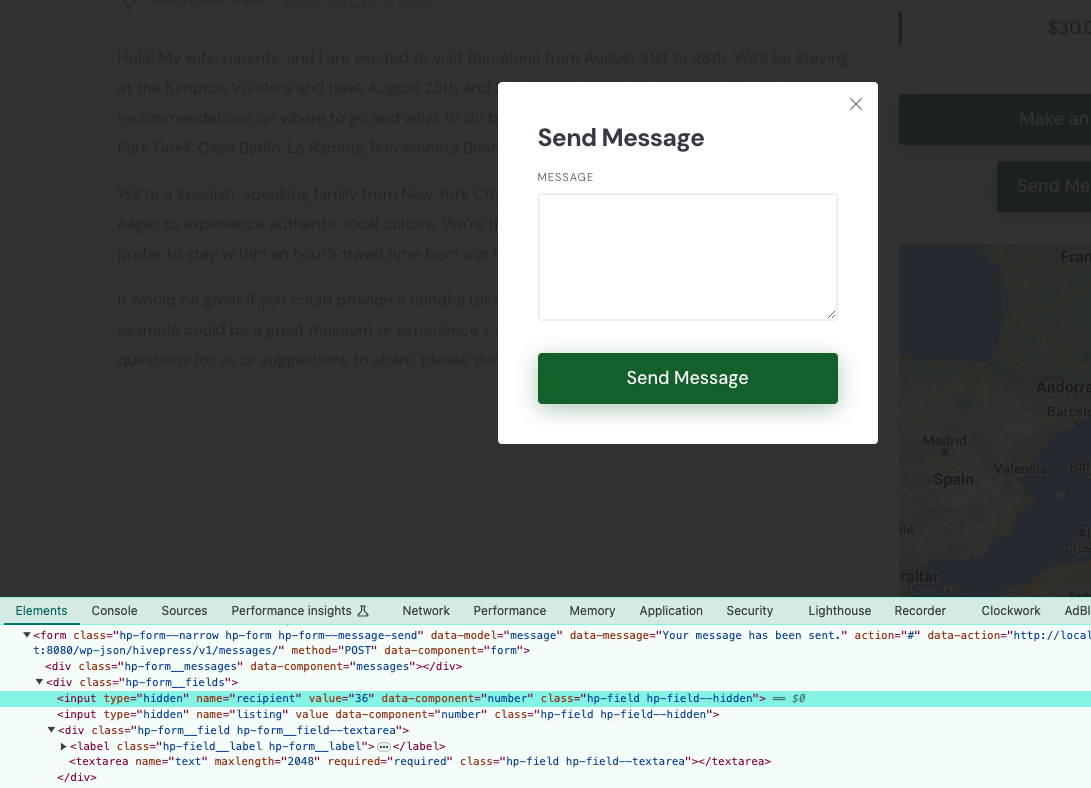
But when I inspect the form, the hidden field for the recipient has a different value. You can see in the attached image. In my case ‘36’ is the ID of the logged in user. And thus it will send a message to himself.

Also in the code snippet above if I do a “var_dump($form);” before the “return $form;” I can see the hardcoded value ( [“recipient”]=> array(2) { [“display_type”]=> string(6) “hidden” [“value”]=> int(33) } ), but it does not affect the form itself …

array(6) { ["button"]=> array(3) { ["label"]=> string(12) "Send Message" ["display_type"]=> string(6) "submit" ["attributes"]=> array(1) { ["class"]=> array(3) { [0]=> string(15) "hp-form__button" [1]=> string(14) "button-primary" [2]=> string(3) "alt" } } } ["message"]=> string(27) "Your message has been sent." ["action"]=> string(52) "http://localhost:8080/wp-json/hivepress/v1/messages/" ["fields"]=> array(3) { ["text"]=> array(1) { ["_order"]=> int(10) } ["recipient"]=> array(2) { ["display_type"]=> string(6) "hidden" ["value"]=> int(33) } ["listing"]=> array(1) { ["display_type"]=> string(6) "hidden" } } ["model"]=> NULL ["attributes"]=> array(1) { ["class"]=> array(1) { [0]=> string(15) "hp-form--narrow" } } }

It looks like the ‘recipient’ value gets overwritten later, but I’m not sure when.

Hello again.
We have submitted a customisation request regarding this matter.
Therefore I’m posting here all the details and code again so we have everything in one place.

Basically we want to add a Send Message button on the request page - for example below the Make an Offer button - Need a few electrical repairs – ExpertHive
And the button should be available for the logged-in Vendors.

In order to do that I’ve used the following code:

add_filter(
  'hivepress/v1/templates/request_view_page/blocks',
  function ( $blocks, $template ) {
    if(hivepress()->get_version( 'messages' )){

      $request = $template->get_context('request');

      if(!$request){
        return $blocks;
      }

      $user = $request->get_user();

      if(!$user){
        return $blocks;
      }

      $current_user = wp_get_current_user();
      if ( ! ( $current_user instanceof WP_User ) ) {
        return;
      }

      $vendor = \HivePress\Models\Vendor::query()->filter(['user' => $current_user->ID])->get_first();

      // $vendor = \HivePress\Models\Vendor::query()->filter(['user' => $user->get_id()])->get_first();

      if(!$vendor){
        return $blocks;
      }

      $template->set_context('vendor', $vendor);

      return hivepress()->template->merge_blocks(
      $blocks,
      [
        'request_actions_primary' => [
          'blocks' => [
              'message_send_modal' => [
                'type'        => 'modal',
                'model'       => 'vendor',
                'title'       => hivepress()->translator->get_string( 'send_message' ),
                '_capability' => 'read',
                '_order'      => 5,
               
                'blocks'      => [
                  'message_send_form' => [
                    'type'       => 'message_send_form',
                    '_order'     => 10,

                    'attributes' => [
                      'class' => [ 'hp-form--narrow' ],
                    ],
                  ],                  
                ],
              ],

              'message_send_link'  => [
                'type'   => 'part',
                'path'   => 'vendor/view/page/message-send-link',
                '_order' => 10,
              ],
            ],
        ],
      ]
    );	
    }

    return $blocks;
  },
  1000,
  2
);

The code above makes the button to show up correctly for the vendors.
But a vendor can not send a message. The error message we are getting is “You can’t send messages to yourself.”

To fix that, I’m trying to use the following filter:

add_filter(
	'hivepress/v1/forms/message_send',
	function( $form ) {
    
    // for debugging I'm hardcoding the ID here.
    // will have to figure out the Request User ID
    $form['fields']['recipient']['value'] = 33; 
		return $form;
	},
	1000 // I did try different values for the priority 
);

But that does not change the value of the Recipient field.

Let me know if more info is necessary.

Thank you.

Hi,

Yes, the recipient is set here if the form is rendered in the Request context hivepress-messages/includes/blocks/class-message-send-form.php at master · hivepress/hivepress-messages · GitHub This code runs after all the related hooks so unfortunately there’s no easy way to override it using an external code snippet, but I recommend trying form-level hooks, e.g. hivepress/v1/forms/offer_make or even replacing values via the hivepress/v1/forms/offer_make/errors filter hook.

Hope this helps

Unfortunately that does not work.
I went ahead with editing directly the Hivepress Message plugin. I know it is not recommended. But this is the only solution I have so far.

Thank you for all the help provided here :pray:

1 Like

This topic was automatically closed 30 days after the last reply. New replies are no longer allowed.