There is a great benefit to use Mapbox as a location tool when publishing a listing. But the only problem is when adding the Address/Location for the place.
For example: The place is mapped already on the map, but you cannot enter it since the auto-fill input provides only address. And in most of the cases the address is not correct or the street is not mapped for house/apartment number yet.
This is the suggestion from Mapbox for the search fields:
Address Autofill vs. Place Search
This is expected behavior. Address Autofill is specifically designed to return postal addresses only — it is built for form-filling use cases like checkout or delivery forms, not for searching by place name (e.g., “Starbucks” or “Empire State Building”). [Address Autofill guide]
If you want to search by place name and get POI (point of interest) results, you need a different product:
Use the Search Box API / Mapbox Search JS
The Search Box API supports interactive search that includes addresses, places, and POIs in its results. [Search APIs overview]
For a web implementation, use Mapbox Search JS with the
<mapbox-search-box>component instead of<mapbox-address-autofill>. This will return place names alongside addresses as the user types.
Quick comparison
Feature Address Autofill Search Box (Search JS) Returns addresses Returns POIs / place names Form auto-fill Interactive search suggestions


What to do
If you need place name search (restaurants, landmarks, businesses), switch to the Search Box API or the Mapbox Search JS search box component. [Search products overview]
If you need both (e.g., search by place name and fill an address form), you would use the Search Box for discovery and Address Autofill for the form-fill step.
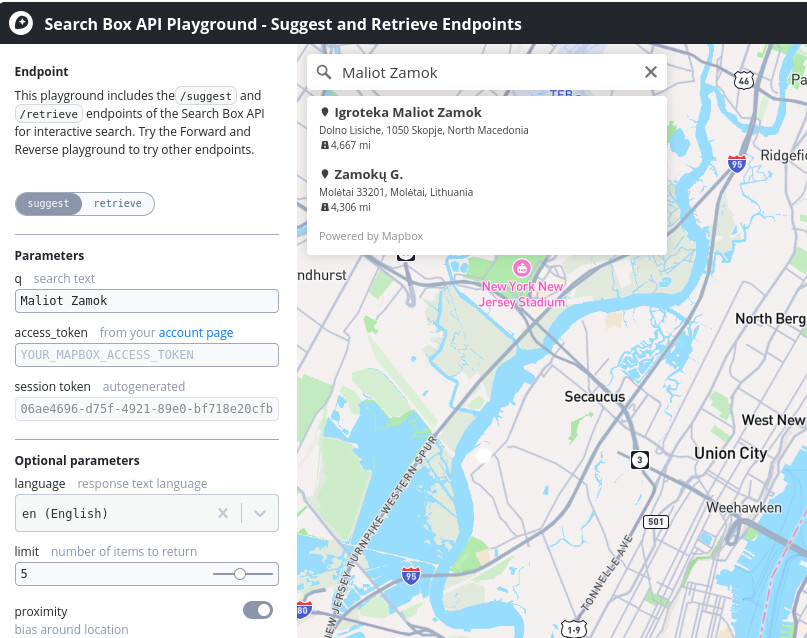
You can explore the Search Box API interactively here: Search Box API Playground.
Is there a way to switch to this location adding input field within the listing form / edit, like in the screenshot?
Thank you!