Need a code snippet to implement Ajax search live results from hivepress main search bar
Hi @carcraze,
I don’t believe there’s a simple snippet that’s been shared that will achieve this. However, although I haven’t tried to implement it yet, I believe the following plugin is able to add search predictions, etc.
“WordPress | WordPress | Algolia” WordPress | WordPress | Algolia
Let me know how you get on!
Cheers,
Chris 
Hi,
Unfortunately, there isn’t a simple solution for this. It would require customization or the use of third-party plugins.
Hi @kseniia and @ChrisB, Thanks for your reply.
I found a way to implement this live search on hivepress default search. here is the code - one is php snippet another is JS snippet ( both are required ), use ‘SNIPPETS’ plugin !
Load JS at the end of ‘body’ section,
Load Php Snippet - everywhere :
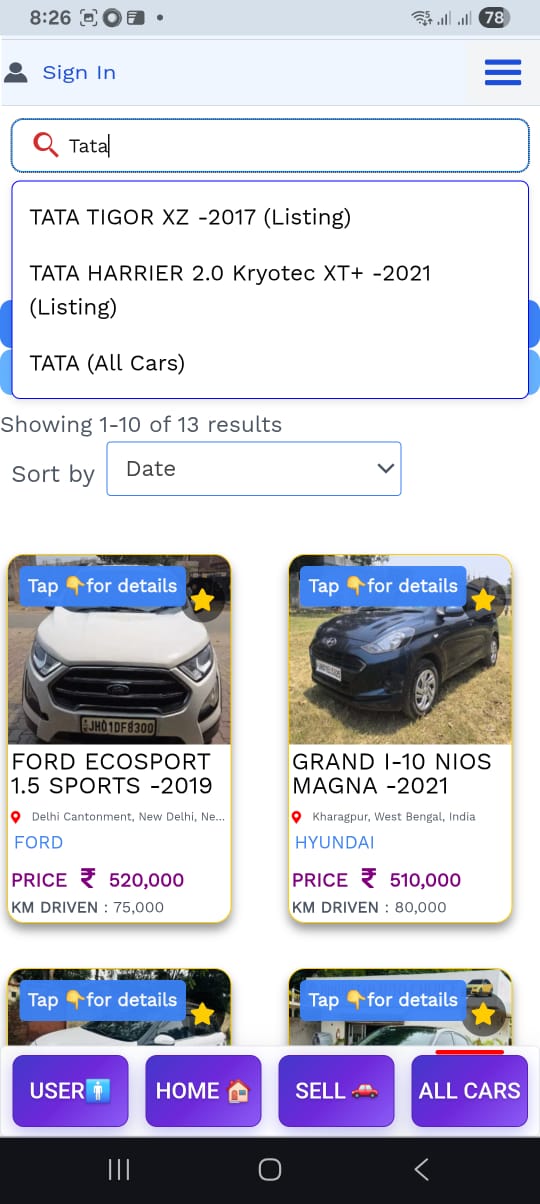
This is how it works for me -
image 1- typing the text ‘hyundai’
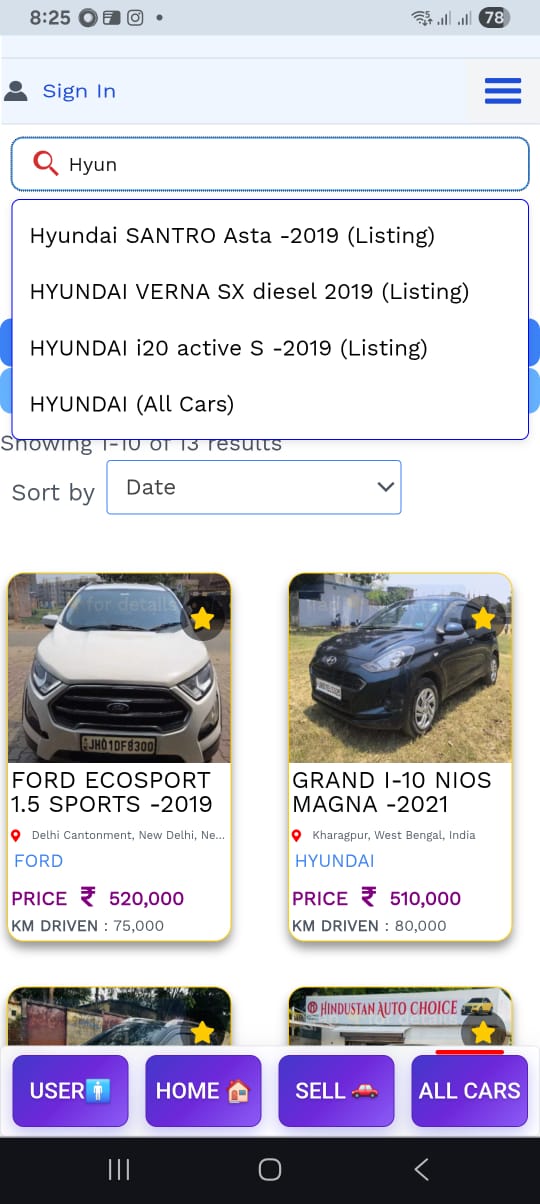
image 2 - typing the text ‘TATA’
**
PHP snippet
** :
add_action('wp_ajax_hp_ajax_search', 'hp_ajax_search');
add_action('wp_ajax_nopriv_hp_ajax_search', 'hp_ajax_search');

function hp_ajax_search() {
    global $wpdb;

    $search_query = isset($_GET['term']) ? sanitize_text_field($_GET['term']) : '';

    if (empty($search_query)) {
        wp_send_json([]);
    }

    $suggestions = [];

    // 1️⃣ Search listing titles
    $results = $wpdb->get_results($wpdb->prepare("
        SELECT ID, post_title
        FROM $wpdb->posts
        WHERE post_type = 'hp_listing'
        AND post_status = 'publish'
        AND post_title LIKE %s
        LIMIT 10
    ", '%' . $wpdb->esc_like($search_query) . '%'));

    foreach ($results as $result) {
        $suggestions[] = [
            'label' => $result->post_title . ' (Listing)',
            'link'  => get_permalink($result->ID)
        ];
    }

    // 2️⃣ Search categories
    $categories = get_terms([
        'taxonomy'   => 'hp_listing_category',
        'name__like' => $search_query,
        'number'     => 10,
        'hide_empty' => false
    ]);

    if (!is_wp_error($categories)) {
        foreach ($categories as $category) {
            $suggestions[] = [
                'label' => $category->name . ' (Category)',
                'link'  => get_term_link($category)
            ];
        }
    }

    wp_send_json($suggestions);
}
**
JS snippet
**
document.addEventListener("DOMContentLoaded", function () {
    const searchInput = document.querySelector("input[name='s']"); // Adjust selector if needed

    if (!searchInput) return;

    // Create results container
    const resultsDropdown = document.createElement("div");
    resultsDropdown.style.position = "absolute";
    resultsDropdown.style.background = "#fff";
    resultsDropdown.style.border = "1px solid #0000FF";
    resultsDropdown.style.width = "100%";
    resultsDropdown.style.maxHeight = "250px";
    resultsDropdown.style.overflowY = "auto";
    resultsDropdown.style.zIndex = "9999";
    resultsDropdown.style.display = "none";
    resultsDropdown.style.fontSize = "16px";
    resultsDropdown.style.boxShadow = "0 2px 6px rgba(0,0,0,0.1)";
    resultsDropdown.style.borderRadius = "6px";
    resultsDropdown.style.padding = "5px 0";
    searchInput.parentNode.style.position = "relative";
    searchInput.parentNode.appendChild(resultsDropdown);

    let debounceTimer;
    searchInput.addEventListener("keyup", function () {
        clearTimeout(debounceTimer);
        const query = this.value.trim();

        if (query.length < 2) {
            resultsDropdown.style.display = "none";
            return;
        }

        debounceTimer = setTimeout(() => {
            fetch(`/wp-admin/admin-ajax.php?action=hp_ajax_search&term=${encodeURIComponent(query)}`)
                .then(res => res.json())
                .then(data => {
                    resultsDropdown.innerHTML = "";
                    if (data.length === 0) {
                        resultsDropdown.innerHTML = `<div style="padding:8px;">No results found</div>`;
                    } else {
                        data.forEach(item => {
                            const link = document.createElement("a");
                            link.href = item.link;
                            link.textContent = item.label;
                            link.style.display = "block";
                            link.style.padding = "8px 12px";
                            link.style.textDecoration = "none";
                            link.style.color = "#000";
                            link.addEventListener("mouseover", () => {
                                link.style.background = "#f0f0f0";
                            });
                            link.addEventListener("mouseout", () => {
                                link.style.background = "transparent";
                            });
                            resultsDropdown.appendChild(link);
                        });
                    }
                    resultsDropdown.style.display = "block";
                });
        }, 300);
    });

    document.addEventListener("click", function (e) {
        if (!resultsDropdown.contains(e.target) && e.target !== searchInput) {
            resultsDropdown.style.display = "none";
        }
    });
});
2 Likes
This looks awesome, @carcraze. Thanks for sharing this with the community! 
I’ll try and give it a test later!
Cheers,
Chris
2 Likes
This topic was automatically closed 30 days after the last reply. New replies are no longer allowed.