Apple Pay / Google Pay payment bypass HivePress commission logic and charge full amount

There seems to be a serious issue with the native HivePress vendor commission system when direct payments via Stripe (Apple Pay / Google Pay) are used.
In this case, the platform commission is not applied correctly, and the client is charged the full service amount instead of only the vendor’s portion or the defined commission percentage.

Additionally, related actions such as WPNotif SMS notifications (which depend on the booking and payment triggers) also fail to execute, suggesting that the payment confirmation flow is being bypassed.


Environment

  • WordPress + HivePress (latest version)

  • HivePress Bookings + HivePress Marketplace extensions active

  • Direct Payments enabled (Stripe)

  • Vendor commission percentage: 15%

  • WPNotif plugin used for SMS notifications (hooked into booking/payment events)


Expected Behavior

When a client completes payment using any Stripe payment method, including Apple Pay or Google Pay:

  • The system should charge only the defined platform commission (15% in our case).

  • The booking should be created correctly.

  • WPNotif SMS notification should be sent to the vendor as usual.


Actual Behavior

When a client completes a booking and pays using Apple Pay or Google Pay:

  1. The commission logic is completely bypassed.

  2. The client is charged the full 100% amount instead of only 15%.

  3. The vendor receives no SMS notification, as the payment/booking hooks are not fired.

This behavior does not occur with regular card payments via Stripe - only with Apple Pay / Google Pay.


Steps to Reproduce

  1. Set up HivePress with:

    • Stripe direct payments enabled.

    • Vendor commission percentage set (e.g., 15%).

  2. Create a listing with a price (e.g., 100$).

  3. As a client, go to the listing and complete a booking.

  4. At checkout, choose Apple Pay or Google Pay.

  5. Observe:

    • The system charges 100$ instead of 15$.

    • Booking appears as fully paid.

    • Vendor does not receive WPNotif SMS notification (trigger skipped).


Impact

This is a severe issue, as it:

  • Directly affects payment integrity (clients are charged full amounts unexpectedly).

  • Breaks consistency with the commission model.

  • Prevents vendors from being properly notified (risking missed bookings).

  • May cause serious user trust and refund problems.


Notes

This was verified multiple times with :

  • Real live payments through Apple Pay / Google Pay

All standard Stripe card payments work correctly - only express wallet payments bypass the commission logic and booking triggers.


Request

Please confirm whether Apple Pay / Google Pay checkout flows are currently supported in the HivePress Stripe integration with commissions enabled.
If not, could the team consider implementing a fix that ensures:

  • The commission split logic applies before the express checkout capture.

  • The booking/payment hooks are triggered consistently for all payment methods.

    Thank you in advance,
    Ivan
Hi,

Could you please share the link to your site or send it privately to support@hivepress.io? Also, could you please clarify if your checkout page is added via shortcode or block? There is a confirmed bug when the checkout is added using a block, and we have it in our bug tracker. As a temporary workaround, please consider using the shortcode for the checkout page.

Hey Kseniia,

thank you for your quick response.

Regarding your question → i confirm that my platform is currently using the checkout via [woocommerce_checkout] shortcode.

At the moment i disabled the Google/Apple Pay functionality to prevent further problems with the payments.

Will only the url of my platform be enough to take a look?

Kind Regards,

Ivan

1 Like

Hey @IvanM, I hope the issue gets fixed sooner !

I am curious to undertand the payment issue as I myself is building a car rental site for a big automotive infuencer client . Could you please share me the link to your site on my email - rexamvbeats@gmail.com so I could understand the booking flow and payments.

I would really appreciate it !

Thanks !

1 Like

Hi,

Thank you for the details. It’s strange that this option is not working with shortcode, as there were no issues with this way of implementing it.
Could you please let me know what extension you’re using for adding Apple Pay/Google Pay payments?

Hey Kseniia,

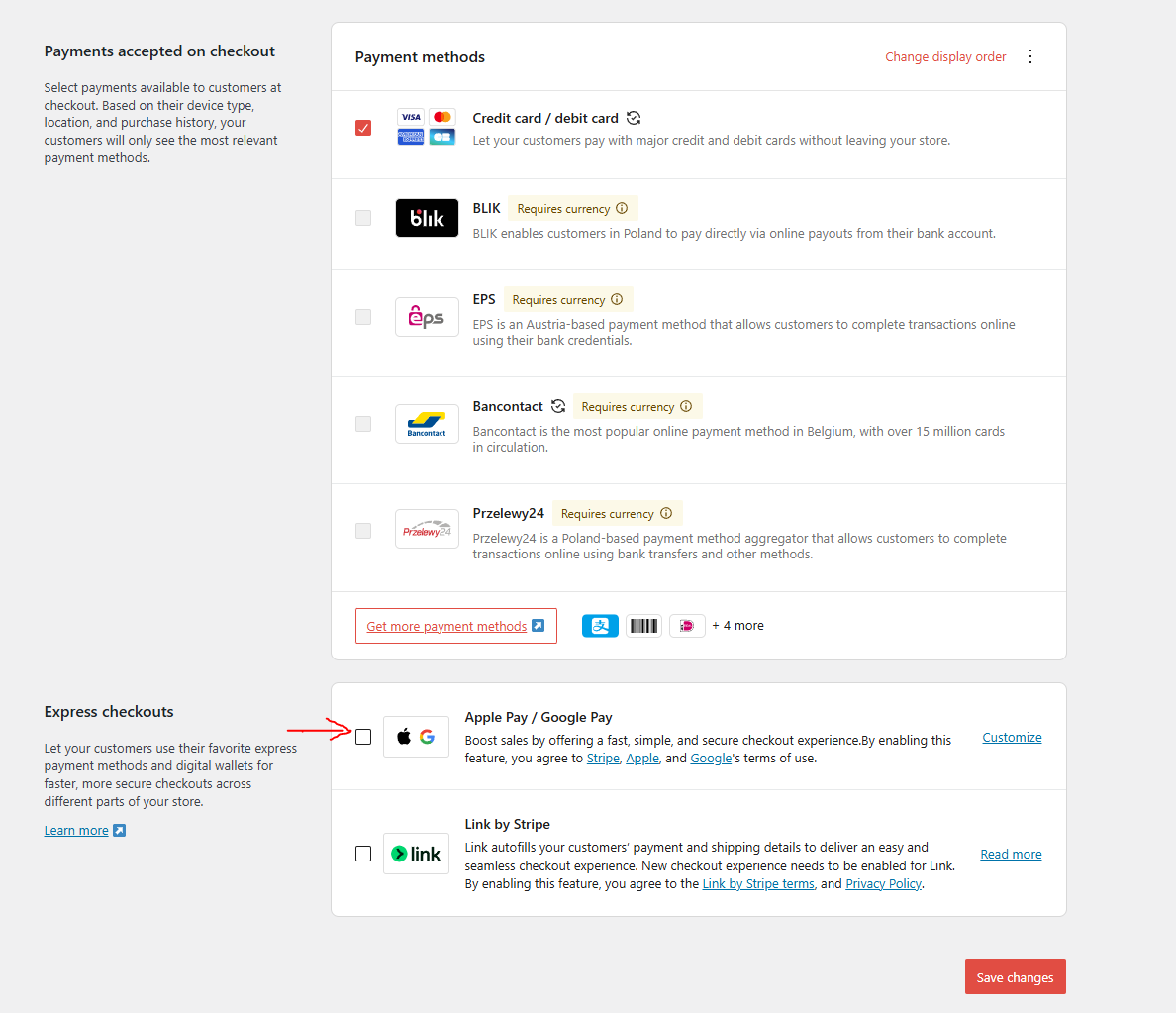
i am using the WooCommerce Stripe Gateway for the payments and the integrated in it Apple/Google Pay option which is under WP Dashboard → Woocommerce → Settings → Payments → Payment Methods → Stripe settings in the “Express Checkouts” field (see the attached screenshot, please)

Thank you for the details.

Could you please specify where we can find those settings that are displayed on your screen? I can’t see Payment Methods in my WooCommerce> Settings > Payments. Once we understand how these payment methods are being added, we’ll be able to suggest a workaround or provide a solution.

Hey kseniia,

i think you should have WooCommerce Stripe Gateway installed in order to see those settings.

Sending a video which found on youtube on which you can see where are the settings.

Best regards,
Ivan

If you’re using the extension mentioned in this video and not WooPayments with the checkout shortcode, thank you for the clarification. The bug is confirmed, and we’ll include a fix in the next Marketplace update.

1 Like

Hey kseniia,

yes - i am using this extension, i think this is the only plugin for Stripe payment (which is the most popular payment processor).

Thank you for the quick responding and reproducing the bug on your behalf.

Best regads,

Ivan

1 Like

This topic was automatically closed 30 days after the last reply. New replies are no longer allowed.