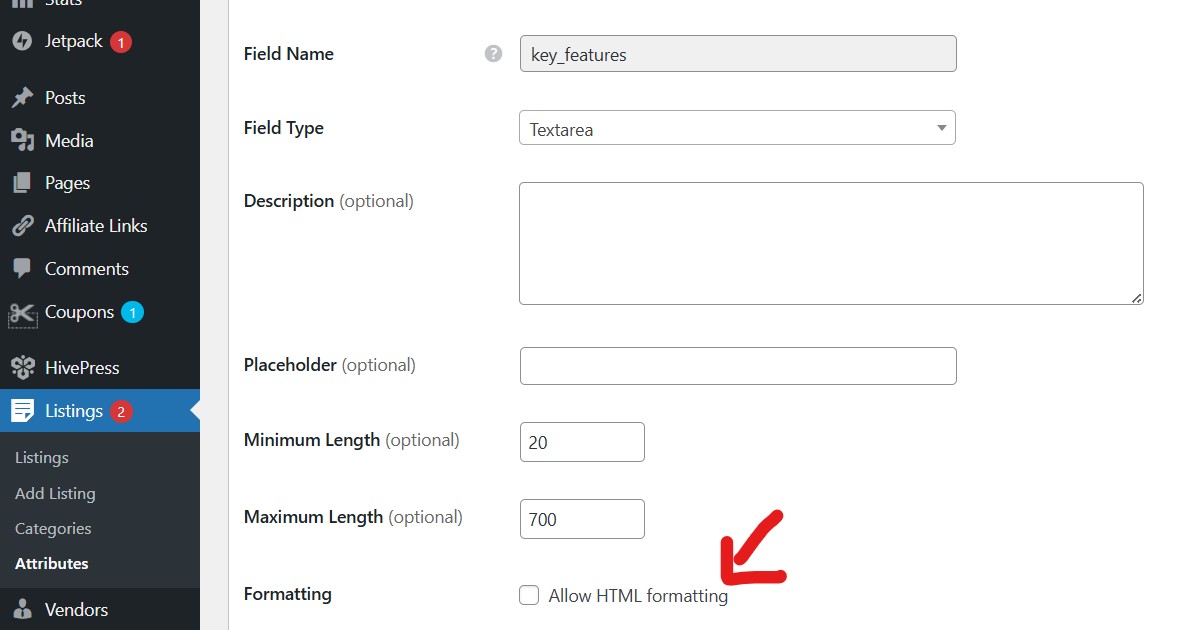
I have created ‘features’ attribute to list some of the services provided by the provider.
This attribute is set to format in HTML. When creating a new list, it does not work (does not save). When I uncheck the attribute HTML format and add the list again, adding some text, it saves.
When I set again HTML format and edit the same post for feature attribute in bullet it works.
Could you please clarify your request? There isn’t an attribute format called “HTML” in HivePress. Screenshots or a screencast would really help us understand what you’re trying to achieve or what issue you’re experiencing.
Then I added new list with list. On saving it, nothng got stored. But when I uncheck the attribute (HTML format) and on adding or editing listing saves the content of this attribute.
In simple words, attribute with HTML format saves not but with HTML format it saves the attribute content in listing.
I’m not sure if it’s relevant, but I’ve found that when I try and copy text or a list into a HivePress form field, the field doesn’t always ‘see’ or register the pasted content, and so, I need to add a few extra characters and then delete them again to get the field to save as intended.
The minimum length of the field input may be playing a part in the form validation, too.
If possible, can you please share the screencast of the issue? I tried to reproduce it locally with your visible settings, but was unable to: Attributes formatting | Loom.
Also, if you have any custom code snippets or other customizations, have you tried disabling them and third-party plugins to rule out conflicts?