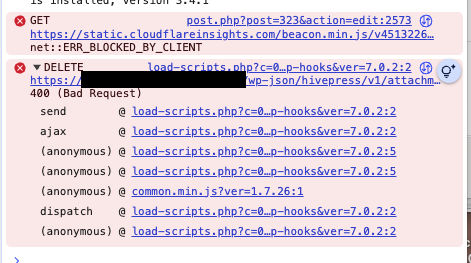
I’m having a problem where I cannot delete listing images nor reorder them, despite being the administrator and creating user. I have noticed in looking in this forum that it seems to stem from a hosting issue (I have tried everything else - turning off plugins, removing firewall, removing caching, etc etc). I’ve gotten a “bad request” error in console rather than forbidden or otherwise:
I’m going to speak with my hoster to see if we can resolve this, but in the meantime, I’d like to clear out the images I don’t want on the listing in the database. The problem is I can’t seem to locate where this information is being kept. I’ve checked individual listing IDs in wp_posts, which doesn’t give me any rows for images that I can see. Can you please help point me to the right spot?
Before you jump into the database, please pause and hold off on manually editing or deleting rows there. It’s incredibly easy to accidentally break your database structure and corrupt data that will cause way bigger headaches down the road than a few stuck images.
Since you mentioned you’re already seeing a “Bad Request” (HTTP 400) error in the console, it usually means the server is receiving a malformed request or a security script is blocking the specific AJAX action HivePress uses to sort/delete on the front end.
While you wait to hear back from your host, there are two perfectly safe, built-in workarounds you can use right now to manage those images without touching the database:
The WordPress Media Library: You can find and delete any uploaded listing images directly via the standard Media page in your WordPress dashboard.
The Backend Listings Menu: As an administrator, you can head to the Listings menu item in your WordPress backend, open the specific listing, and manage or remove the images safely from the backend editor.
Try checking the backend Listings editor to see if it lets you bypass the error for now, and let us know what your host says about the console error.
Thanks so much for the reply. I understand the risks in database editing and ensure I take a backup prior to doing anything inside of the database.
The image in question is a placeholder image that is used by multiple listings, so I am not looking to delete that image full out.
I am the only user on the site, and the only administrator, so the backend listings menu has not allowed me to delete those images.
A good methodology I have just discovered in which I can modify these in the meantime is using an importer to replace choice listings with the images I’ve already uploaded to the media library.
Still hoping you can share some insights into where the images are linked in the database so I can make single, one-off changes if necessary.
This reply comes from HivePress AI, so take it with a pinch of salt, but please do make a backup beforehand.
Database Storage
Listing images are stored in the WordPress database with the following structure:
Images are stored as attachments in the wp_posts table (as post type attachment )
The listing connection is maintained through the post_parent field, which contains the listing ID
Metadata is stored in the wp_postmeta table with these specific meta keys:
hp_model = “listing”
hp_field = “images”
Important Conditions
For images to display correctly on the front-end, all three of these conditions must be met:
hp_model post meta set to “listing”
hp_field post meta set to “images”
post_parent set to the listing ID
File Storage
The actual image files themselves are stored in your WordPress uploads directory (typically /wp-content/uploads/), while the database maintains references to these files and their associations with listings.
Thanks for the reply. I was specifically not asking the AI because I didn’t see any documentation on this particular issue and was hoping the developers could shed some light when available. I don’t see anything in your profile that indicates you are a HivePress developer. Are you, or are you simply trying to “help out” by putting questions through AI and providing “answers”?
No, I’m not HivePress staff, just trying to help. However, the HivePress AI is trained on the available documentation and codebase, so it’s often correct, or can at least point you in the right direction.
The staff don’t usually work weekends, but they’ll most likely respond tomorrow.
Could you please confirm that you’re uploading the images using the same uploader that is part of the listing submission/edit form? For example, not via the Add Media*button above the editor, a third-party import plugin, or any other upload method.
Also, please make sure that there aren’t any security plugins or hosting-level security features that could be blocking or modifying the upload process.
You can also describe what you’re trying to achieve and the steps you’ve taken so far.
This information will help us narrow down the possible cause of the issue.