Files are not attaching when changing order status to "Delivered"

Hello,

I have the “Allow file attachments” option enabled to the Orders, but I’m encountering an issue. When I try to upload files while transitioning an order to the “Delivered” status, the files are not being attached to the order. The status changes successfully, but the uploaded files no. Could you please check if this is a known issue or a bug in the delivery form?

Thank you!

Hi,

Thanks for the details.

Could you please let us know what format (PDF, JPG, PNG, etc.) of the attachment you tried to upload?

Hi,

Thank you for the answer!

I tried to upload PDF and Word. Neither of them could be uploaded. Which means that it is possible that none of the file types selected as allowed will be able to be uploaded. I have allowed the following file formats to be uploaded:
image/jpeg,
image/png,
image/webp,
image/avif,
video/quicktime,
video/mp4,
text/plain,
application/rtf,
application/pdf,
application/zip,
application/rar,
application/x-7z-compressed,
application/msword,
application/vnd.ms-powerpoint,
application/vnd.ms-excel,
application/vnd.openxmlformats-officedocument.wordprocessingml.document,
application/vnd.openxmlformats-officedocument.spreadsheetml.sheet,
application/vnd.openxmlformats-officedocument.presentationml.presentation,
application/vnd.oasis.opendocument.text

Thanks for the details.

I was able to reproduce the issue locally. It seems there’s a bug affecting vendors, though everything works correctly with admin accounts.

We’ll fix this issue in the next Marketplace update. In the meantime, if this feature is crucial for your site, please let us know, and we’ll provide a temporary solution for you.

Apologies for the inconvenience.

Hello,
Thank you for your support!
I would appreciate if you could help with a temporary solution until the next update is released.

Best regards,

Hi,

I hope you had a relaxing weekend.

It requires developer attention, and we’ll do our best to provide a solution as soon as possible.

Thanks for your patience.

Thanks for your patience – we finally found the reason, and the issue will be fixed in the next HivePress & Marketplace updates. As a temporary fix, please add this code before the last line of hivepress-marketplace/includes/models/class-order.php file:

final public function get_user__id() {
	return $this->get_seller__id();
}

Also, please change line 148 in hivepress/includes/controllers/class-attachment.php file from:

if ( ! current_user_can( 'edit_others_posts' ) && ( get_current_user_id() !== $user_id || ( $parent::_get_meta( 'type' ) === 'post' && ! in_array( $parent->get_status(), [ 'auto-draft', 'draft', 'publish' ], true ) ) ) ) {

to:

if ( ! current_user_can( 'edit_others_posts' ) && ( get_current_user_id() !== $user_id || ( $parent::_get_meta( 'type' ) === 'post' && ! in_array( $parent->get_status(), [ 'wc-processing', 'auto-draft', 'draft', 'publish' ], true ) ) ) ) {

Hope this helps.

Hello,
I have added the code you provided in

hivepress-marketplace/includes/models/class-order.php final public function get_user__id() {
return $this->get_seller__id();
}

and I replaced
if ( ! current_user_can( ‘edit_others_posts’ ) && ( get_current_user_id() !== $user_id || ( $parent::\_get_meta( ‘type’ ) === ‘post’ && ! in_array( $parent->get_status(), \[ ‘auto-draft’, ‘draft’, ‘publish’ \], true ) ) ) {

with

if ( ! current_user_can( ‘edit_others_posts’ ) && ( get_current_user_id() !== $user_id || ( $parent::\_get_meta( ‘type’ ) === ‘post’ && ! in_array( $parent->get_status(), \[ ‘wc-processing’, ‘auto-draft’, ‘draft’, ‘publish’ \], true ) ) ) {

But it seems that vendors are still unable to attach files when delivering the order.

Thank you!

Hi,

Please make sure that you’ve followed the instructions correctly (e.g., changed only line 148 without replacing any others). I’ve applied the provided fix, and the issue has been resolved: Attachment Fix | Loom.
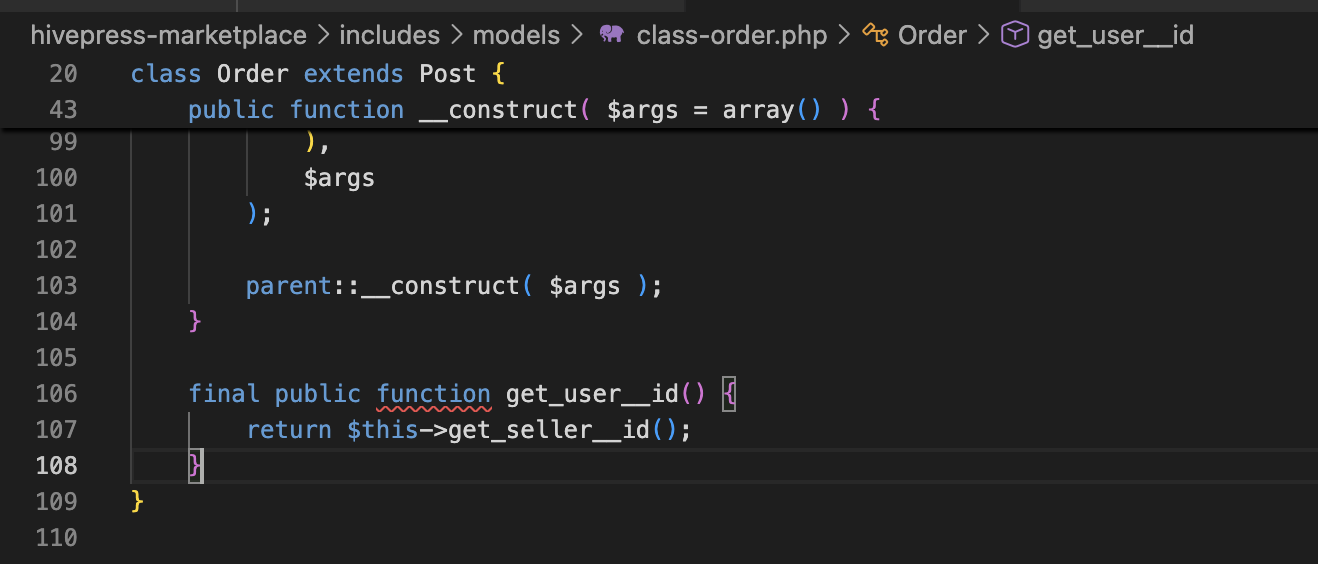
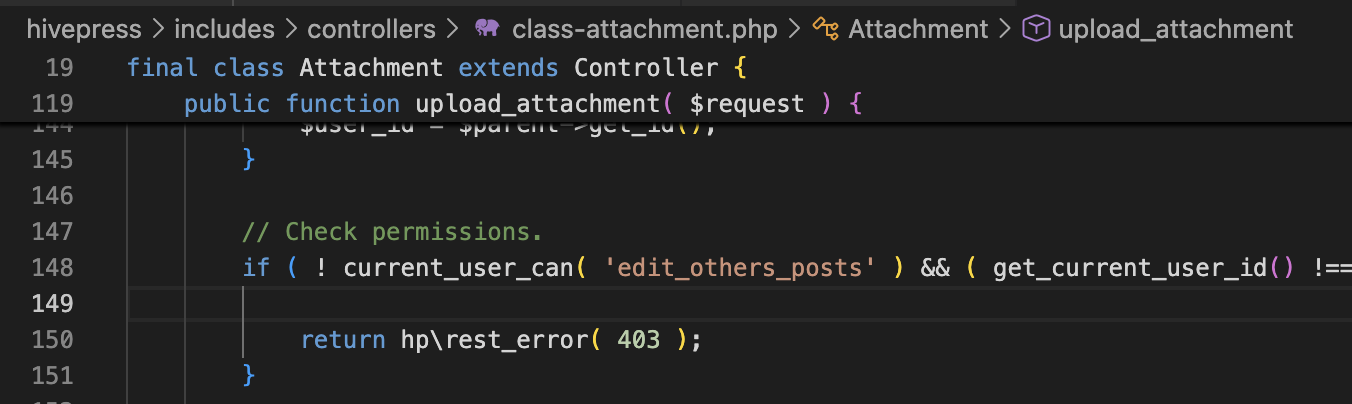
Hope this helps resolve the issue.

Hi @kseniia ,

My mistake. It seems that the temporary solution you gave me works.

Thank you!

1 Like

Glad that you’ve sorted it out.

Wishing you a relaxing weekend. :herb: