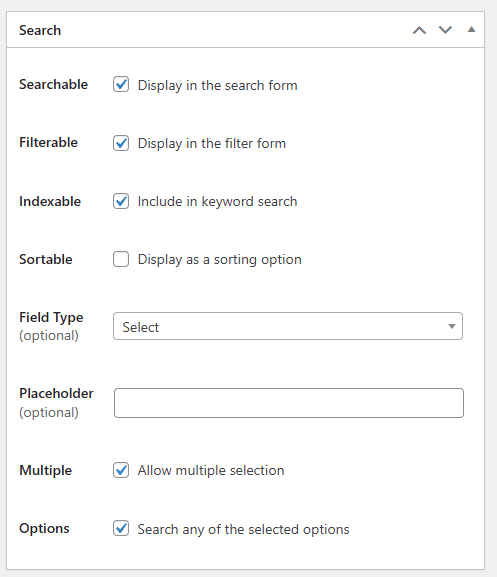
Hello, I am having an issue with search results. I want the search to show listings by its attribtue if the user searches for it.
Example:
I have a Select attribute with [Allow multiple selection] checked. It is called “Property Utilities”. The selectable options are: AC, Water, Internet, Heat.
I have a listing called test123 which has the attribute options: AC, Internet, Heat added to it.
When I search for AC, I want the test123 listing to appear in search result but it doesn’t.
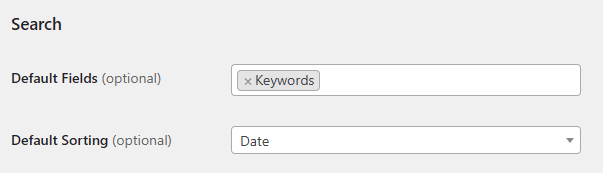
I have the following setting turned on: Hivepress > Settings > Search > Default Fields [Keywords].
Any idea how I can fix this? Right now the search bar is very limited. I want it to work with attributes so my users can easily find what they’re looking for.
To make your Property Utilities attribute searchable via the keyword search bar, you need to mark it as Indexed (or Searchable depending on the attribute type and your use case). Here’s what you need to do:
Go to Listings > Attributes
Edit your Property Utilities attribute
In the Search section, look for the Indexed or Searchable checkbox and enable it
Make sure the attribute is also marked as Filterable if you want it to appear in filter forms
Simply save your changes
The Indexed option makes attribute values searchable through the keyword search field
The Filterable option adds the attribute to the filter sidebar/form
Could you please let us know if the “Search any of the selected options” feature is enabled in attribute settings? This option can be found in the Search block.
Please send temporary WP access to support@hivepress.io with the link to this topic, and we’ll check the issue (please send only the link, without login and password). You can create a temporary access link using this plugin.
i have almost the same issue with the latest version of HivePress.
i have a SELECT field with ‘location’ attribute which has a lot of cities in it.
On the older version when you click it on the front end it opens all the options, while on the latest version it expects to start typing at least 3 characters to show you the option, which is strange.
The expected flow is when you click to show the list of all options at the bottom.
This is actually expected behavior due to a recent change we made. When an attribute has more than 100 options, we no longer use a standard dropdown because of performance issues. Instead, the system remotely loads options as the user searches/types, which is what you’re experiencing now.
Thanks for your feedback. We will consider making this behavior optional in future updates.
In the meantime, if this is critical for your use case, we can look into providing a temporary fix for you.
Thank you for the explanation. I understand the performance reasoning behind the change, but for our specific use case this is a critical regression that is directly hurting both our vendors and our end users. I’d really appreciate that temporary fix you mentioned.
I confirm → Our “cities” attribute contains more than 100 options.
Here’s why this matters so much for us:
1. Front-end search bar (main homepage CTA) — our entire conversion flow starts with a two-step search: the user picks a photography category on the left, and then picks a city on the right. The city dropdown is visible immediately on click — it’s the most prominent interactive element on the homepage. Now instead of seeing all cities at once and clicking, users see a blank field with the message “Please type at least 3 characters”. Most users don’t expect to type here at all — they just click and expect to see options. This will introduce serious friction at the very top of our funnel. (right now we cannot upgrade to the latest HP version because of this, we tested it on stage env.)
2. Vendor listing creation — when photographers create or edit their listing, they need to select which cities they serve. With the new behavior, many vendors simply won’t see the options and will skip or misconfigure this field entirely, which breaks how their listings appear in search results.
3. We have a special option(“All cities“), which serve as “The whole country“ - at the top of the list. This is a key option: when a vendor selects it, their listing appears in results for any city search. This is powered by custom code on our end. If vendors can’t easily see and select this option, it completely breaks that logic.
In short: this field is not a background filter - it is the core search and discovery mechanism of the entire platform. Reverting it to a standard dropdown (or making the remote-load behavior optional per attribute) would solve all three issues immediately.
Would you be able to provide that temporary fix? Happy to test it on staging first.
hello sir i am also facing the same issue if user not loged in it is not loading the result for search in select field where options are 500 in city in my case pls provide any fix as i tried to fix the line 797 but in my folder filr in class atribute. php file lines ends at 238 not getting 797 pls healp
Please make sure you’re looking for the line in the proper file hivepress/includes/components/class-attribute.php, because it’s not possible that the code ends at line 238, that would break the plugin and some features wouldn’t work, or there would be a critical error displayed.
Could you double-check the file path and confirm you’re editing the correct file? You can also send a screenshot that shows the issue with the partial code.