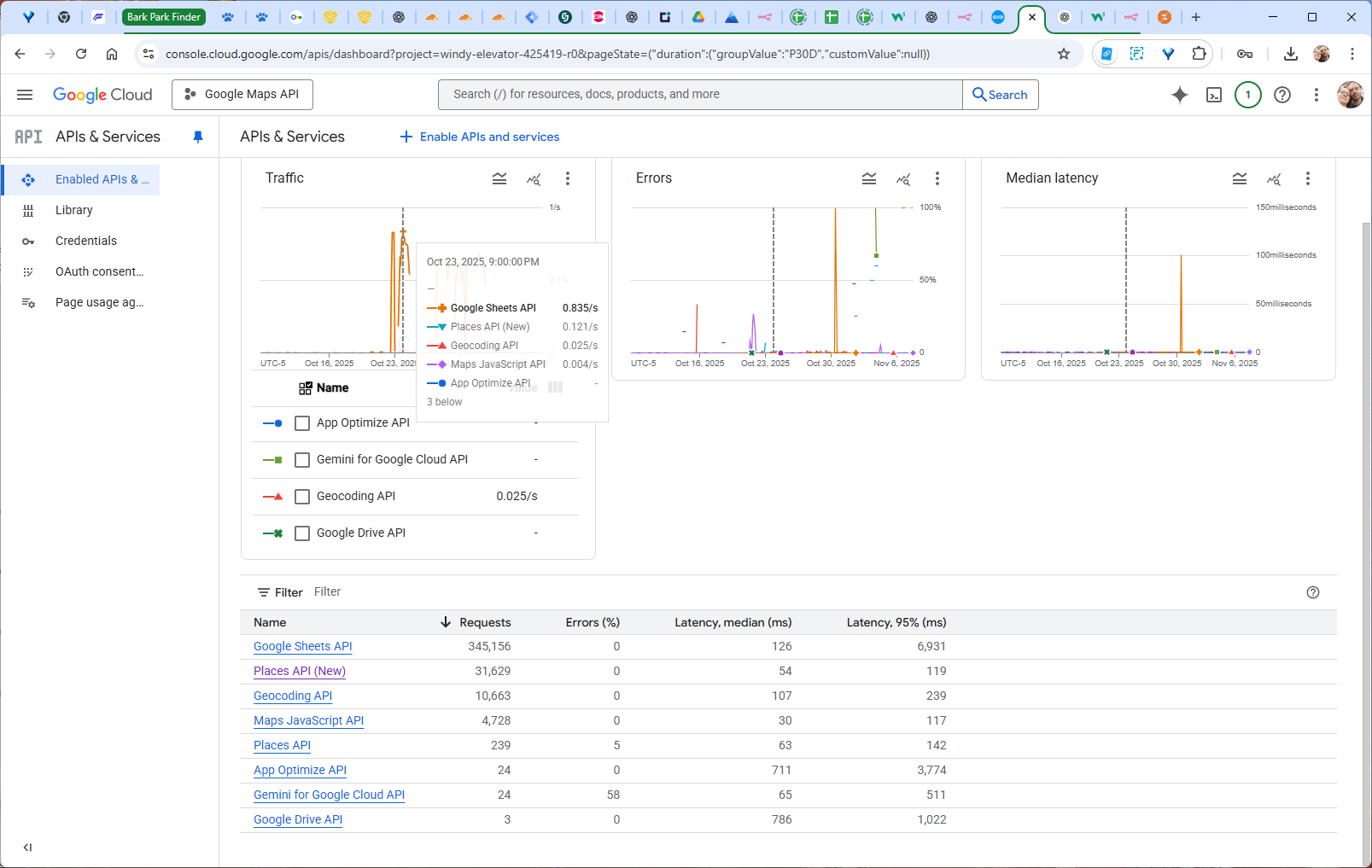
Please let me know if you use our Import extension, or a third-party one (like WP All Import)? It seems that when the listings are created and saved on import, there are multiple API calls per listing, which shouldn’t occur.
Please note that our Import extension doesn’t call Google Sheets API and Places API when importing; it may only call Geocoding API for generating regions (and only if Regions are enabled). If the described costs are in any way related to the Google Sheets API and you’re using a third-party import solution, please reach out to their support because 300k+ calls don’t seem adequate.
As a temporary solution, even if you use a third-party solution, you can disable Regions while importing; this will prevent Geocoding API and possibly Places API calls.
Also, please try testing a small CSV file for the next import, to test if there are too many API calls per listing first (there should be none if Regions are disabled, and if the reason for Google Sheets API calls is found).
Your import extension (which I did buy) nor any of the others would fit my particular need properly so I ended up making my own import flow in N8N. This is where the Google Sheets API call is happening so that has nothing to do with it (those are free anyway).
Essentially all I am doing is importing a listing via the API: /wp-json/wp/v2/listings
I then add some images and reviews but those are not related to any Google Maps (or now I’m testing mapbox) api calls.
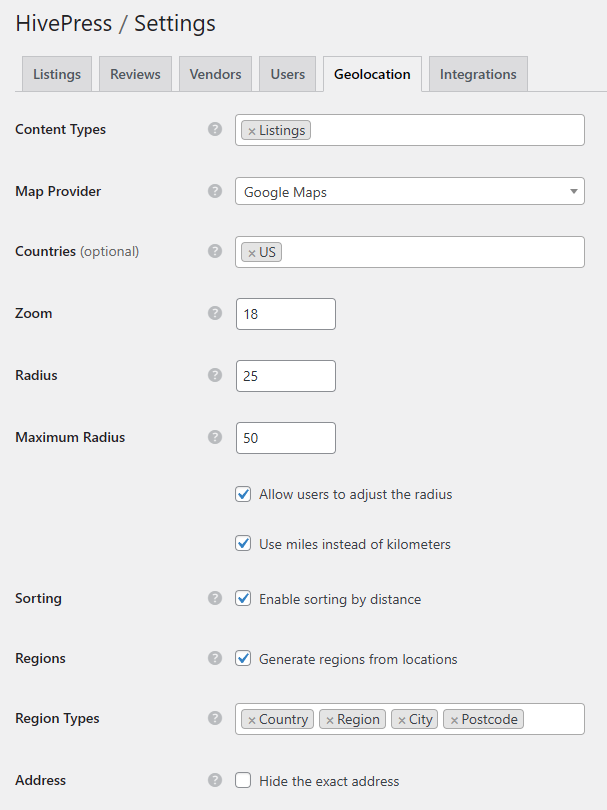
Long story short, I am now testing mapbox as they allow 100k free temporary geocoding api calls (per month I believe). This should be plenty I think as I set “Region Types” to only do “City” and “Postcode” so only a few calls per import ( I think that’s how it works).
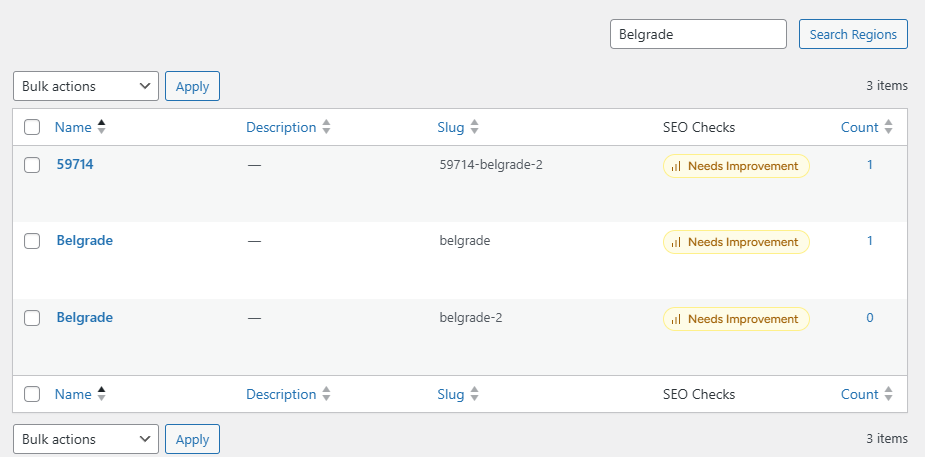
The only thing I’m noticing is there may be some duplicating of regions after switching from Google to mapbox:
I haven’t pinpointed why this has happened but I noticed it on a lot, if not all, of the imports I’ve done after switching to mapbox.
Would this be an issue and if so how can I fix this now?
I’m open to disabling / deleting all regions and starting over if need be. Not re-importing but if I disable/delete all regions, can I re-initialize them all somehow after I do all imports?
Please ensure that N8N doesn’t call Places API (e.g., it may happen if it populates latitude/longitude based on the location text, or vice versa) or makes extra listing updates (that may trigger multiple Geocoding API calls). Also, there’s no “/wp-json/wp/v2/listings” API endpoint in HivePress (currently we don’t have an endpoint for adding listings, only for updating), if it’s not built-in WP REST API endpoint please also make sure that there are no similar issues on the endpoint implementation side.
Regarding the Mapbox duplicating regions, if there were regions generated while using Google Maps then duplication may occur since we use Place ID as a unique identifier for regions (using labels is not reliable), and different map providers have differens IDs for places.
N8N itself isn’t calling Places API but I am importing the latitude/longitude which I actually thought would help stop the geocoding api calls but it doesn’t so I may reconsider that.
I actually extended/exposed “/wp-json/wp/v2/listings“:
/**
Expose hp_listing in the REST API at /wp-json/wp/v2/listings
*/
add_filter( ‘hivepress/v1/post_types’, function( $post_types ) {
if ( ! empty( $post_types[‘listing’] ) ) {
$pt = &$post_types[‘listing’];
$pt[‘show_in_rest’] = true;
$pt[‘rest_base’] = ‘listings’;
$pt[‘rest_controller_class’] = ‘WP_REST_Posts_Controller’;
$pt[‘supports’] = ‘custom-fields’;
}
return $post_types;
} );
/**
Register each hp_… meta key so it’s exposed in REST and we can write to it via meta_input
*/
add_action( ‘rest_api_init’, function() {
$meta_keys = [
‘hp_location’ => ‘string’,
‘hp_fenced_area’ => ‘boolean’,
‘hp_double_gated’ => ‘boolean’,
‘hp_small_dog_area’ => ‘boolean’,
‘hp_large_dog_area’ => ‘boolean’,
‘hp_combined_dog_area’ => ‘boolean’,
‘hp_shade’ => ‘boolean’,
‘hp_covered_shelter’ => ‘boolean’,
‘hp_seating’ => ‘boolean’,
‘hp_water_fountain’ => ‘boolean’,
‘hp_swim_area’ => ‘boolean’,
‘hp_poop_bags’ => ‘boolean’,
‘hp_trash_bins’ => ‘boolean’,
‘hp_parking’ => ‘boolean’,
‘hp_paved_paths’ => ‘boolean’,
‘hp_lighting’ => ‘boolean’,
‘hp_agility_equipment’ => ‘boolean’,
‘hp_off_leash_allowed’ => ‘boolean’,
];
I’m too far into things to completely start over…. it looks like mapbox gives enough free temporary geocoding api calls to cover what I need.
Sooo…. would it be best to delete all of my existing regions and re-initialize them from what listings I already have via mapbox and then just let it add new ones as I import?
Yes, you can delete the regions and new ones will be generated when a new listing is added or an existing one is updates (the regions generation is triggered when the “hp_location” meta field is changed). Please note that this would require a single API call per existing listing, you’d have to trigger the location change hook via a script if location will not be changed for these listings. I can provide a sample code snippet to trigger the listing region generation by ID – let me know.
Please ensure that there’s a single “hp_location” field change per API call, or that N8N doesn’t call the API endpoint more than once for the created/imported listing, multiple API calls or repeatable updates in the script (if there are no conditions to prevent this) may cause the issues you described.