I tried looking for help but there were no related to my need.
I got to know the listinghive + hivepress has files in blocks not full page HTML/PHP.
But the main problem here in my case is how the page appears and how can I make it look different or change the layout.
Suppose listing page where the search bar, filter, and content(card) appears. If I want it to appear as three columns and filter that is in left side to appear along with search may be smaller search box and filter option below it. Just to make a better look for my case.
Similarly changing the page like add new list as it appear in full width. Which I dont thing good for category dropdown, so making it in two column where the short fields will go to smaller area and large input/textarea in large side.
Or other page or content cards to appear in differnt ways. Which page to look for…
But still some do like template, when I create attribute and set it to display in block primary, it shows well in listings page but in related section it shows with a kind of button view (div).
This look bad when one div is block and another appears like button that suppose not to show like button.
With AI Assitent I got solved this temporary but align is not set. Looking to solve these
The approach to take depends on what changes you’re looking to make. Custom CSS is recommended for styling items differently, and can really make a huge difference to how things look.
To add custom CSS - In the back-end of WordPress, visit Appearance > Customise > Additional CSS.
If you’re unfamiliar with coding, you may find the HivePress AI or another similar tool can help you identify the code and format it correctly.
You can also customise most HivePress pages by visiting HivePress > Templates in the backend of WordPress. Here you can add a new template and select which default page you’d like it to replace. After selecting the original page template and saving the page, you’ll find the block selection now updates to include all of the original page-specific blocks which you can use to then re-create and re-arrange pages.
By default, you’ll be using the Gutenberg WordPress editor to design the new page templates, so you’ll have a wide selection of blocks to choose from at your disposal.
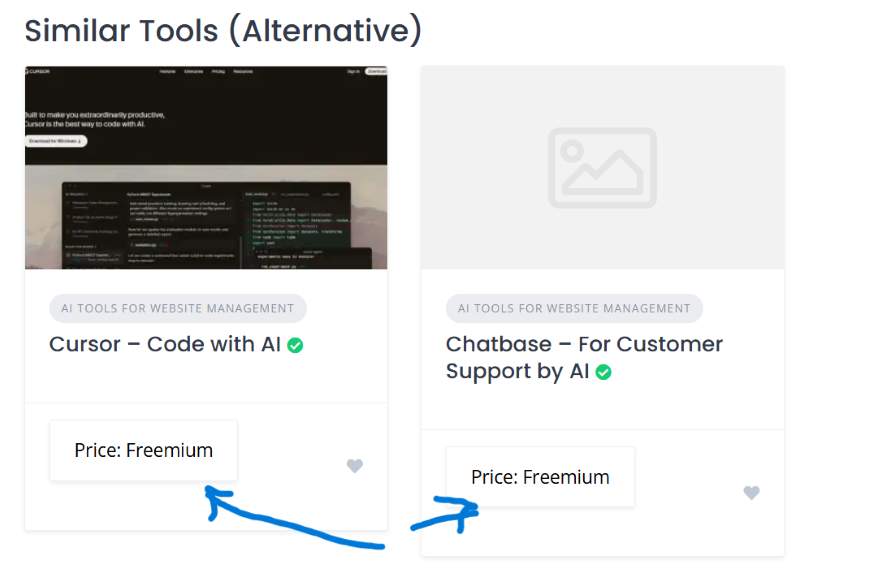
The card alignment issue is caused by the differing title lengths of the Listings. In your example, The Chatbase listing title spills onto two lines; thus forcing the card to be taller than the one to the left.
I shared a solution to this a while back which you can find here:
If you need more advanced customization, this may require CSS tweaks or, in some cases, PHP snippets. You can try adjusting it yourself, use our AI assistant or another AI tool, or reach out to one of our verified freelancers.
As Chris mentioned, the card height depends on the amount of text you use.
Regarding the attribute that appears as a button on the listing block, please make sure there are no custom CSS snippets affecting it, and that you haven’t set such a style in the attribute settings — this is not a default ListingHive style.