I have subscribed to the Import extension and wish to use it to import Listings from a CSV file. I can’t see any place to do this in WordPress. Can you provide some guidance please?
Hi,
If you want to import the listings using our extension, please check this doc: How to set up and import listings - HivePress Help Center
I hope this is helpful to you.
Yes I have looked at all the guidance on how to import listings but there is no option showing even though I have paid for the Import extension. In this guidance it says go to “My account” but where is this? Please send a screenshot of where to find it.
Also I have had a further problem which I cannot solve. The filter bars are not showing on my listings - they were previously. I cannot see how to enable them. All my attributes are set to be filterable. Please advise.
On the Import issue please check that the Import extension is active on my account as it is still showing as something I can purchase.
As an update I have now got the filters to show but only by accessing the listing categories via a page that shows both. I’m probably OK with this but would be interested to know how they can be enabled on a page that just shows listings from one category.
The import issue is still outstanding and of most importance.
Finally can you advise on how (if at all) it is possible to change the layout of a listing so, for example, the Block Secondary info shows next to the Block Ternary info as opposed to above it…or can you specify that the attributes run across the block rather than in a vertical list.
Thanks
Carol
Hi,
-
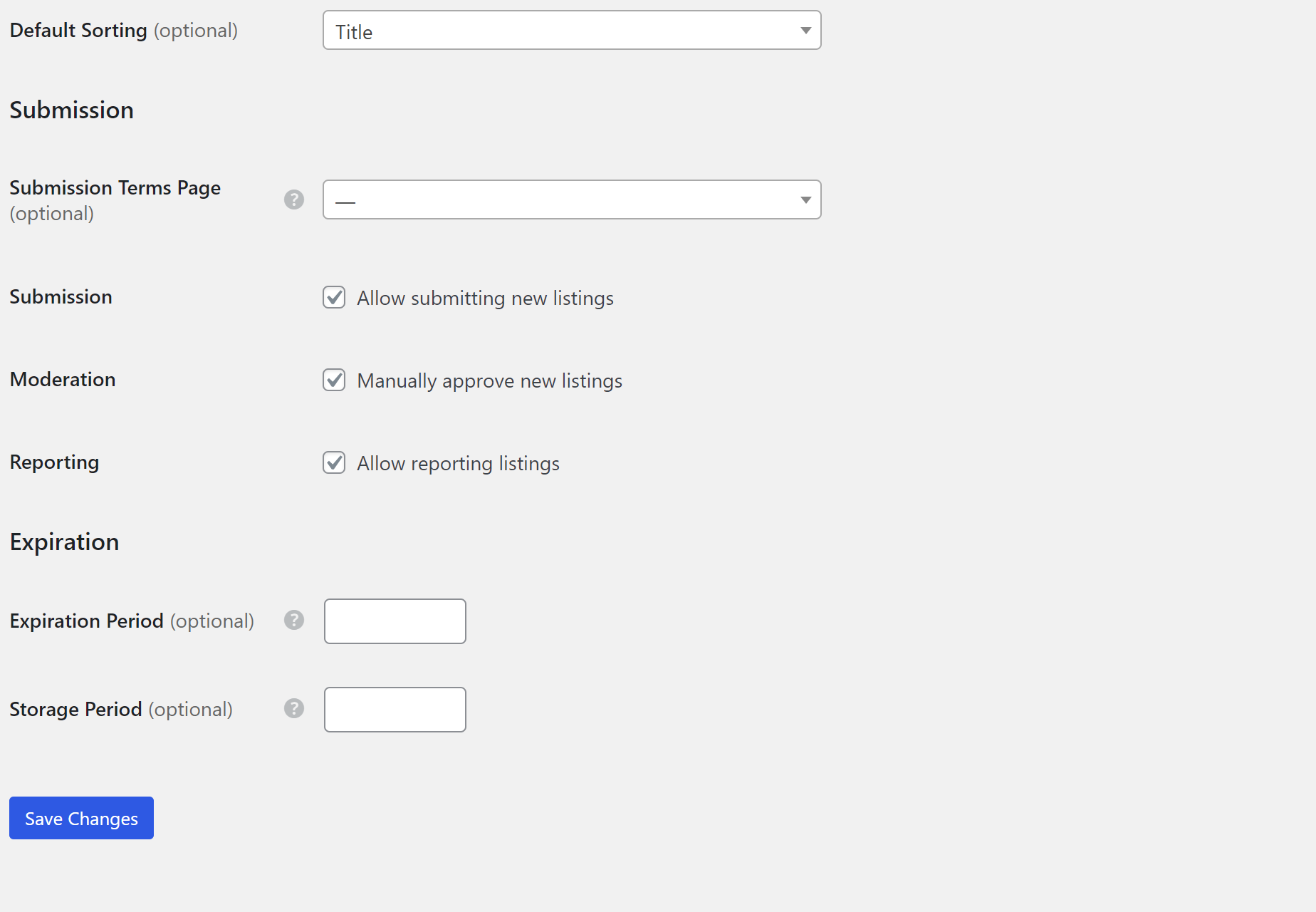
Please make sure this feature is enabled in HivePress > Settings > Listings > Allow importing listings. You can see an example in this video: https://www.youtube.com/watch?v=qeOJKmYoVQ0
-
Regarding the filter display, please ensure that you have not restricted this attribute to categories in Listing > Attributes.
-
If you need to change the page layout, you will need a custom implementation. If customizations are required for your site, please try customizing it using the collection of code snippets Search · user:hivepress · GitHub and other developer resources, or consider hiring someone for custom work https://fvrr.co/32e7LvY
The below screenshot is what shows up under HivePress/Settings Listing tab. There is nothing about Importing. Following the video I have clicked on the Admin icon at the top of the page (with Add Listing showing to the right). I just get my listings showing with no Import option.
How can I check that the Import add-in is actually enabled and activated? It is still showing as something I can purchase.
Hi,
I see. Please make sure that the Import extension is installed and activated in WP Dashboard > Plugins.
I have received the email with the download but there are no instructions on how to actually install it. I believe it is an extension rather than a plug-in. It is not on the Plug in list and it is still showing on the extension list as something I can purchase.
Please advise further on how to install it.
I have now managed to do it. Could I suggest the instructions for installing it are put directly in the email that is sent on purchase. Otherwise it is very confusing!!
Thanks
Hi again. I’m now struggling with the filters on one of my listing attributes. I have Station as an Attribute. It is filled in in all my Listings (though I only have two listings at present to test all this). In the two I currently have Station is set as Chippenham and Moreton-in-Marsh respectively. In the filter I want to use a box that shows all the stations which occur across the listings and invite users to specify one or more. I can’t seem to see a way of doing this though it seems like an obvious need (?).
The Attribute Station is set as a Text field type.
Can you advise please.
Thanks.
Am now trying to use the import facility. It seems to be virtually unusable as there seems to be no way to pick up the declared attributes from columns in the CSV. The description said there was a capability of mapping columns but thsi only seems to cover the most basic things like name (OK) and location (very difficult to put this in a spreadsheet) and image (likewise).
Is there a way to direct it to allocate colums as attributes?
Thanks
Carol
Hi,
If you are experiencing an issue with filters, please create a new topic where you describe your actions step by step so that we can reproduce the issue.
For imports, please make sure you import everything according to this document: How to set up and import listings - HivePress Help Center
Hi Andrii. Regarding the importing, I have done everything as set out in the instructions. My question is how do I import columns that contain the attribute data for each listing?
Thanks
Carol
Hi,
You can import columns with data into attributes by simply using mapping in the second import step. Make sure the data is compatible with the attribute type and constraints. If you are having problems and are sure that it might be a bug, we recommend creating a thread in the Bug Reports category and describing it in more detail.
I can’t see any sign of any ability to map onto attributes so I have given up with this and used a complex post set up with data imported into those.
HOWEVER now that I am using posts I need support on how to change the post template so the Post Details (I can see this is the area using the Chrome Inspect window) are not displayed. I don’t want date, author or comments.
I’m happy to add some code in the custom css section. I have tried various things but nothing has worked so far. Can you point me towards the code to do this.
Thanks
Carol
I have now created a separate post on this.
If the issue is still not resolved please send a link to this post and I’ll try to help, or maybe it was already answered by Andrii.
This topic was automatically closed 30 days after the last reply. New replies are no longer allowed.