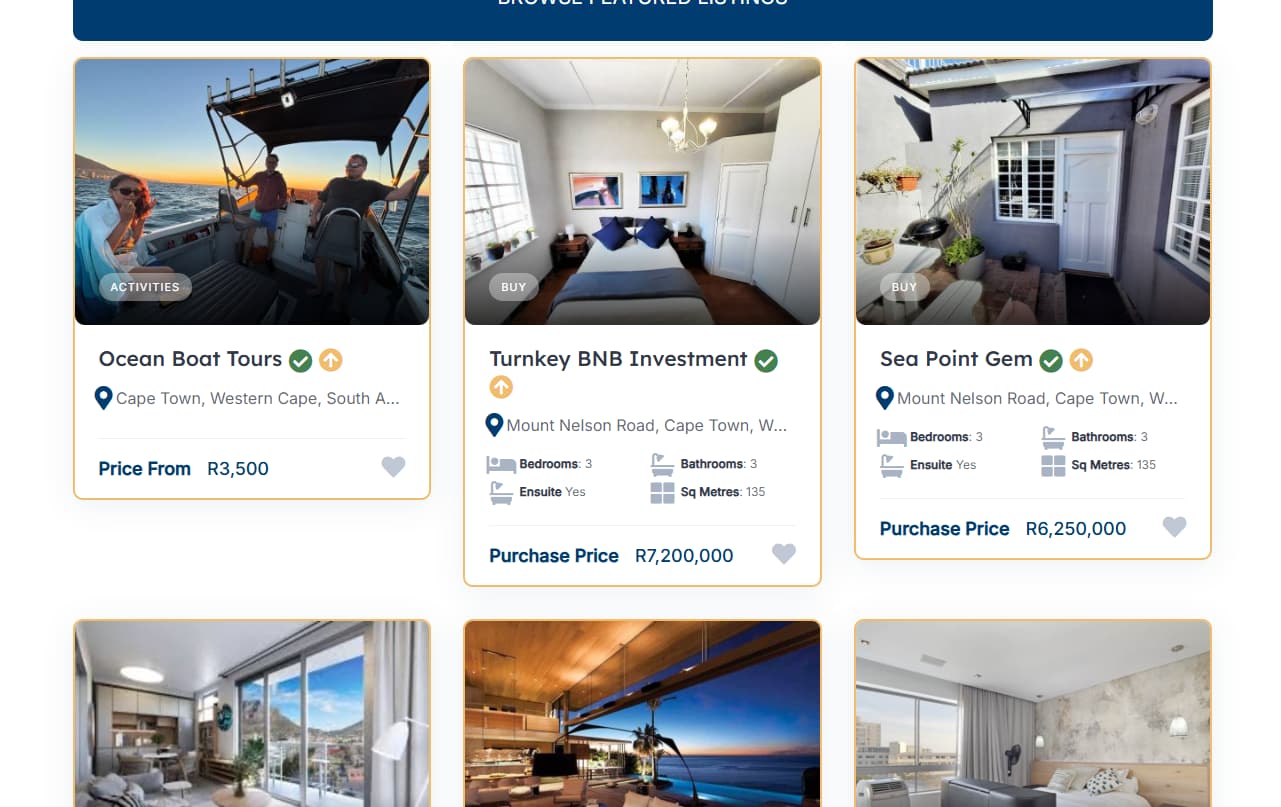
Is there any way that I can control the display of featured listings per category 'cause let’s say I’ve got 2 fairly different types of categories and they each have a lot of different attributes Which make the display of the boxes different lengths and it looks a bit wonky if they are all displayed on the front page. Here with a typical screen shot example
Hi,
Unfortunately, there’s no simple solution to this. There are a few workarounds, but each has some cons, e.g., making listings the same height would add an extra gap inside, and cropping the listing titles to the same number of lines may cut important words from the title.
However, if you don’t mind the gap, you can try this CSS snippet for all listings and adjust it to your needs, but please note that it can require further customization:
/* Make all listing blocks equal height */
.hp-listing--view-block {
    display: flex;
    flex-direction: column;
    height: 100%;
}

/* Ensure content area grows to fill available space */
.hp-listing--view-block .hp-listing__content {
    display: flex;
    flex-direction: column;
    flex-grow: 1;
    padding: 1.5rem;
}


/* Alternative: Set a fixed height for the entire listing block */
/* Uncomment and adjust the height value if you want all blocks exactly the same size */

/* .hp-listing--view-block {
    min-height: 400px;
}
 */
Or this one that affects only featured listings:
/* Make ONLY featured listing blocks equal height */
.hp-listing--view-block.hp-listing--featured {
    display: flex;
    flex-direction: column;
    height: 100%;
}

/* Ensure featured listing content area grows to fill available space */
.hp-listing--view-block.hp-listing--featured .hp-listing__content {
    display: flex;
    flex-direction: column;
    flex-grow: 1;
    padding: 1.5rem;
}
Hope this helps
This topic was automatically closed 30 days after the last reply. New replies are no longer allowed.