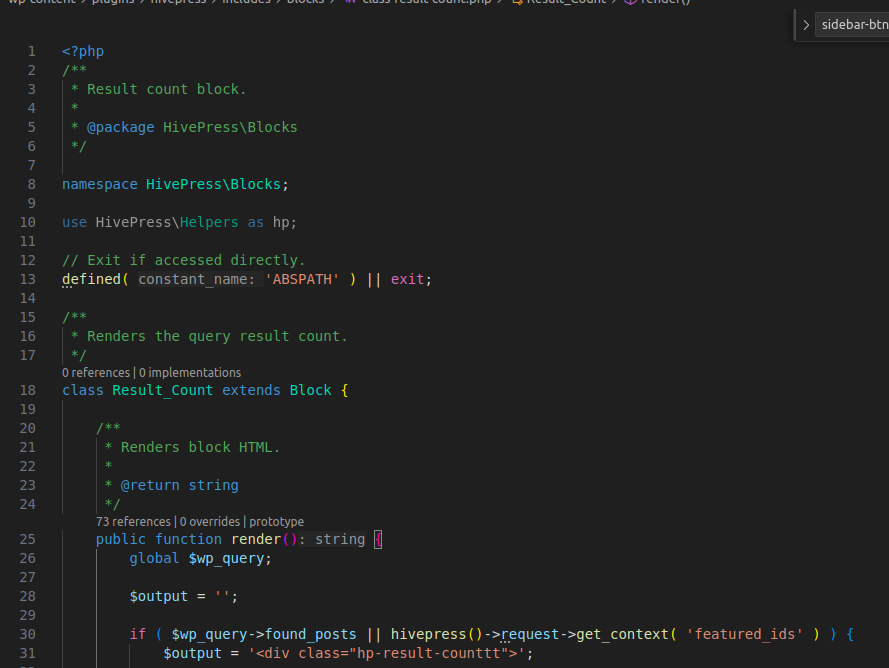
<?php

/\*\*

 \* Result count block.

 \*

 \* @package HivePress\\Blocks

 \*/


namespace HivePress\\Blocks;


use HivePress\\Helpers as hp;


// Exit if accessed directly.

defined( 'ABSPATH' ) || exit;


/\*\*

 \* Renders the query result count.

 \*/

class Result_Count extends Block {


/\*\*

     \* Renders block HTML.

     \*

     \* @return string

     \*/

public function render() {

global $wp_query;


$output = '';


if ( $wp_query->found_posts || hivepress()->request->get_context( 'featured_ids' ) ) {

$output = '<div class="hp-result-counttt">';


// Get first result.

$first_result = 1;


if ( hivepress()->request->get_page_number() > 1 ) {

$first_result = $wp_query->query_vars\['posts_per_page'\] \* ( hivepress()->request->get_page_number() - 1 ) + 1;

            }


// Get last result.

$last_result = $first_result + $wp_query->post_count - 1;


// Get total results.

$total_results = $wp_query->found_posts;


// Add featured results.

if ( hivepress()->request->get_context( 'featured_ids' ) ) {

$featured_results = count( hivepress()->request->get_context( 'featured_ids' ) );


$last_result   += $featured_results;

$total_results += $featured_results;

            }


/\* translators: 1: results range start, 2: results range end, 3: total results. \*/

$output .= sprintf( esc_html_\_( 'Showing %1$s-%2$s of %3$s results', 'hivepress' ), number_format_i18n( $first_result ), number_format_i18n( $last_result ), number_format_i18n( $total_results ) );


$output .= '</div>';

        }


return $output;

    }

}
how to orverride this code
please help me regarding this block code override
kseniia
November 19, 2025, 8:33pm
5
Hi,
Please note that PHP classes can’t be overridden via a child theme, only the files inside /templates (template parts) can be replaced there. Everything else can still be customized using hooks.
If you could describe what exactly you’d like to change in this block, we’ll be happy to suggest the best approach.
I need to add an extra <div> above the hp-result-count div, and inside that new div I need to add a button. How can I do this using a hook? Please help.
kseniia
November 20, 2025, 7:35pm
11
Please try this PHP code snippet and adjust it to your needs [How to add custom code snippets - HivePress Help Center ]:
add_filter(
	'hivepress/v1/templates/listings_view_page/blocks',
	function( $blocks, $template ) {
		$blocks = hivepress()->template->merge_blocks(
			$blocks,
				array(
					'page_content' => array(
						'blocks' => array(
							'heading' => array(
								'type'    => 'content',
								'content' => '<a href="#" class="hp-button">Click Me</a>',
								'_order'  => 1,
							),
						),
					),
				)
			);

		return $blocks;
	},
	1000,
	2
);
Hope this helps.
I want to add a div above the hp-result-count div, but with this code it’s not working.
kseniia
November 24, 2025, 9:01pm
13
Hi,
Please make sure the provided snippet is copied correctly, as this is the outcome showing the button above the count.
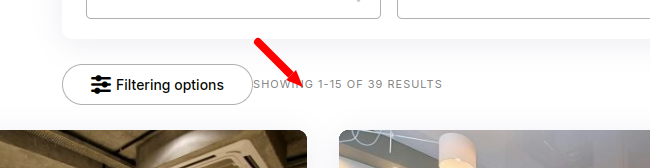
Showing 1-15 of 70 results
I need to add a “Filter Option” button above this div. Right now I’m injecting it via JavaScript, but I want to add it directly in the code.
kseniia
November 25, 2025, 6:47pm
18
If you want to add a button inside the .hp-result-count div, there’s no hook available at that level, and it can’t be overridden with a child theme either. The closest option would be to insert it before or after this element using the code snippet sample provided above.
system
December 25, 2025, 6:48pm
19
This topic was automatically closed 30 days after the last reply. New replies are no longer allowed.