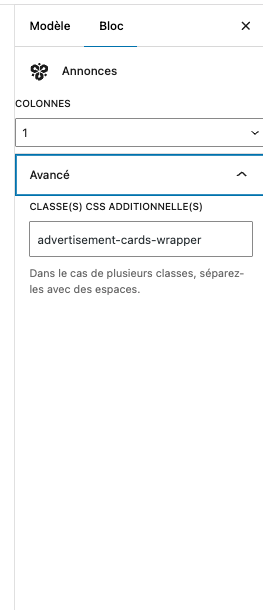
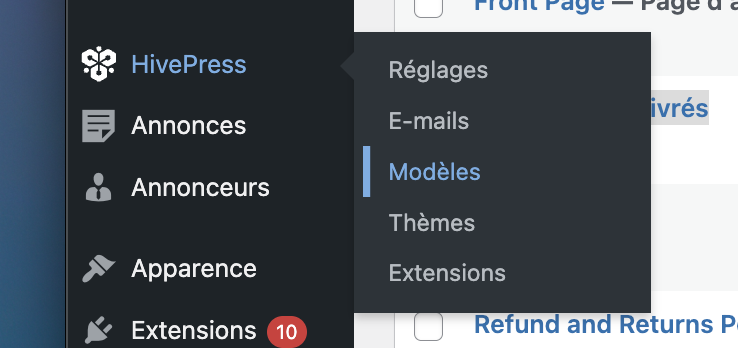
I’ve tried many solution like shortcode or even custmize blocks but I can’t find a solution.
Is there any way to add a listings block which filter by category in the listings model page ?
It seems to be all listing and then you can add filters on the UX, but the blocks with the filter on the admin doesn’t exists on the model page.
If you’ve selected a Listings page in the settings, the content of that page is replaced with the listings layout, which includes filters, pagination, and category filtering options.
If you need to display a few listings from a specific category (or based on other criteria) on a different page like your homepage, you can use the Listings block for that purpose.
I’m currently editing a listing model (as shown in the following screenshot) which is the one for the “Listings” page, and I don’t see any way to add a listings block (a block which is not part of the listings layout with the filters blocs / pagination, …).
As you described, I need to display a few listings from a specific category on the Listings page model, and appart the basic listings form. Do you know if it can be done ?
I think there might be a slight misunderstanding about Templates (Models in your translation).
In templates, there’s always a context. For example, if you created a template for the Listings page, look for a section of blocks called “Template”, these are blocks that automatically “pick up” the template’s context. So if you insert a Listings block there, it will show the listings that the user intends to view on that Listings page, either all listings (with pagination), or the ones they’re currently searching for, etc. These blocks populate themselves automatically based on the context.
If you intended to add a Listings block with custom criteria to that template, it would show the same listings based on those criteria 100% of the time, regardless of what the user is searching for.
The key point is: the Listings block with custom criteria is typically used on other pages (like your homepage or a custom landing page), whereas the Listings page is a common page where users narrow down the results they’re searching for through filters and search parameters.
Please let me know if you need further assistance.
Thanks for the explanation. Does it mean that I can’t show a listings blocks with custom criteria (the one typically used on other pages) and a listing block with the template context (filters by the user’s input) in the same page ?
Yes, if you create a Listings page template in HivePress/Templates, then the Listings block within this template always shows the listings being viewed at the moment (e.g. all listings, or filtered by criteria via the search/filters form, or if viewed by category). If you try to insert the Listings block into the Listings template this way, it has only the Columns setting (other settings are hidden since they are not used).
At the same time, you can insert the Listings block into any other page (e.g. home page) and it will have settings to define the criteria. You can also describe the use case and we can try to provide general dev guidance if needed.
I have 4 category (available, sold, reserved, new)
In my listing page, I wanted to show on the top of the pages only the new category, and then the filters and all the listings (as it is in the Listings page template).
Yes, this is possible, but it would require a custom implementation using the hivepress/v1/templates/listings_view_page hook. If you’re familiar with HivePress hooks, you can check some sample implementations on our forum to see how similar cases are handled.
Based on your use case, we’d actually recommend a slightly different approach. Instead of modifying the Listings template directly, you may want to create a dedicated landing page. You can do this by creating a regular WordPress page and displaying different listing categories there using Listings blocks along with a search form block.
This way, users can start their journey from that landing page, and when they perform a search, they’ll be redirected to the standard Listings template. This approach often provides a better user experience and helps avoid showing the same listings at the top by default, which can otherwise affect usability.
I’ll try to do that and let you know if I’m blocked or something else.
I wanted first to use the “featured” listing to avoid the “new” category that I have, but it looks like they appears on top of all the listings pagination when I only wanted them on the landing page
Yes, that’s right: if you had done what was requested in that topic (adding a block with listings from a specific category to the Listings template), those listings would appear on any page along with the search results, which is the same issue that occurred with featured listings.
If you only need to show this on the initial Listings page (before any search is performed), I’d recommend doing what I suggested earlier: create a landing page in WordPress Pages (don’t mark it as the Listings page in settings) and build any landing page layout you want using Listings blocks. Then, provide a way for users to get to the search results, for example, add a Search Form block, and below the Listings block, add a “View More” button that links to the page you’ve selected as the Listings page in settings.
Yeah, but when I’m on the search result, I can simply hide my “new”’ category with css while the features will have an impact on the numbers of result in each page.
Thanks for the clarification. Unfortunately, we’re not able to help with this kind of customization as it’s outside our support scope. However, you can consider a workaround by creating a separate landing page for listings, with a dedicated block for the new category.
No worries,However I’m a bit stuck with the hivepress/v1/templates/listings_view_page hook. This is my code, but I can’t display the block on my template page, is there anything I’m missing ?
I noticed you’re using parameters like “query” in your code. Please note that this parameter doesn’t exist in the listings block. It’s possible an AI tool suggested this approach, but those parameters aren’t available in HivePress.
I suspect this block will populate with the same listings as the main content because it automatically picks up the page context. This means it might not filter the way you’re expecting.
Please consider using the workaround that was recommended earlier. With your current workaround approach, users would see the same listings from your “New” category at the top of ALL pages, including search results, category pages, and other listing pages. This probably isn’t the user experience you’re looking for.
Okay, thanks, yes I tried to get some help from an AI tool, as I didn’t find any doc or something to know what’s inside each objects. Is there any ?
I tried using a workaround, but I can’t reproduce the same page (the filters and so on).
Having the listings with “New” category on top of ALL pages isn’t a problem for me, it’s even better this way.
If you want to achieve the desired outcome with a template, you can do so with code. You may want to consider hiring a freelancer for custom development: Customize your website | HivePress.