I would like to add a “title” to the description (e.g. “Description:”) field on the single listing page and also to style the description text (change color ant text size).
After failing to do so by myself, I searched on the forum and found a promising fix from @aqmiami7 ( Can we show the label of description in listing details page and Make it first item to show on page ) for the Title part, which worked partially - the title was added but it was displayed at the very top. I managed to fix this by setting the order to 50 (numbers from 0 to 29 didn’t work, from trial and error) → maybe this will benefit others as well. There is still a small issue though - there is a bit too much space (like a whole line/enter) between the title and the description text now. I tried to fix this using CSS like “.hp-listing–view-page .hp-section__title { margin-bottom: 5px; }” but without luck. Any suggestions?
This can be achieved with a few CSS tweaks. If you’re comfortable working with CSS, you can target the description section using the following selector: .hp-listing--view-page .hp-listing__description [seems that you missed the hyphen].
Thanks for the suggestion - however, there are actually two hypens in my code, but for some reason when I pasted it here it “fused” them together in a break line.
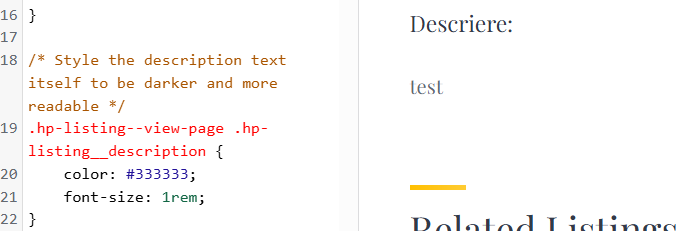
Below you can find the code I am using and also how the text looks (which is basic, as the CSS does not apply):
Thanks a lot for showing me evidence, as it convinced me the code is fine. For some reason, it doesn’t work if I add it in Additional CSS, but it did work when I put it into the style.css file
Sometimes changes don’t appear in real time, and you need to click the Publish button to see them. It can also be caused by a third-party plugin.
If you have a minute, please rate HivePress on the WordPress repository. Your feedback means a lot to us and makes a real difference in helping us grow.