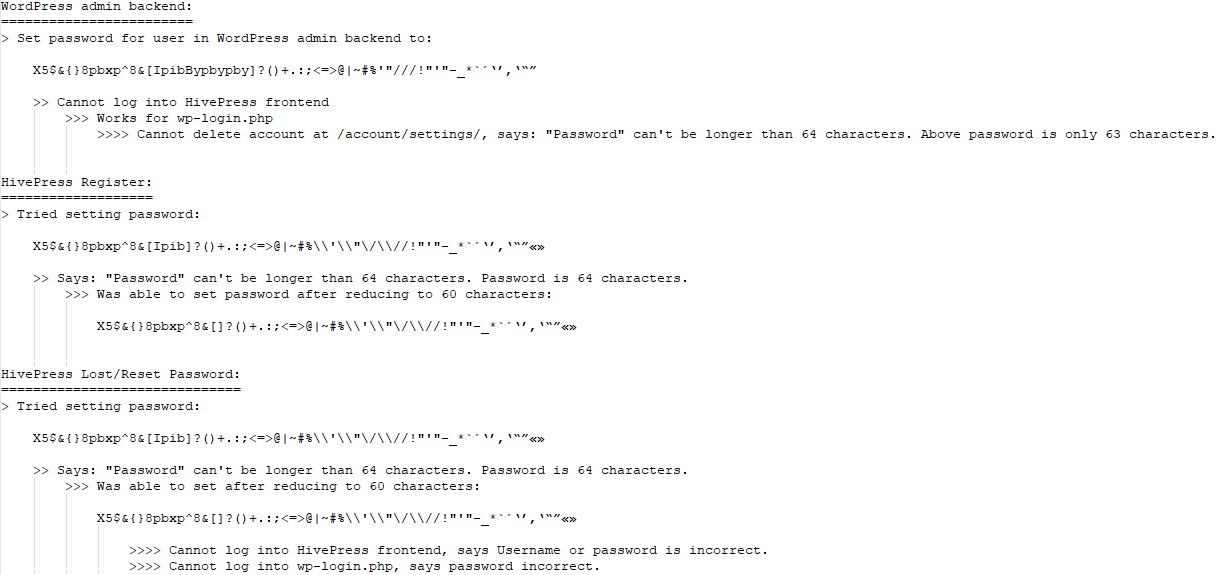
I was doing some quick testing on v1.7.26 regarding passwords. Please have a look below for your consideration:
WordPress admin backend:
Set password for user in WordPress admin backend to: X5$&{}8pbxp^8&[IpibBypbypby]?()+.:;<=>@|~#%‘“///!”’"-_*`´‘’‚‛“”
Cannot log into HivePress frontend
Works for wp-login.php
Cannot delete account at /account/settings/, says: “Password” can’t be longer than 64 characters. Above password is only 63 characters.
HivePress Register:
Tried setting password: X5$&{}8pbxp^8&[Ipib]?()+.:;<=>@|~#%\‘\“/\//!”’"-_*´‘’‚‛“”«» says: “Password” can’t be longer than 64 characters. Password is 64 characters.
Was able to set password after reducing to 60 characters: X5$&{}8pbxp^8&[]?()+.:;<=>@|~#%\\'\\"\/\\//!"'"-_*´‘’‚‛“”«»
HivePress Lost/Reset Password:
Tried setting password: X5$&{}8pbxp^8&[Ipib]?()+.:;<=>@|~#%\‘\“/\//!”’"-_*´‘’‚‛“”«» says: “Password” can’t be longer than 64 characters. Password is 64 characters.
Was able to set after reducing to 60 characters: X5$&{}8pbxp^8&[]?()+.:;<=>@|~#%\\'\\"\/\\//!"'"-_*´‘’‚‛“”«»
Cannot log into HivePress frontend, says Username or password is incorrect.
Cannot log into wp-login.php, says password incorrect.
HivePress update password at /account/settings/:
Current password: X5$&{}8pbxp^8&[IpibBypbypby]?()+.:;<=>@|~#%‘“///!”’"-_*´‘’‚‛“”
Tried setting new password: X5$&{}8pbxp^8&[Ipibby]?()+.:;<=>@|~#%\\'\\"\/\\//!"'"-_*´‘’‚‛“
Says: “New Password” can’t be longer than 64 characters and “Current Password” can’t be longer than 64 characters. Neither are more than 64 characters.
Seems that maybe the counting is not right, if I was only able to set the password at 60 characters during my registration test (likely to be the same for /account/settings/ password changes and lost password)? Also, WordPress will not allow me to set a password for a user with \ in it, but I can using the HivePress interfaces. Perhaps this is part of the issue, too?
I’ve tried to reproduce the issue locally but wasn’t able to do so. Please take a look at the screencast: WordPress admin backend | Loom.
Please make sure that there are no spaces added at the beginning or the end of the password field.
The password you tried to use: X5$&{}8pbxp^8&[Ipib]?()+.:;<=>@|~#%\‘\“/\//!”’"-_*´‘’‚‛“”«» contains 59 characters, and I was able to register with it successfully via the frontend: HivePress Register | Loom
If you meant to use the longer password mentioned in the WordPress section, I also tested that one and everything worked as expected: HivePress Register [long password] | Loom
The provided password contains 59 characters: X5$&{}8pbxp^8&[Ipib]?()+.:;<=>@|~#%\‘\“/\//!”’"-_*´‘’‚‛“”«»
Could you please provide the exact steps to reproduce the issue? Should I create an account via the frontend and then try to use the password reset flow, or is the workflow different?
I was able to reproduce this issue. The error says that the New Password cannot be longer than 64 characters, while the password I tested contains only 62 characters. We’ll take a closer look at this.
I can see what has happened is some characters were stripped from my forum post, like some of the backslashes and the format was changed for some of the quotes (causing the passwords to work). Please see below for more information for the first three items. I am glad to hear you could replicate the issue at /account/settings/. Regarding the password reset, yes, please create an account via the frontend and then use the password reset flow provided by HivePress (my user is already a Vendor (Contributor role) and has a few listings).
This isn’t the ideal way to post the exact passwords, but I have attached a screenshot of the passwords I was using from a text editor to remove any chances of the text changing again.
Could you please send the passwords as a .txt file [or in similar format]?
Unfortunately, I can’t copy them accurately from the image.
It also seems that the issue is related to the quotation marks. From my testing, quotation mark characters appear to be counted as two characters instead of one, which may be causing the incorrect password length validation.
Thanks for your collaboration. I was able to reproduce the issue on my end.
As suspected, it does seem related to how certain quotation marks are being handled. This is admittedly a fairly rare edge case, but we’ll get this addressed properly.