Phone numbers are not stored for some countries

Phone numbers for some countries can’t be stored.
When e.g. country as Switzerland is selected, and number like this is entered 544 54 86

without error, ad is saved in the phone never shows up in the ad as part of the Attribute.

Also tried to enter this number for Singapore and the same is happening.
80537676

I’m doing this from admin area.

Hi,

Please share the phone settings and the version of HivePress you’re using. This will help us better understand the issue.

The settings are that all phone numbers are allowed, and this happened after recent update Version 1.7.19
Allow front-end editing –> true
Sync with the vendor field –> true
Default Country –> United States (US)

Thanks for the details.

If possible, could you please share screenshots (full settings of this attribute for listings and vendors) and detailed steps to reproduce the issue? You can also record a screencast to make sure no step is missed, that would be really helpful.

As far as I understand, you’re trying to create a listing and want the vendor’s phone number to be pre-filled in the listing form. I tried to reproduce this flow on my end but haven’t been able to replicate any issues: Phone Number Sync | Loom.

At the moment, we don’t have enough information to reproduce the bug, but once we can replicate it, we’ll be able to provide a solution quickly.

I have the same issue. When I add phone numbers into my listing hive and save, the phone number does not save and disappears. you cannot even past the phone number into the listing either and on my last import none of the phone numbers imported into the system. big issue

Hi,

Could you please provide a bit more detail about the issue?

  • Is it related to a listing attribute or a user attribute? Are those attribute synched?
  • Does it occur only with new listings, or are you unable to resave existing ones as well?
  • How were the existing entries added: manually or via import?

The more details you can share, the easier it will be for us to identify the cause and find a solution.

Hi Kseniia

I add all my listings by import. The phone numbers don’t import, whats app numbers niether.

If I go to edit listings, pasting the number in doesn’t work. if I type the number in an save, the number doesn’t save.

It is a listing attribute.

existing phone numbers are there, its just the new ones that I am trying to be imported

Thanks for the info.

Could you please provide the example of a phone number that is stored in your CSV? Does it contain spaces, country code, + sign and so on?

just did an import (css attached). the phone numbers just don’t port in. have it got the phone numbers in the right format ?

css looks like this

ID,Category,User,Featured,Verified,Latitude,Longitude,Gallery,Title,Location,Capacity,Price,Reservations,Type,Private Rooms,Cost per Room,Wifi,Camping,Pilgrims Only,Washing Machine,Dryer,Pool,Dinner,Restaurant,Kitchen,Open,Breakfast,Book this Albergue,Bike Storage,Description,Host Name,English Spoken,Phone,Email,Website,Whatsapp,Instagram
,Castro Urdiales,Pensión Ardigales 11,“C. Ardigales, 11, 39700 Castro-Urdiales, Cantabria, Spain”,Yes,Pension,Yes,from €73,Yes,No,No,All year,https://www.booking.com/hotel/es/ardigales-11.html,,"Check out the other Albergues in Saint Jean Pied de Port.
We have also self published a Camino Francés Journal for Pilgrims walking the route so you can record all your day by day memories. Have fun and journal away…

Pilgrim Insight

This accommodation offers pilgrims a comfortable and welcoming place to rest along the Camino de Santiago. It provides the essential amenities most walkers need, including shared accommodation, a place to prepare meals, and facilities for laundry and relaxation.

The atmosphere is friendly and focused on providing a good night’s rest before continuing the journey. Whether you’re traveling solo or with companions, it’s a reliable stop for pilgrims looking for rest and connection on the Camino.

Full details about the facilities, pricing, and services will be added soon as more information becomes available.

    <a rel=""sponsored""
       href=""https://57hours.sjv.io/c/4051399/3443379/43346"" target=""_top"" id=""3443379"">

<img src=“”//a.impactradius-go.com/display-ad/43346-3443379"" border=““0"” alt=”“”" width=““728"” height=”“90"”/><img height=““0"” width=”“0"” src=““https://imp.pxf.io/i/4051399/3443379/43346"” style=”“position:absolute;visibility:hidden;”" border=““0"” />”,942781616,info@pensionardigales11.com,https://pensionardigales11.com/,,
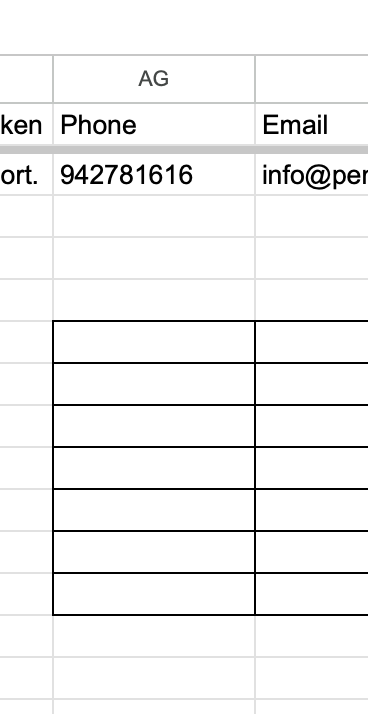
Thanks for the details, but I don’t see the phone’s format here. Could you please share an example of how it looks in the column, e.g., +48 543 678 345, or 543 678 345, or 543678345, or 48 543 678 345?

this is it in google sheets. the +34 is already set by listing hive

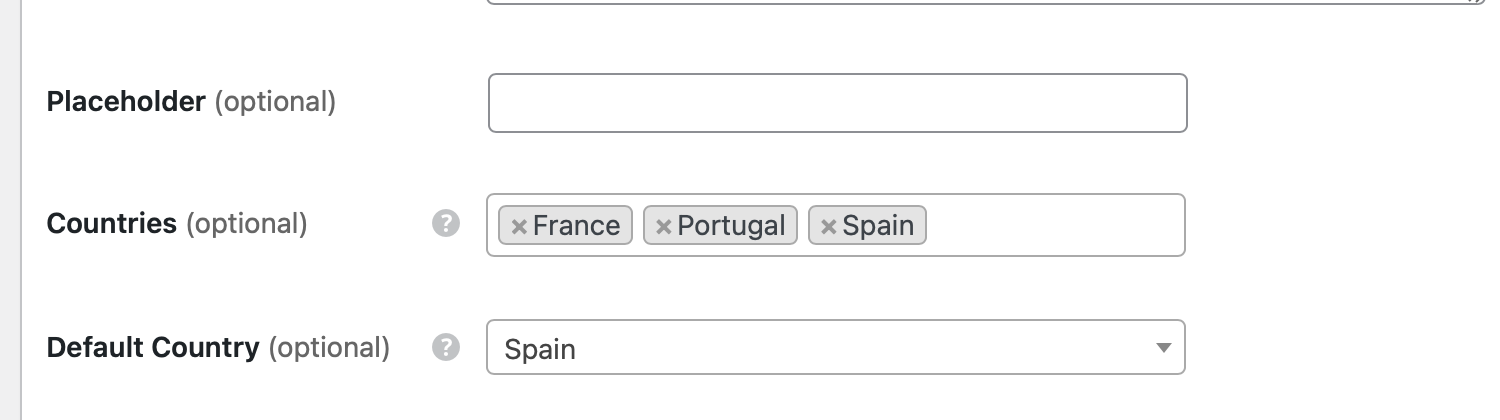
these are my phone attribute settings

I have tried taking the default country code away and they import correctly then. when I go into the listing to add the country code and save, they disappear again

Thanks for the details.

The issue is related to the latest update to phone number formatting, which now has stricter validation. We’ll fix this issue within a week.

thank you kseniia

1 Like

Hi @kseniia any update as yet on the fix ?

thanks

mark

Hi Mark,

Thanks for following up. The fix will be delivered within the next three days.

Hi @win2win and @Caminoalbergue,

We tried to reproduce the issue, but weren’t able to replicate it on our end.

Regarding the import issue: I noticed in the screenshot that the phone number doesn’t have a country code. We’re planning to add functionality to the Import plugin so that if an imported number doesn’t start with “+” and a default country is selected in the phone field settings, it will automatically add the country code. However, at the moment, the country code needs to be included in the imported phone numbers for them to work correctly.

Regarding the bug when manually entering numbers: our dev tested with the same phone numbers that were shared in the first post, but he couldn’t reproduce the issue where numbers aren’t being saved. This suggests there may be a JavaScript error or conflict on your site preventing the save function from working properly.

Could you please provide temporary WordPress access to support@hivepress.io so we can investigate this directly? It would really help us identify what’s causing this, since we haven’t been able to reproduce it in our test environments. We’ve already fixed other phone-related issues (like display format breaking), but this particular issue has been difficult to track down without seeing it in action.

Thanks

I will do a video and also give access. I am travelling atm but will do tomorrow at some stage

Mark

1 Like