I need to rename the ‘Add Item’ button that is on the https://site.com/submit-listing/details/ page (without installed any additional plugin). This button comes from the ‘Allow sellers to add price extras’ HivePress option.
I have tried a couple code snippets without success. What kind of snippet can you recommend for this?
Thanks for the reply @andrii .
I don’t really like the idea of having to install a plugin just to edit text. I’m also surprised that this button text cannot be edited with a php snippet.
So in that case, I guess the class-repeater.php file would have to be edited in a child theme - is that right?
Unfortunately functiona files like this one can’t be overridden via a child theme, for cases like this it’s better to use hooks (actions/filters) but currently there’s no hook to override this label, it’s common for any field of Repeater type.
Please consider using Loco, it’s really lightweight and may be useful if you need to change any other static labels within the theme/plugin without code changes. We wrap all the static texts within the code with translation functions (detected by Loco and similar plugins) so any text is editable this way, and it’s the easiest way to do this.
Thanks @ihor for your reply and explanation.
The main reason I would prefer not to install Loco Translate is because I already have TranslatePress installed, and I don’t want them to conflict with one another.
OK, I tried now with Loco Translate, and, like @andrii said, this changes ‘Add Item’ everywhere and not only on the Extras field, so that’s not going to work either.
@ihor@andrii now I have a real problem - after I translated that button text, the translation seems to be stuck. I have removed Loco Translate because I couldn’t change the translations back to the original “Add Item” text, but still the button looks like this:
I have emptied all caches and deleted all ‘Loco’ files and folders in the WordPress installation.
Strangely, if I select a different Category on the Add Listing page, the buttons show up again with the original text of ‘Add Item’, but whenever loading the Add Listing page it always first shows these ‘Add Shipping…’ button texts.
I also tried making Listings to see if there was a draft stuck with these renamed buttons, and I tried with various users - nothing gets rid of these renamed texts!
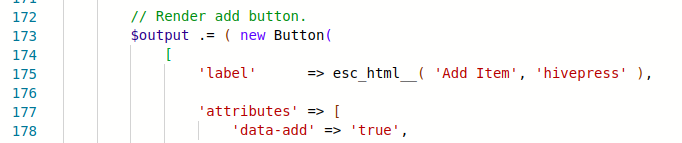
I also triple-checked the class-repeater.php file and it’s in it’s original state:
The direct change in the field class will not persist unfortunately, but we can add a parameter for changing these labels in the next update so it will be possible to replace this change with a third-party snippet. Please note that also if you change the field class directly, the label will change for any Repeater fields (so this change would work the same as using Loco), otherwise some conditional logic is required there (e.g. checking the field name if you need to change this label for a specific field).