Search & filtering not working, revert to standard Wordpress "Nothing found" page

Development site: http://wiras.dora.group

Using WordPress 6.8.3, latest HivePress incl. Geolocation and Import extensions, Enfold Theme 4.7.6.4, PHP 8.2

Steps to reproduce

Click on “Weltweit” (Worldwide) in den main menu, scroll down to the Hivepress search bar. Search for category “WIRAS Verbund”, or “Berufsgruppe” > “Steuerberater”, both should have two search results. Hit search button. The website will display the standard WordPress “Nothing found” page as supplied by the Enfold Theme, but not the Hivepress search result or “listings” page / template, and no results.

You can also directly access our working Hivepress “listings” page here:

http://wiras.dora.group/listings

You will see two active listings in the middle. However, if you filter the results or use the search bar above, the standard WordPress “Nothing found” page is displayed instead of actual Hivepress search results.

Actual result

When searching or filtering for Hivepress listings, the standard WordPress “Nothing found” page is displayed instead of actual Hivepress search results.

Expected result

We expected the “listings” template to display listings that match the search / filter.

Extra details

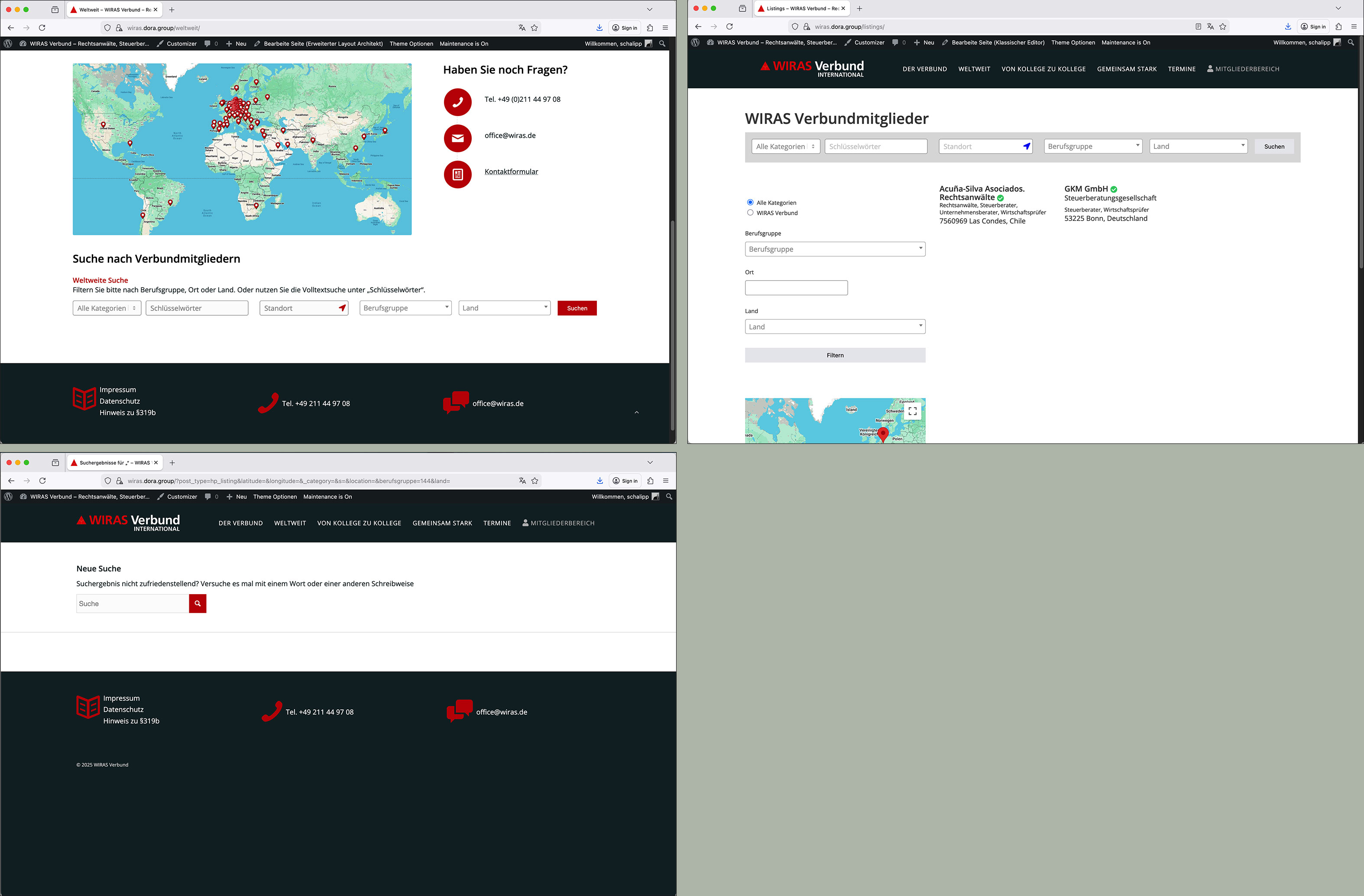
Three screenshots:

  1. Top left: Hivepress searchbar on “Weltweit” page
  2. Top right: Hivepress “Listings” page showing filters and searchbar
  3. Bottom: Actual “Nothing found” search result page when searching or filtering for listings (presumably WordPress/Theme template)
Thank you very much for any idea or suggestion as to what might be causing this and how to fix it. It is highly appreciated! Also, if HP developers require admin access to the backend of this dev site to check the setup, I would happily supply admin access details.

Best regards, Sebastian

Hi @sebi.s,

I’d guess this is likely to be caused by the third-party theme you’re using. To confirm this, you could try temporarily switching to HivePress’ free ListingHive theme, or the default WordPress theme, and then test if the search results show as expected then.

Let us know if switching theme revolves the issue for you. In any case, you may also find the following documentation page useful as it relates to using HivePress with third-party themes.

I hope this helps!

Cheers,
Chris :victory_hand:

Hi,

Thank you for sharing the details. We’ve taken a look, and it appears the Enfold theme is hijacking the page even for custom post types like Listings.

Could you please check the Enfold theme settings to see if there’s an option to disable this for the Listing post type? Alternatively, you might want to reach out to Enfold support to ask how to disable their built-in 404 page handling for custom post types.

The URL https://wiras.dora.group/?post_type=hp_listing&s= should definitely display the search results for the Listing post type (since the parameter is in the URL after clicking Search). As a quick test, you could temporarily switch to a different theme like Astra to confirm whether this resolves the issue and confirms it’s theme-related.

Thanks for your input. And yes, I know the issue was caused by the Enfold theme, I had already tried debugging with fallback themes where the Hivepress listing search worked just fine. Unfortunately, we had to stick with the Enfold theme as the whole website was already fully built with it and its ALB visual editor, making it impossible to switch themes just for Hivepress compatibility.

However, yesterday I took a full day to investigate the Enfold theme files, and I am happy to report that I have found the cause, and thus could fix the problem.

The file causing the Hivepress search problem is found in the Enfold theme file structure, namely

/themes/enfold/includes/helper-template-logic.php

In this file exists a function called “avia_search_query_filter”, starting around line 37. Its purpose is to “make sure that empty searches are sent to the search page as well”. Empty searches would mean searches without a keyword (search term).

The problem is that most Hivepress searches would be considered “empty” searches as they don’t have a keyword parameter, but are searches by checkbox, select menue or radio button values. Thus, the above mentioned function of the Enfold theme catches those searches and instead of handing them over to Hivepress, redirects them to the themes’ own “Nothing found” search result page.

All I had to do now is to comment out the whole function in the file “helper-template-logic.php”, starting from line 41 until line 66:

41  if(!function_exists(‘avia_search_query_filter’))
42  {
43  	function avia_search_query_filter($query)
\[…\]
64  	add_filter(‘pre_get_posts’, ‘avia_search_query_filter’);
65  }

I have to say that it is quite bold of the Enfold themes’ developers to catch all presumed “empty” searches and redirect them, I am sure this would cause a lot of trouble with many WordPress plugins and extensions. Not every search within a website is using a keyword parameter, many only use form field values. Just categorically assuming all those search calls are empty and should be redirected is rather drastic. I have also informed the company “Kriesi”, developers of the highly popular Enfold theme, to that extend, maybe they try to finetune their function in the future to make sure it really catches only completely empty searches, not just those that don’t specify a keyword.

Best regards,
Sebastian

2 Likes

Glad to hear you managed to resolve this @sebi.s - and, thank you for sharing the solution with the community. I’m sure others will find this useful!

Cheers,
Chris :victory_hand:

Hi,

Thank you for the update and for sharing the solution!

It may be beneficial for others.