Having 1.7.23 and a free theme, on a WP 6.9.4
When I go to a front-end, Listings, type two letters (it does not seem to matter how many) into a search field, select certain category (using radio buttons) and hit Search button,
then the search results does NOT show only results from a selected category, which would be expected when i have specifically selected which category to search.
This way the results contains too much listings unrelated to my interest.
Also when i submit empty search field while having selected certain category, it is expected by me to see all listings of that category, but it again shows all categories listings.
I am adding listings to a subcategories.
There is a
workaround 1 in settings/Listings: “Display categories instead of listings”: then the search allows clicking category button, but it requires two page loads instead of one to get to the listings.
With “Display categories instead of listings”:
/?post_type=hp_listing&_category=41&s=si (this works to show only one category listings)
Without:
/?post_type=hp_listing&_category=&s=si (not works - shows all categories while one was selected)
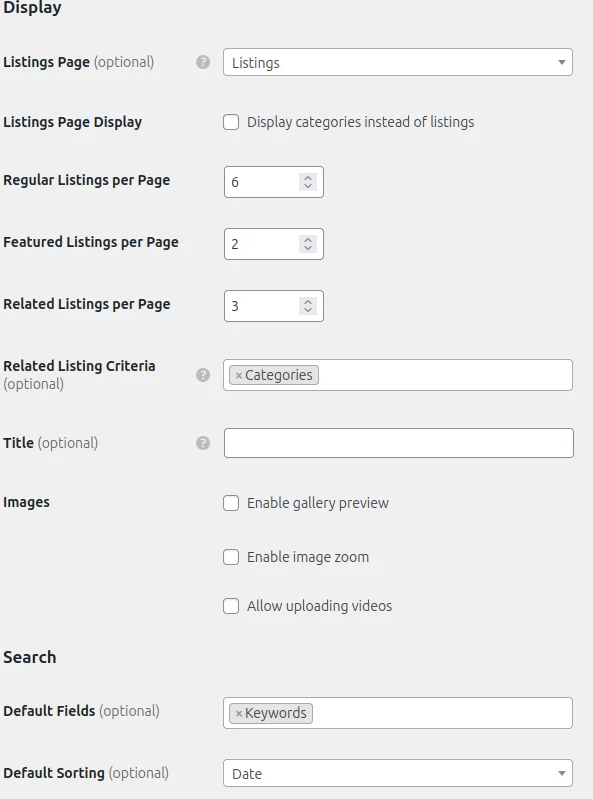
Workaround 2: in settings/Listings: “Default Fields (optional)” set to both Keywords and Categories. On the site front-end the categories drop-down (in the search field) requires additional scrolling through the list, because the drop-down menu is unnecessarily short, even i have large desktop screen, can you improve this, for example to make the drop-down height flexible? Here is what worked for me:
- Go to WordPress Dashboard → Appearance → Customize
- Click Additional CSS
- paste:
/* increase height of a categories drop-down menu in the search field  */
.select2-results__options {
	max-height: 70vh !important;
	overflow-y: auto !important;
}
short drop-down is less optimal than the radio buttons list which currently does not work as described on the beginning of my post.
Workaround 3: in settings/Listings: “Default Fields (optional)” leave this empty. It causes usage of a radio buttons along with a Filter button which is located below it and it works. But the search field is not clickable, not allowing to find anything by keyword. So this seems to be worst workaround.
UPDATE: after spending around 20 minutes on this, i have figured out that the expected order of actions is to first search and then select category and then click filter button.
This is non-standard way to search. It would be handy if you pair the search button with the category selection to avoid additional filtering step.