Shortcode for displaying listings by custom attributes

I want to create a shortcode to call the latest listnings not only by category like it is possible in standard … i also want to select e.g. the value of a "eigenschaft"in german… a other property I gave the listning.

I want to set: category, property, number of items to show, ordering of items

How I do this?

Thanks
Daniel

Hi,

If you’re referring to filtering listings by custom attributes and the attribute is of the Select type, please make sure it’s marked as filterable. Once enabled, it will appear in the block settings for listings.

Could you also clarify why you decided to use shortcodes? Are you working with a third-party page builder? If not, we recommend using blocks instead, since all settings are available and much easier to manage there.

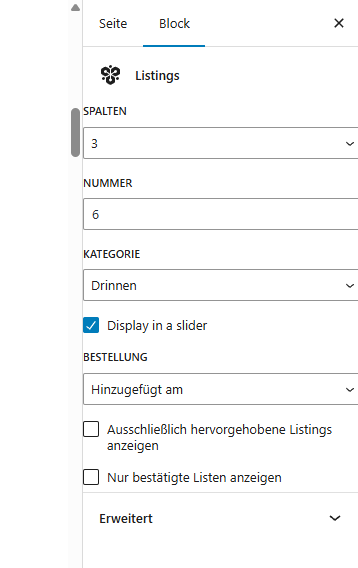
I use blocks and this is what I currently use:

Beside of the Kategorie I want to be able to filter it to any other attribute I have set and filter it here.
Those are the standard Options you see here.

Mhh when i put the attribute to checkboxes it does not appear in that filter… as single select it works - why?

Hi,

This is because checkboxes allow multiple selections, and that type of UI is not currently available in block settings. We are planning to add it in the future. For now, we can provide general guidance on how to achieve this if you’re familiar with coding or have a developer.

Ye I am familiar.
I already had a hook putting in the values of the checkboxed but i struggeled to get the listning block filtered to it… :slight_smile:

BTW something else: Is it possible to get a hook out of the box from you to change the order of box listnings to e.g. a date I have as attribute. :slight_smile:

Please try using the pre_get_posts WordPress hook to alter the listing query. In the callback function you add for this hook, you can check if the post type is “hp_listing”, for example via $query->get('post_type') and that it’s not the main query. Also, depending on the page you can add extra conditions, for example if it’s the home page is_front_page()
This way you can target a specific listing query and change it by adding or replacing the query parameters WP_Query – Class | Developer.WordPress.org

Hope this helps

Yes worked out… thanks. :slight_smile:

for the others:

add_action( ‘pre_get_posts’, function( $query ) {

if ( is_admin() ) {
    return;
}

if ( $query->get( 'post_type' ) === 'hp_listing' ) {

    // Erst nach hp_start_datum (wenn vorhanden)
    $query->set( 'meta_key', 'hp_start_datum' );
    $query->set( 'meta_type', 'DATE' );

    // Orderby-Array: zuerst Meta-Datum, dann Erstellungsdatum
    $query->set( 'orderby', [
        'meta_value' => 'ASC',
        'date'       => 'DESC', // Fallback
    ]);

    $query->set( 'order', 'ASC' );
}

});

hp_start_datum is my attribute that it is orderd.

Hi,

Thank you for the solution! This will be very helpful for our community.

This topic was automatically closed 30 days after the last reply. New replies are no longer allowed.