Subject: Clarification on Statistics Plugin Dependency and Alternative Solutions
Hi HivePress Team,
We recently installed the Statistics Plugin on our DEMO site after purchasing your $199 package, but we noticed the plugin didn’t display the expected features in the HivePress settings. It’s installed, but it isn’t functioning. Other plugins, such as the Booking plugin, appear correctly in the settings, so we assume this issue is related to the Statistics plugin itself.
Additionally, we see that it requires Google Analytics to track view counts for listings, which won’t work for us long term.
Before moving to another solution, I wanted to ask if you’ve had anyone successfully use alternative plugins like WP PostViews, Simple Post Views, or Post Views Counter to track view counts for listings without needing Google Analytics. These plugins seem like they might offer a more cost-effective and less third-party-dependent solution and should be able to be easily added to the single-listing.php file with a code like:
Your request is related to a premium product. Please add the license key to the account settings to access forums for your purchased products and get the Premium Support badge on your profile.
Sorry for the delay. Yes, the badge appears now so all the extension-specific forums are now available for posting.
Yes, it’s possible to use third-party plugins to show the number of views per listing, but this would require custom development. If you’re familiar with code customizations, or have a developer for custom work, I can provide some general guidance regarding this - please let me know.
At the same time, I recommend using Google Analytics integration via the Statistics extension because it’s highly reliable. Plugins with simple view counters add views on every page refresh while Analytics counts unique users, checks IPs, etc. to prevent false stats. This is especially important if you allow sorting listings by popularity.
We’ll give the Statistics extension a try for now, as it sounds like it will work for our initial business model. That said, we’d like to keep our options open to move toward a solution that’s not as dependent on Google in the future. Given Google’s history of phasing out services and shifting users toward premium options, it would be great to have a pathway to use alternatives, especially for something as straightforward as view counts.
Could you provide the code snippets for integrating third-party view count plugins? This would allow us to explore other options if needed down the road.
Do you have an updated screencast for using your HivePress Statistics plugin? The data that you have for implementing this doesn’t match Google Analytics any longer and putting in the Measurement ID and Property ID didn’t work. When you click the Grant Access on the Integration tab, it gives you this error message…
Access blocked: This app’s request is invalid
“You can’t sign in because this app sent an invalid request. You can try again later, or contact the developer about this issue. Learn more about this error
If you are a developer of this app, see error details.
Error 400: redirect_uri_mismatch”
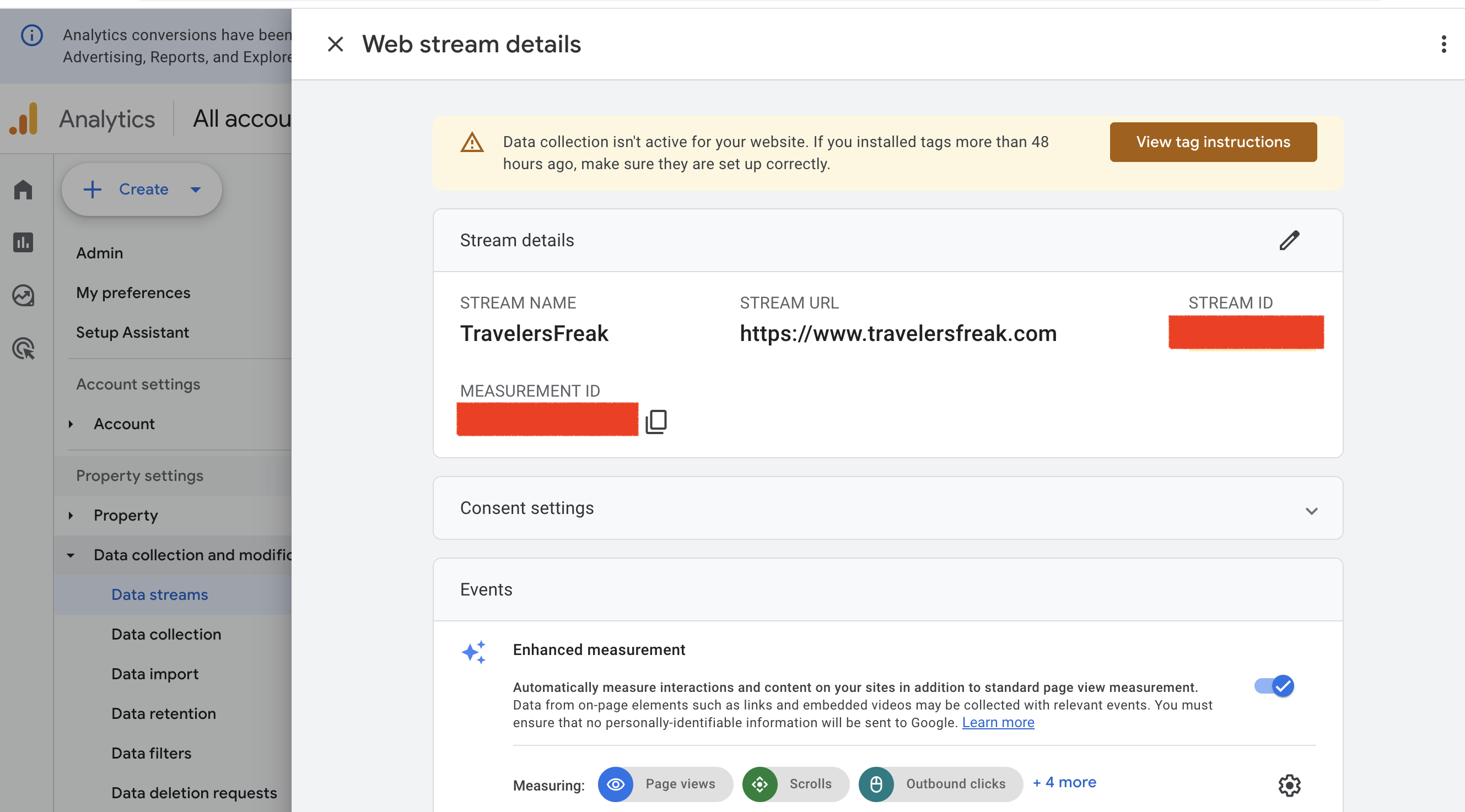
The plugin doesn’t work with the current update from version 2.0 when your screencast was done to like version 4.0 of Google Analytics now, unless I’m missing something? Is there an update to this plugin or some other way to configure it now that you can suggest? Please advise when you can. Here’s a screenshot of our analytics with the Stream ID and Measurement ID blocked out, but we have it setup with our URL?
We were able to get to the Grant Access point in your screencast. It’s not that simple though. We are required to get Authorization (Verification) as a developer to obtain Analytics access.
It would be great if you simply offered an easy Statistics Plugin that simply showed how many POST VIEWS a person received of their ads? This is really what most advertisers care about “Has anyone seen my ad?”.
Here’s the notification from Google to get verified now as a new Google Analytics user. Hivepress has probably been approved for a long time with Google Analytics. I thought you should be aware of the process now for any of your users who purchase your plugin and want to use your Google Analytics plugin, but have not been already verified.
It’s definitely a process…
Needs verification
Please prepare your app to submit for verification.
"If you want all users (vendors viewing their ad analytics) to access Google Analytics data without limitations, you must complete Google’s app verification. Here’s a simplified way to do it:
Submit for Verification:
On the OAuth Consent Screen, click the Submit for Verification button.
Fill out the required details:
Explain why you need the Google Analytics API:
2.“We use the Google Analytics API to provide vendors with statistics on their ad performance (e.g., post views, traffic sources) in a secure and transparent manner.”*
Upload a screenshot showing how the integration works (e.g., your ad dashboard displaying a placeholder for analytics data).
Ensure your Privacy Policy and Terms Of Service and any other URL is in place and describes how you handle user data to be verified. Also include any URL’s that are also affiliated with your business, should you have multiple websites.
Wait for Approval:
Google typically takes a few days to a few weeks to approve."
Sorry if there was a confusion, you don’t have to submit your app for a review, this is needed only if you require accessing Google Analytics data of other Google users. Please skip this step or simply close this page, if possible try following the screencast stepby step, there are 2 main actions regarding getting the Client ID and Client Secret credentials:
Create a new OAuth app in Google API Console
Enable the Google Analytics APIs for it, shown in the screencast
That’s it, after this you can simply copy the Client ID and Client Secret credentials and add them in HivePress/Settings/Integrtaions. Then, once you click Grant Access, there will be a redirect to the Google consent screen for sharing the Google Analytics data. Please make sure that you’re logged in as the same Google user which created the OAuth app previously, then the app verification is not needed since the app owner and the user requesting data access is the same, and this permission is enabled by default without any verification.
Thanks, we’ll consider adding a simple page views counter, but it may not be reliable, especially if the number of views affects the listings order on your site (e.g. if users sort by popularity). A simple counter for page refreshes may be easily falsified, while Google Analytics checks unique user IPs and other details.
Thank you. We will try it again and see if we can get it to work without the existing one we have. I appreciate the follow-up. I will let you know if we can get it work.
The post views is very simple, it is built-in to our other classified ad sites. For example, if you visit this link you will see the eyeball at the bottom of the ad shows 665 views of this ad - CoolCarGuy.com – Relaunch Mode! – Cars Freak
It’s pretty simple and people visiting or the user can see how many people have seen their ad.
It doesn’t track the IP address, but it is only tracking views of that page.
Do you have any updates or solutions regarding this feature request?
We’re working on building a real estate listing site using HivePress, aiming to create something similar to Zillow, Realtor.com, and other major platforms. One critical feature for real estate websites is displaying the number of views a listing has received once it goes live. This is especially important for paid listing sites, as it provides tangible evidence to users that their listings are being seen, which is a key selling point for marketing purposes.
Currently, ListingHive doesn’t support this feature, and while tools like Google Analytics can provide detailed data, it’s not practical for end-users who simply want to see a view count on their listings. Most people won’t care if a tech expert claims that Google Analytics data is “better”—they just want a straightforward, visible view counter.
For example, on Zillow, a listing that went live this morning already shows over 72 views in just five hours: View Example Listing. This simple feature offers tremendous value to real estate agents and sellers by showing immediate engagement.
Is there a plan to introduce this feature, or would you consider adding it? It seems like a straightforward implementation and would significantly enhance the value of ListingHive for those of us building real estate platforms.
It’s not available yet, but if you use the Statistics extension, I can provide a sample code snippet to show the total number of views (30 days back) on the listing card/page, let me know if this works for you. Then checking the Statistics tab would be optional, but it may be useful if sellers purchase the featured package for their listings - then they can check if there was a spike in views when the package was purchased.
If you mean integrating a third-party Post View Counter, unfortunately I can’t provide a snippet for this - this would require researching their API, but maybe they provide a code snippet for integration.