I’m setting up a marketplace with HivePress (RentalHive) and I want to use Stripe Connect for payouts.
Here’s what I’ve done so far:
Disabled WooPayments and switched to Stripe Connect in HivePress.
Using WooCommerce Stripe Gateway plugin.
Connected my Stripe account in test mode.
When I place a test order, the order appears correctly in WooCommerce (under Orders) and the booking shows in HivePress.
The checkout process works fine on the website.
But nothing shows up in my Stripe Dashboard (Test mode) — no payment, no event, nothing.
I expected to see the test payment in Stripe → Payments (test mode), but it stays empty.
Has anyone faced this with HivePress + Stripe Connect?
Do I need to configure webhooks or additional settings in WooCommerce Stripe Gateway to make the transactions show up in Stripe (test mode)?
Could you please clarify if you set up Stripe Connect? This option should appear when you submit your first listing.
P.S. Please note that we have to move this topic to the Marketplace forum category. Since it’s related to a premium extension, the forum category is restricted — please add the license key to the account settings or consider renewing support if you still need assistance related to the premium themes or extensions Renew Support | HivePress
For context:
I’m building a rental marketplace where customers can book goods or spaces. The platform charges a commission on each booking, and the seller (host) should only receive their payout 24 hours after the check-in/start of the rental (or possibly after manual validation by the host).
My current setup:
Installed WooCommerce Stripe Gateway
Configured Setup Connect under HivePress → Settings → Payouts
Enabled Stripe under WooCommerce → Payments
What I tested so far:
I couldn’t get Stripe test accounts to work, so I tried with a real account.
I successfully created a listing from a vendor account (I had to create a Stripe account, which I believe is a Stripe Connect?).
I booked this listing, and I can see the payment arriving in my platform’s Stripe account.
I can see the order on WooCommerce > orders (status: Processing) and the Booking (status: Confirmed)
Problem:
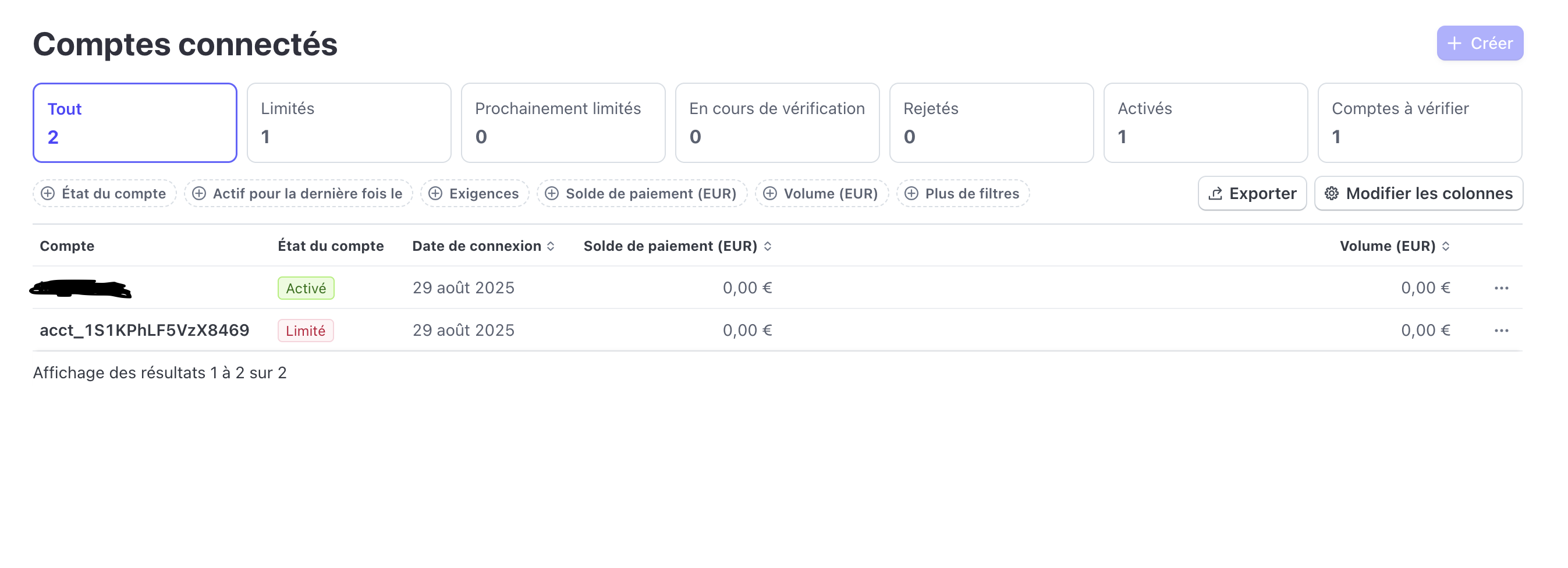
On my platform’s Stripe account, I don’t see the “Connect” section, so I assume my account is not properly set up for a marketplace.
Question:
How can I configure Stripe so that:
The platform receives only its commission, and
The seller (host) automatically receives the remaining payout (e.g., 24 hours after check-in)?
But nothing shows up in my Stripe Dashboard (Test mode) — no payment, no event, nothing.
Do you mean the Stripe dashboard (that accepts payments via WooCommerce checkout) or the Stripe Connect dashboard? If you mean the Stripe dashboard for accepting payments, if you correctly set up the Stripe payment gateway in WooCommerce, then test payments should appear there. For Stripe Connect, please make sure that you completed the Stripe onboarding as a vendor (you can create a test vendor for checking this), there’s a redirect to onboarding when adding the first listing.
By default, if you choose the Stripe Connect payouts mode, all the initial payments are sent to your Stripe account via WooCommerce checkout. Then, payments land on your Stripe Connect balance (there may be a delay, but payouts may occur earlier without issues since payouts reference the initial transactions). When the order is marked as Completed on your site, HivePress triggers a payout (transfer) from your Stripe Connect balance to the vendor’s Stripe Express balance (vendors set up a Stripe Express account for payouts during the onboarding.
My first post is not relevant anymore, I made progress and my current situation is summarized is me second post.
I am confused about what is the difference between the Stripe dashboard, and the Stripe Connect Dashboard?
For Stripe Connect, please make sure that you completed the Stripe onboarding as a vendor (you can create a test vendor for checking this), there’s a redirect to onboarding when adding the first listing.
When the order is marked as Completed on your site, HivePress triggers a payout (transfer) from your Stripe Connect balance to the vendor’s Stripe Express balance (vendors set up a Stripe Express account for payouts during the onboarding.
I am confused: when a vendor creates their first listing, is a Stripe Connect account or a Stripe Express account created?
Currently, I assume that the money was held in the Stripe Dashboard, but I can see that I don’t have any Stripe Connect accounts associated with this account yet.
However, I tried to create another account to try to book this listing, but my checkout page shows “Something big is brewing, our store is in the works and will be launching soon” instead of the payment informations.
Yes, there’s a delay for funds to appear on the Stripe Connect balance, but you can try to trigger a payout by changing the order status to Completed, then funds (the vendor’s share) should appear on the vendor’s Stripe Express balance.
There are two ways to complete orders:
Manual Completion - if you have this option enabled in HivePress/Settings/Orders, then customers see the Complete Order button on the order page, so they can click it to indicate that they’re happy with the order and it’s completed.
Automatic Completion - useful if customers forget to complete the order, you can set the number of days for auto-completion in HivePress/Settings/Orders. This period is counted from the order payment, or from the order delivery if you also enable Manual Delivery and require vendors to indicate when they deliver the order.
If you also use Bookings, then orders are completed automatically within 12 hours after the booking end date is reached.
 The checkout process works fine on the website.
 But nothing shows up in my Stripe Dashboard (Test mode) — no payment, no event, nothing.