Describe the issue in as much detail as possible. Please remove the sections below if the issue is obvious enough and doesn’t require extra details.
Steps to reproduce
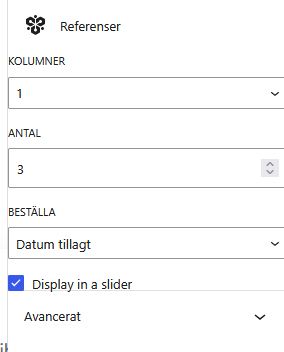
Add the review block on any page, then set colums to 1 and amount to 3.
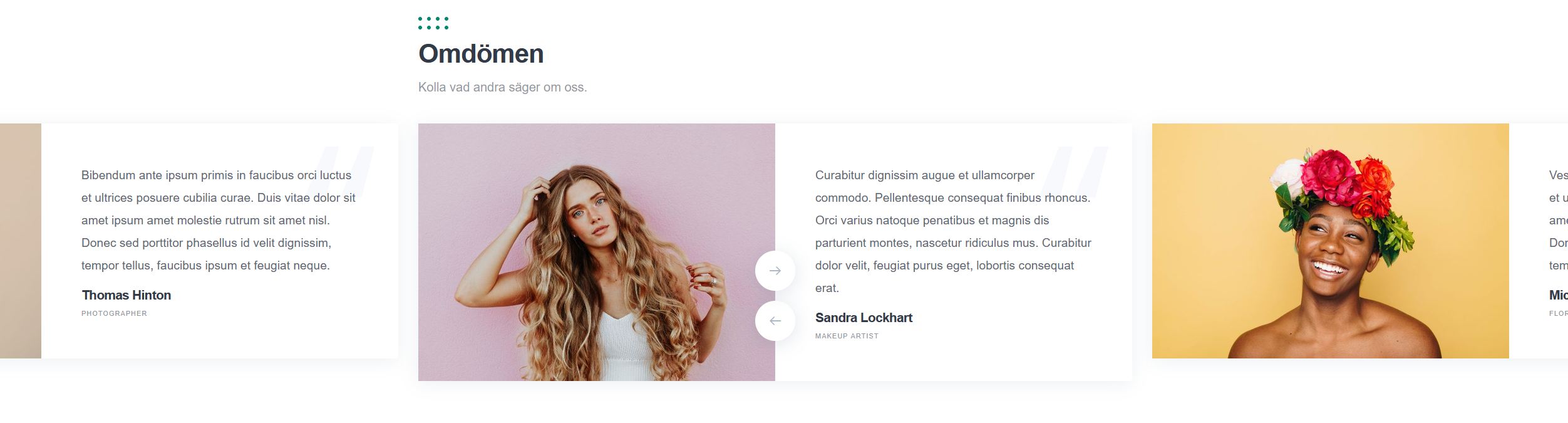
It still will show all reviews and not look good.
Actual result
It still will show all reviews and not look good.
Expected result
Should only show one review at a time I guess?
Extra details
Hi,
The block shown in your screenshots is the Testimonials block. Such blocks are usually used to display manually added customer testimonials or quotes. You can also see that the selected block in your screenshot has a “Referenser” title. This term is commonly translated as “References” or “Testimonials”.
If you need to display actual user reviews submitted through HivePress, please make sure to add the Reviews block instead.
P.S. Please note that we have to move this topic to the ExpertHive forum category. Since it’s related to a premium theme, the forum category is restricted — please add the license key to the account settings or consider renewing support if you still need assistance related to the premium themes or extensions Renew Support | HivePress
Hi,
my mistake on the words. I used loco translate and Google API to translate the whole thing fast.
But the issue remains on my website. I should show 1 testimonial in a slider, but shows “all” as the screenshot shows.
Everything on the website is updated and cleared cache both server and browser etc.
Any idea what is wrong?
If your settings are the same as in the screenshot, then you’ve configured one column with three testimonials.
If you want to display only one testimonial on the page, please change the Antal value to 1.
I think I might write badly.
If I choose only 1, then I cant present the other testimonials.
I want to show all the testimonials, but in one column. Thought that was the feature of the setting. Does not makes sense to not be able to control it?
Thanks for the details.
If I understand your request correctly, by default, the display area for testimonials adjusts based on the user’s dimension. When I visit the theme’s demo page, or test it locally on my own screen, I only see one testimonial at a time. If I increase the demension using the browser console’s device settings, the testimonial block expands proportionally to maintain a good layout, and on mobile, the block shrinks accordingly.
So, to answer your question: by default, these blocks are designed to be responsive, in order to ensure the best possible UI across different screen sizes: Testimonials block | Loom. If you’d like to fix a single testimonial layout across all screen sizes instead, this would require some CSS adjustments.
You could consider implementing these changes yourself with the help of our AI assistant (or any other AI tool), by providing it with the specific CSS classes you’d like to target, you can find these using your browser’s Inspector tool (right-click > Inspect), or a plugin designed to highlight CSS classes on a page: Visual CSS Style Editor – WordPress plugin | WordPress.org. AI tools are generally quite good at helping with this kind of CSS customization. Alternatively, you’re welcome to reach out to one of our verified freelancers for a more hands-on customization: Customize your website | HivePress.
One last note, we noticed that this theme’s purchase was refunded, so unfortunately we’re not able to provide developer guidance, code snippets, or similar hands-on assistance in this case. If you’d like to continue receiving this level of support going forward, we’d kindly ask you to consider repurchasing the theme (or any other premium plugin you may need support for). This also helps us continue developing HivePress and its ecosystem further. It can also work in your favor, since staying on an active plan means you’ll continue receiving product updates, otherwise, you may end up missing out on new features and improvements we release down the line.
Thanks for your understanding