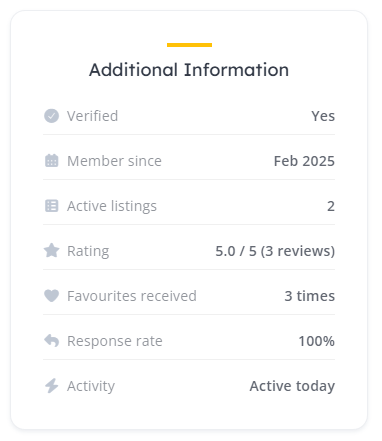
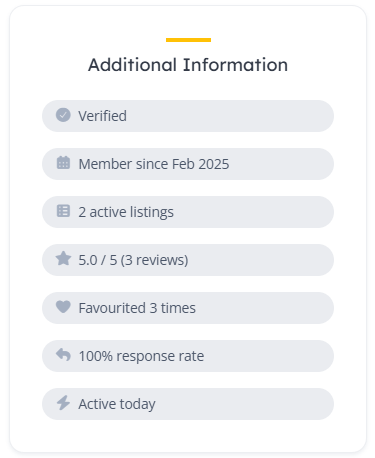
I’ve been brainstorming some new extension ideas and experimenting with what can be achieved with the help of AI. My latest project is a plugin that adds a new block to Vendor profiles and Listing pages - (it can be used on both or as a standalone block).
The block displays an array of stats about the vendor to help build credibility and trust with potential buyers and clients.
Key Features:
Customizable Styling: I’ve included a few built-in options to tweak the look within the plugin settings.
Translation Ready: All text strings can be easily reworded or translated using a plugin like Loco Translate.
Easy Setup: Once installed, you can access the configuration page via HivePress > Settings > Trust Signals.
Let me know how you get on with it, and if you have any suggestions or tweaks, feel free to drop them below. Happy HivePress-ing!
Cheers,
Chris
P.S. If this extension saved you time or money, consider buying me a coffee! Sharing these tools for free takes a lot of time and resources, and your support helps me keep doing it for the community. Thank you!
That looks fantastic! Thanks a lot for sharing it, I’m sure many HivePress users will find it useful.
We really appreciate you contributing to the HivePress ecosystem. It’s genuinely exciting to see the platform grow and expand thanks to community contributions.
One of the core goals when developing HivePress was to create an ecosystem that could evolve beyond the core products, allowing developers and community members to build their own extensions and ideas. Seeing that vision become a reality is incredibly rewarding.
Thanks again for being a part of the HivePress community and helping it grow!
Bringing my ideas for HivePress to life has been an amazing experience, and it’s great knowing my contributions to the community are welcome and appreciated!
I’m hoping to set an example and see fellow community members share their own creative ideas and customisations, too.
PS: I’ve already got some more in the works, so watch this space!
Just a quick heads-up - I’ve released a new update to the Trust Signals plugin with a few new features, tweaks and bug fixes:
New: you can now choose exactly where the block sits in the sidebar, with separate position controls for listing pages and vendor profiles.
New: the “typically replies” wording now scales to a vendor’s real median (within an hour, a few hours, a day, and so on), and the response-time/rate thresholds are all configurable in the settings.
Changed: the default block title is now “Overview”, plus a few styling fixes (including icon colours in the list-rows layout).
Fixed: a handful of under-the-hood bug fixes and robustness improvements, and it’s now tested up to WordPress 7.0.
As before, enabled Trust signals only show when there’s genuine data behind them - nothing is estimated or padded. Give it a go and let me know if you run into any issues. If you have ideas for other signals worth adding in the future, drop them below!
I updated the link in original post, but you can also grab the latest version here.
Edit 2: I’ve now added an update checker to the plugin, so new releases should appear in the backend of WordPress automatically, and, I won’t need to continually update the link.
Your data survives a delete - removing the plugin no longer wipes your settings or the figures built up for each vendor. A tickbox under Removing the Plugin is the only thing that erases them, and it is off unless you turn it on.
Donate link - a quiet link on the Plugins screen, for anyone who would like to support the work.
Fixed
The author link on the Plugins screen pointed at a page that no longer resolves.
Choose The Icon Beside Each Signal - From HivePress’s own icon list plus a set of newer Font Awesome and brand icons. The standard icons are unchanged.
Icon Size And Icon Weight - Size as a percentage of the surrounding text, weight as Normal, Semi-bold or Bold. All icon options now live in a new Icons section and appear only while Show icons is ticked, so Show icons and Icon colour have moved there from General.
Quick Links On The Settings Tab - Jumping to each section, with dividers between them, so the tab is no longer one long scroll.
Changed
Icons Ship Inside The Plugin - Rather than being fetched from a third-party server, so every request stays on your own site.
Shorter Descriptions - Kept to the points that matter, wrapped at a readable width on wide screens, with wider tooltips.
Fixed
“View details” is back on the Plugins screen. The plugin stayed quiet whenever there was nothing to update to, which is almost always, so the details popup and its changelog were unreachable.
Checking for updates no longer holds up an admin page, and no longer reports “Could not reach GitHub” when nothing is wrong.
A failed update check no longer hides an update that is genuinely waiting.
Every Font Awesome icon - the icon picker now offers the whole free Font Awesome 7 set, brand icons included, which is around 800 more choices than before.
Changed
Type to find an icon - the picker searches as you type rather than making you scroll a very long list, and every result still shows you the icon itself.
Lighter pages for your visitors - icons are drawn straight into the page instead of loading a font, so a visitor’s browser no longer downloads roughly 230 KB of stylesheet and font files just to show a few small pictures. Your colour, size and weight settings work exactly as before.
A faster settings screen - the icon choices are fetched as you search instead of every one of them being written into the page.
Shared icon library - Updated to the version that fixed two faults found in Account Menu Enhancer 3.4.0; neither could happen on this extension’s own screens and nothing here changes, but every extension now carries the corrected copy whichever one your site loads it from.
Live preview - A panel to the right of the settings draws the block as it will appear in a sidebar, with the style, signals, icons and colours on the page, following every change as you make it; drag its edge to make it wider. The figures are examples.
 Click here to download it via GitHub