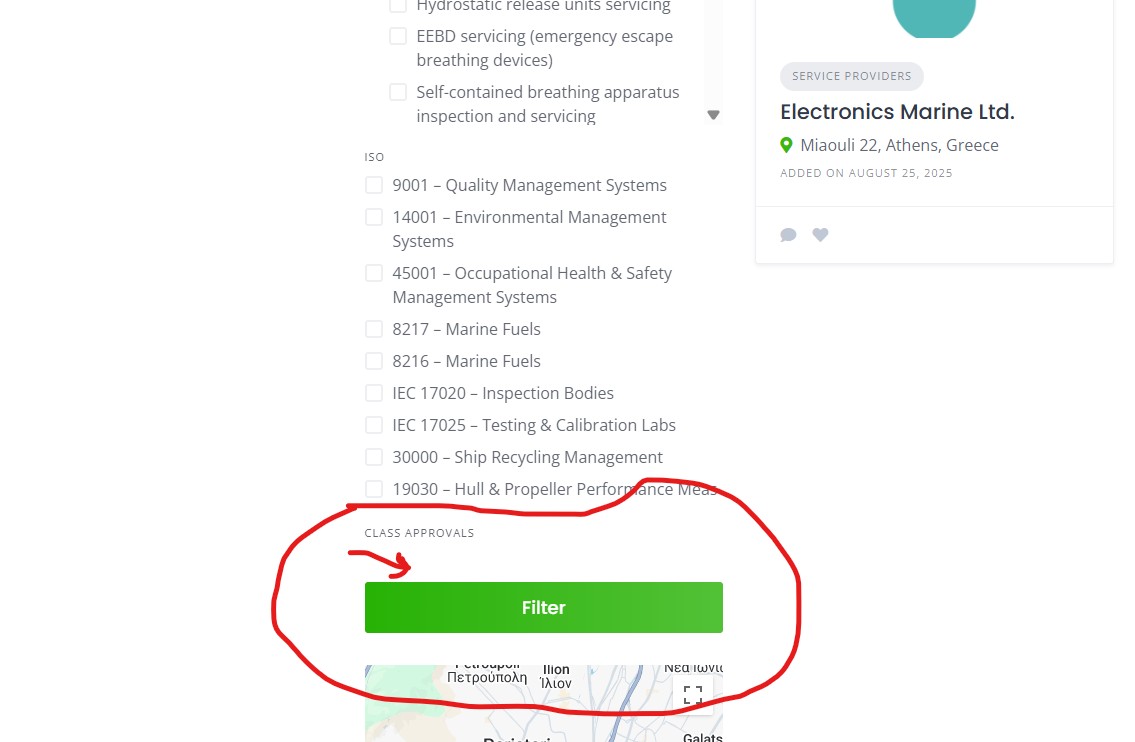
Hello there, i have an issue where i make the attributes per category and list them as ‘‘checkbox’’, and when i get to the results page i see first the title with small letters and then the checkbox with the title i put again. afte repeat for next attribute. My question is how can they be each attribute next to the other like in the demo that says ‘‘all categories and then lists attributes’’ ?
Could you please share a screenshot of how it displays or the steps to reproduce the issue?
Also please disable third-party plugins and customizations (if there are any) and check if this issue persists. If you use a caching plugin, make sure that caching is disabled for logged-in users.
I had an issue with the attributes not appearing as checkboxes, i had to publish first and then the options appeared to edit sub attributes.
But now i have an other problem i ve adder a lot of attributes cause its needed in the field of the directory i build, and instead of showing everything when they reach the map, they go behing it. and its not scrollable. Any idea how to fix it?
As for your question about the options for checkboxes, this is the default behaviour, firstly you set up the main settings of the attribute and after publishing it you have access to options.
We tried to recreate the issue by adding many filter options but did not encounter the same problem. Each filtering attribute block should be scrollable if it becomes too large.
Please disable third-party plugins and customizations (if there are any) and check if this issue persists. If you use a caching plugin, make sure that caching is disabled for logged-in users.