Additional Gallery for HivePress

Hey @everyone, :waving_hand:

I’m excited to announce my latest custom extension with the community…

Additional Gallery for HivePress! :camera_with_flash: :tada:

It gives every vendor a new Gallery feature, separate from their listings: folders they arrange themselves, a public page they can share, and the option to hold some of it back for members - or, for people who pay for access. It suits any marketplace or directory where the vendor’s own work is the thing worth looking at, so photographers, venues, trades, artists, anyone with a portfolio.

What visitors see

  • Folders with their own pages - A wall of folder covers with an “Updated 2 days ago” line, and any folder opens at its own shareable address. The vendor chooses the cover photo, and there is a setting to switch back to one long page instead.
  • A page for every photo - Each photo opens on its own page with its description, previous and next buttons, the conversation underneath, and a sidebar holding the vendor’s profile card and a widget area you fill from Appearance > Widgets.
  • Likes and comments - Signed-in visitors can like a photo and talk about it, with replies one level deep. All of it is stored as ordinary WordPress comments, so you moderate it on the usual Comments screen, and either feature can be switched off.
  • Videos, if you allow them - MP4, WebM and OGV play inline in the grid, the same way HivePress shows listing videos.


What vendors get

  • A new Gallery item in the account menu - Vendors create folders, drag them into any order, and upload, reorder and remove photos in each one, giving every photo a description that shows under it, on its own page, and as its alt text.
  • The gallery on profiles and listings - As well as the sidebar link, you can show the gallery itself as a section on vendor profiles and on listing pages. Each is off to begin with, each is independent of the sidebar link, and a vendor with no gallery gets no empty heading.
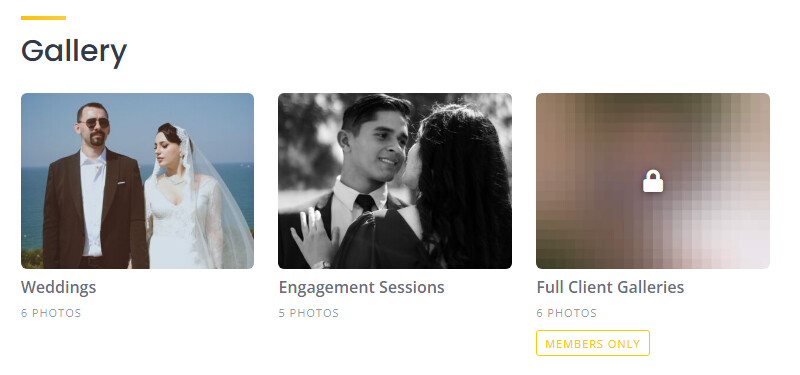
Holding some of it back

  • Public, Members only and Private folders - A locked folder can show heavily blurred previews, lock placeholders, or nothing at all. The blur is made on the server, so the original photo addresses are never sitting in the page for someone to find.
  • Protected files - Photos in private and members-only folders are handed out through an access-checked link, so the address alone opens nothing. On hosting that allows it the files are kept outside the folder your web server publishes, with a notice on the settings screen if yours does not.
  • Membership gating - Set it on the plans themselves in HivePress Memberships: “Allow using the photo gallery” for vendors, “Allow viewing members-only gallery folders” for viewers, and optional per-plan folder, photo and storage limits. Leave it alone and every vendor gets the gallery.

Selling access

  • Vendors can sell access to their own gallery - With Paid Access switched on and WooCommerce active, a vendor prices up to three lengths (a day, a week, a month, three months or permanent) and buying is an ordinary checkout. A second purchase extends what is left rather than being wasted, a refund takes back only what that order paid for, and buyers are warned a week before access runs out.
  • A Platform fee on those sales - Take a percentage, a fixed amount or both, added on top at the checkout as its own line so the vendor still receives the price they set. Leave both boxes empty to take nothing. If you use a Stripe Connect direct-charges gateway, use that gateway’s own application fee instead, because a fee set here reaches the vendor rather than you.

Keeping it in hand

  • Limits - Cap the upload file size, restrict which image formats are accepted, resize photos as they arrive, and set a storage quota per vendor, site-wide or per plan, after which vendors see “X used of Y allowed” on their Gallery page.
  • Optional AI photo review - The first ten photos in a public folder are checked by OpenAI’s free moderation service, using one key shared with other OpenAI-based HivePress extensions. It runs in the background moments after the folder is saved, so nobody is left waiting, and anything flagged is taken out of public view and the vendor told.
  • In your WordPress admin - Each Gallery Folder has an Images box using the same drag-and-drop manager as listings and a Settings box for visibility, and the folders list shows the vendor, the visibility, the photo count and the size.
  • Your galleries survive a delete - Removing the plugin keeps the folders, photos, likes, comments, purchased access and settings, so a plugin removed by mistake comes back as it was. There is a tickbox to wipe the lot if that is genuinely what you want.

Working with the rest of your site

  • Tells people what happened, if you want it to - The gallery raises an event whenever a photo is liked or commented on, a comment is replied to or liked, and whenever gallery access is bought or ends. Pair it with my Notifications for HivePress extension and vendors hear about all of it, on site, by email or by SMS, with each person choosing which of those they want.
  • Automatic updates - New versions turn up on your Plugins screen like any other plugin, with the release notes in the details popup.

You need HivePress, WordPress 5.8 and PHP 7.4. WooCommerce is only needed if you want vendors to sell access, and HivePress Memberships only if you want to gate the gallery to plans.

:backhand_index_pointing_right: Download the latest release

  • Then go to Plugins > Add New > Upload Plugin, choose the zip, and activate. Every release after this one will arrive on your dashboard by itself.

Cheers,
Chris :v:

P.S. If this extension saved you time or money, consider buying me a coffee! Sharing these tools for free takes a lot of time and resources, and your support helps me keep doing it for the community.

ko-fi

1 Like

v1.8.16 - Plugin Update Notes

The first update since Additional Gallery was announced.

Fixed

  • Lapsed Gallery Access Hides The Gallery Everywhere - If you gate galleries behind a membership plan, a vendor whose plan had lapsed still showed folder titles, photo counts and full size cover images on their profile and on every one of their listings, with every link out of them bouncing the visitor to your home page. Every other part of the plugin already checked.
  • Clearer Commission Guidance - The Commission Rate description now says plainly that the fee only reaches you if your payment gateway settles gallery orders into your own payment account. With a gateway that charges each vendor’s connected Stripe account directly, the buyer is charged the fee and the vendor receives it, so both boxes should be left empty.
  • Delete All Gallery Data Really Does - Four settings were being left behind, including a stored server path, and photos the plugin deliberately keeps held on to their AI review marks, so a reinstall treated them as already reviewed.

Update via your dashboard as usual! :slight_smile:

Cheers,
Chris :v:

Hi Chris,

Thanks for creating such a great plugin.

I think this could be especially useful for members directories and directories where users need to showcase their portfolios, or event directories.

I’ve tested it briefly to see how it’s implemented and works, and I wanted to share a few questions and possible improvements [just my personal thoughts]:

  • What is the difference between an author and a vendor on the backend: Loom | Free Screen & Video Recording Software | Loom? I was wondering whether there is a specific distinction between the two roles in the plugin.

  • The feature is integrated into the HivePress section in the WordPress dashboard. Since the functionality is related to vendors, perhaps it could be a bit more intuitive and user-friendly to place it under the Vendors section instead. Just a small suggestion that might make it easier to find and manage.

  • The Private folder doesn’t appear on the author’s dedicated gallery page. It might be useful to have access to all folders in one place, although I also understand that keeping the current setup and managing folders through the Gallery Settings tab may be perfectly fine. Just sharing a thought in case you consider improving the folder management experience in the future.

In any case, this is a great addition to the HivePress ecosystem. Thanks again for your contribution and for taking the time to develop it!

1 Like

Many thanks for the support and feedback, @kseniia! :blush:

It’s great to hear you had a quick test of the extension to see how it all works - I really appreciate you taking the time to check it out! You’re totally right about all of the points you raised:

  • Author meta box: This was an accidental leftover from a previous version, so I’ve removed it to make things clearer and more intuitive.
  • Placement: You’re spot on that ‘Gallery Folders’ fits much better under the ‘Vendor’ sidebar option.
  • Private folders: I’ve taken your feedback on board and updated it so Private folders are now visible on the frontend, but only to the Gallery owner.

I also came up with a few extra improvements while working on these, so I’ll push out a new update as soon as possible.

Thanks again for your suggestions! :folded_hands:

Cheers,
Chris :victory_hand:

1 Like

v1.9.2 - Plugin Update Notes

New

  • Sidebars on gallery pages - Gallery and folder pages can now have a sidebar on either side, each with its own widget area.
  • Folder grid - Choose how many columns of folder covers to show, whether covers are horizontal, vertical or square, and how many rows to show on profiles and listings.
  • Per-folder pricing - Paid access can now be sold folder by folder, so a buyer pays only for the folder they want.
  • Gallery Settings link - A quick link in the top right of a gallery page takes you straight to your gallery settings.
  • Your private folders - You now see your own private folders on your gallery page, marked Private, and visitors still see nothing.
  • Button placement - Choose where the View Gallery button sits in the sidebar, separately for vendor profiles and listing pages.

Changed

  • Gallery Folders menu - Folders have moved from the HivePress menu to the Vendors menu.
  • One owner per folder - The folder screen’s Author box is gone, so the Vendor field is the only place a folder’s owner is set.
  • Settings tidy-up - Layout and page options now have their own Gallery Pages section, with nothing renamed or reset.
  • Comment names - Names and avatars on photo comments link to that person’s profile.

Fixed

  • Changing what a paid unlock buys left the other choice’s passes on sale, so an old whole-gallery pass could still be bought at its old price. Passes are now on sale only while you are offering them.
  • Every “Members only” badge now carries a padlock, rather than only some of them.
  • The View Gallery button sits with the other action buttons instead of floating below them.
  • Headings on the gallery pages now match the other headings on your site.
  • The sidebar and locked folder settings no longer offer an empty “-” choice that read as an extra option.
  • The photo description box no longer mentions alt text in its placeholder.

Update via your dashboard as usual! :slight_smile:

Cheers,
Chris :v:

1 Like

Hey ChrisB,

Amazing work “as always”! I have another extension idea for you which I believe you can bring to reality.

The idea is essentially a Catalog/Menu Inside a Listing.

HivePress already allows a listing to have things like images, attributes, opening hours, etc. What I’m imagining is an additional section where the listing owner can create a list of items/services that their business offers.

For example:

Hotel listing

  • Luxury Room - $100/night

  • 2 Bedroom Suite - $200/night

  • Single Room - $50/night

Or:

ABC Tire Shop

  • Tire Change - $50

  • Dent Repair - $100

  • Michelin Tire Set - $2,500

  • Tire Inspection - Free

The important part is that these items wouldn’t necessarily be purchasable through the website. It would simply be a visual catalog/menu that visitors can browse to see what the business offers.

During listing submission/editing, the owner could have a section such as “Catalog” where they can add multiple items. Each item could have:

  • Image

  • Name

  • Price

The price could allow things like “Free”, “Starting at $50”, etc.
Each item will have the image/name/price inside a square aspect ratio box so that all the items look consistent.

I also think it would be great if the catalog section itself could work similarly to HivePress attributes/features that are controlled by membership plans. For example, the site administrator could decide which membership plans have access to the catalog and potentially control things such as how many catalog items a member can add. So a free plan might allow 5 items, while a premium plan could allow 20 or unlimited items.

Another important feature would be making the catalog section title customizable. Instead of forcing every website to call it “Catalog,” the administrator could rename it to whatever makes sense for their particular directory.

For example:

  • Hotel → Rooms & Suites

  • Restaurant → Menu

  • Tire Shop → Services & Products

  • Salon → Services

  • Auto Dealer → Inventory

This would make the extension much more versatile across different types of directories.

Basically, the goal would be to give every HivePress listing its own mini catalog/menu, without turning HivePress into an e-commerce platform. The items would simply be displayed visually for visitors, with no requirement for online purchasing.

I think this could be useful for a lot of different HivePress directories. Restaurants could have menus, hotels could showcase rooms, mechanics could list services, salons could list treatments, stores could showcase products, etc.

I was wondering if this is something you might be interested in developing as an extension? I imagine a lot of directory owners (myself included) could find it very useful.

Would love to hear what you think!

Hi @astro,

Many thanks for the kind words! :blush:

I’m glad to hear you’ve found another one of my extensions useful.

Many thanks for the listing catalogue menu idea, too. I’m not sure if you’ve had a chance to check it out yet, but HivePress has some of this already built-in by default. Under HivePress > Settings > Listings tab, scroll down and enable:

image

You can have a play around with this for now. You may also find this topic useful, as I implemented something similar myself.

In regards to the idea as a whole, it does sound really cool and I’ll try and find some time to have a look into the feasibility of it all soon. I’m currently in the process of an all-existing-extensions-update, and I’ve always a few more ideas in the works behind the scenes that I’m working on, but I’ll let you know if/when I get round to this! :slight_smile:

Cheers,
Chris :victory_hand:

1 Like

Thank you for the quick response @ChrisB.

I did try the Marketplace extension but noticed it adds a lot of complexity like payout, order, buy now, and all of those things. I was thinking of a lightweight extension that simply adds an extra attribute of menu items to listings. Just a visual menu with items to let customers see what the business offers and for how much.

I tried my best to depict my idea in microsoft paint lol, have a look.

Listing Page:

Submission Page:

1 Like

v1.10.2 - Plugin Update Notes

Rolls up 1.10.0 to 1.10.2.

New

  • An AI Moderation Photo Limit - Shown once AI Moderation is ticked. AI review covers at most ten photos per folder save, so set the limit between 1 and 10 and no folder can hold more photos than one review covers. It overrides higher limits, including per-plan ones.

  • Quick Links On The Gallery Tab - One per section, with a divider between sections, so a setting near the bottom no longer means scrolling blind.

Changed

  • The AI Moderation Description Was Wrong - It said photos beyond the tenth are never checked. Each save reviews up to ten photos that have not been looked at before, so a folder’s backlog is worked through over later saves. Only the wording was wrong.

Fixed

  • The Unprotected Files Warning Could Go Missing - Protect Files cannot always move photos out of the folder your web server publishes, and the plugin warns you when that happens. The warning only appeared when the web address named the Gallery tab, so opening Settings from the HivePress menu showed the tab with nothing on it. Please open Settings > Gallery once after updating: if the warning is there, your private and members-only photos have been openly reachable, and the notice explains what to do about it.

  • The OpenAI API key on the Integrations tab has its show/hide button and normal field width back.

Update via your dashboard as usual! :slight_smile:

Cheers,
Chris :v: