Hey @everyone, 
Back in December I posted a few ideas for HivePress extensions. Number 3 on that list was Automated Listing Moderation, and all I actually asked for was the blocked words feature from HivePress Messages, pointed at listings instead, so a submission gets refused if it contains something you have banned.
I started building that, and it turned into a lot more than a word list. Once you are already reading every submission before it saves, it seems a waste not to also spot the phone numbers, the duplicate spam, and the pictures nobody wants to find on their site at 9am.
Say hello to Automated Listing Moderation for HivePress 

It checks every listing as it is submitted or edited on the front end, and either refuses it outright with a clear reason, or quietly holds it for your review.
Two ways to deal with something
Every detector can be set to one of two things, so you decide how heavy handed it is:
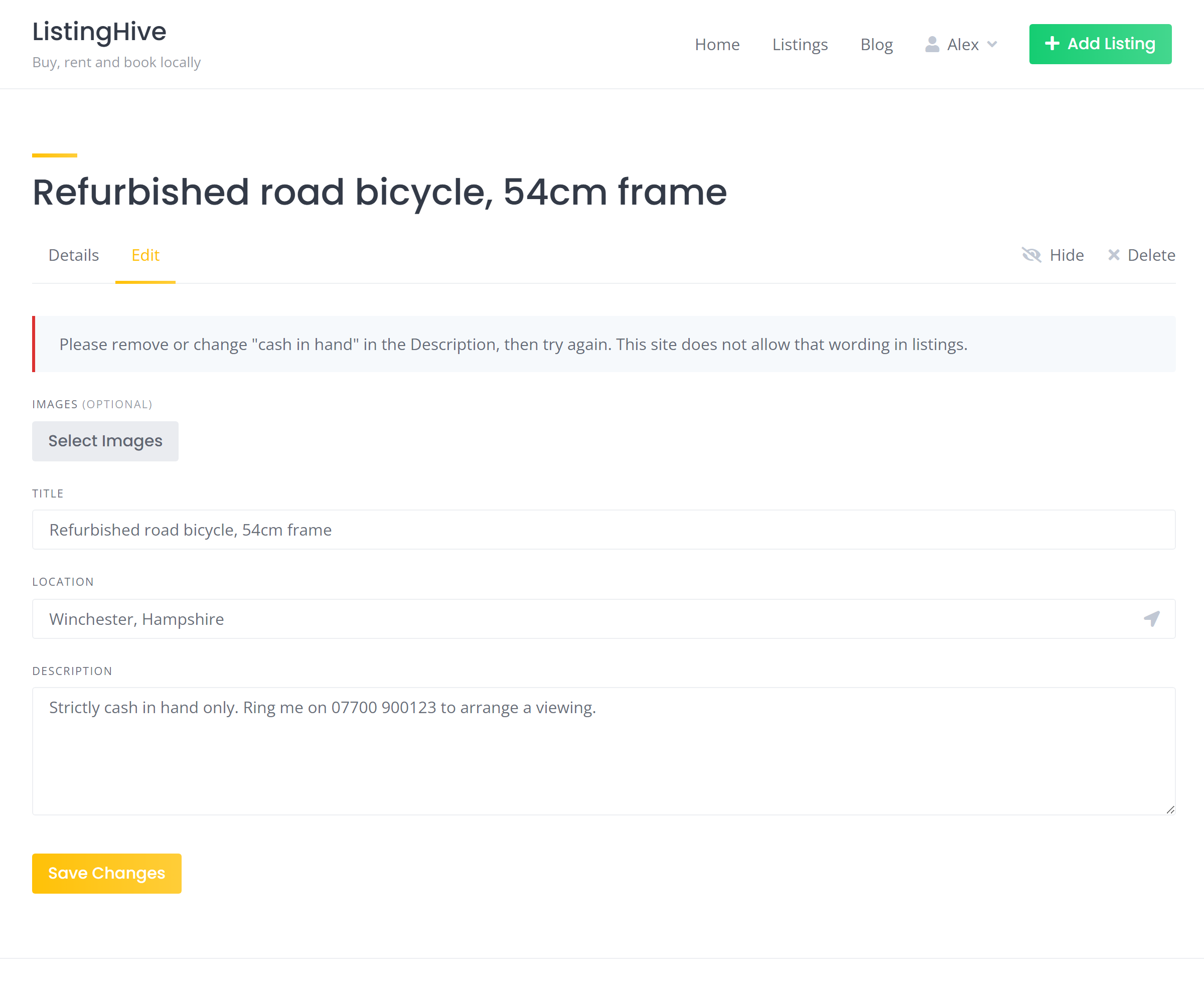
- Block submission - the vendor gets an inline error naming exactly what tripped it, before anything is saved. They fix it and carry on.
- Add to risk score - soft signals add up points. If the total reaches your threshold the listing is accepted but held as Pending for you to look at, using HivePress’s own moderation flow. Native pending status, the pending badge on the admin menu, and HivePress’s own emails to you and the vendor.
There is deliberately no auto-delete option. Automated checks get it wrong sometimes, so a human always makes the final negative decision.
What it looks for
- Blocked keywords - words or phrases, commas or new lines, case insensitive
- Blocked patterns - proper regular expressions for whole word matching and anything clever
- Disguised spellings - optionally also catches blocked words dressed up with symbols or accents (often used to avoid detection)
- Phone numbers, email addresses and website addresses - the usual attempts to move a deal off your site
- Duplicate titles and descriptions - compares fingerprints against your live and pending listings, so the same spam listing posted eight times gets caught on the second one
- AI text review - sends the listing text to OpenAI’s moderation endpoint, which flags hate, harassment, violence, self-harm and sexual content
- AI photo review - sends the photos themselves, up to ten per listing, and flags sexual, violent and self-harm imagery
- Excessive capitals - adds points for SHOUTY LISTINGS. Risk score only, never a block
It reads the title, the description and your custom text attributes, so if you have added a “Seller notes” box or similar, that gets checked too and the error tells the vendor which field it was in.
Starter blocklists
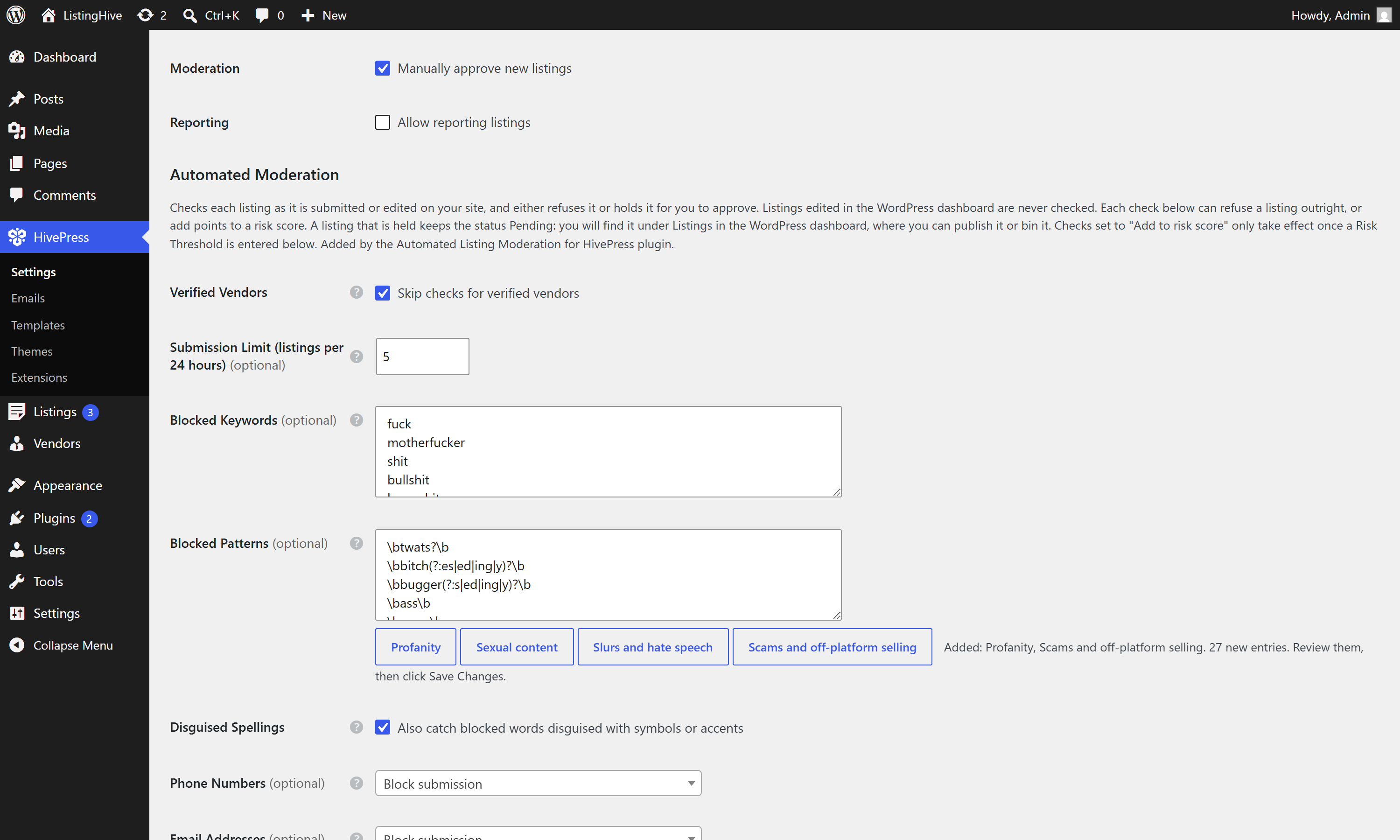
Nobody wants to sit and type out a profanity list, so there are four you can add with one click: Profanity, Sexual content, Slurs and hate speech, and Scams and off-platform selling. About 120 entries between them.
Nothing is saved until you have read the lists and pressed Save Changes.
What you see in the dashboard
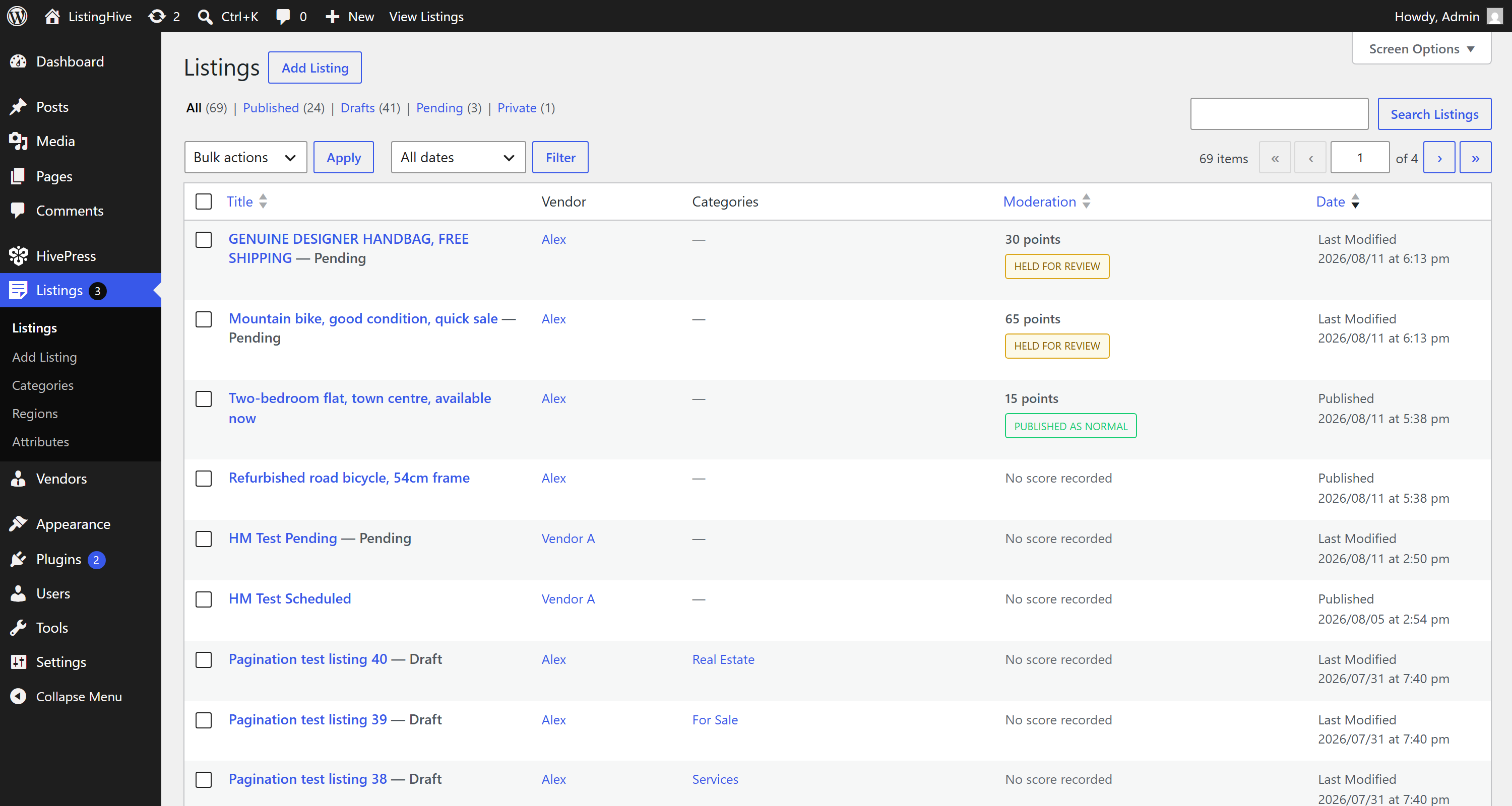
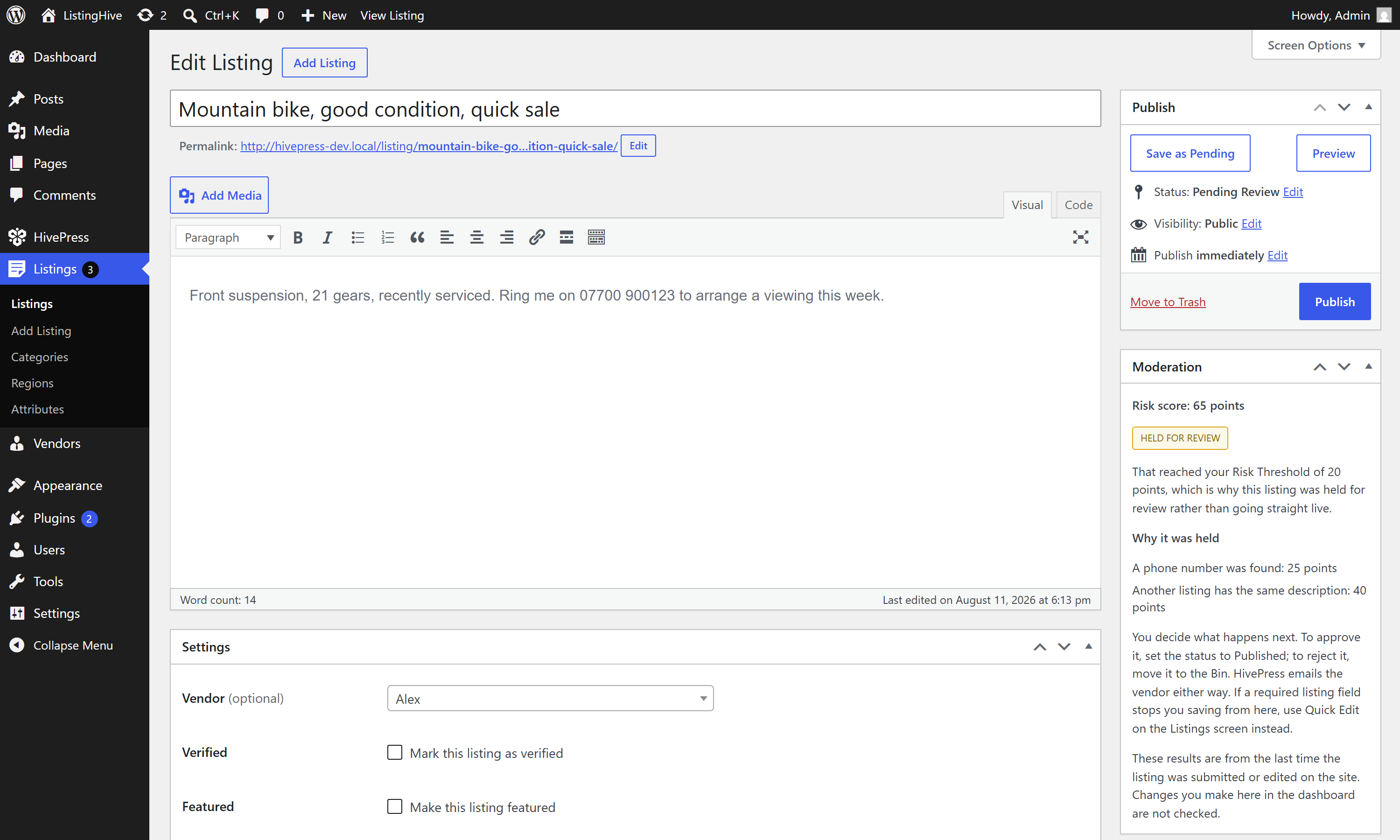
A sortable Moderation column on your Listings screen, and a Moderation panel on the listing edit screen.
Both tell you the score in points and what actually became of the listing: held for review, held then approved, held then rejected, or published as normal. The panel also breaks down exactly what was found and what each thing was worth, and tells you what to do next.
The part
The OpenAI moderation endpoint is genuinely free to call. But OpenAI will refuse every API request on an account with no payment method or purchased credit, so a brand new account will not work until you have put a few pounds on it. That caught me out, so the plugin now tells you: if the calls are failing, a warning appears on the settings screen naming the reason, rather than leaving you thinking it is protecting you when it is not.
If OpenAI is unreachable or slow, submissions go through unchecked rather than breaking your site. A moderation outage should never stop people listing.
The whole AI side is optional. Everything else works without an API key.
Other bits
- Verified vendor bypass - vendors marked with HivePress’s Verified tick skip every check, including the submission limit
- Submission limit - cap how many new listings each vendor can post in 24 hours. Editing an existing one never counts
- Deleting the plugin keeps your data by default, with a tick box if you genuinely want it all gone
- Every string is translatable, so you can reword any message, including into US spellings, with something like Loco Translate
One thing worth setting straight away: the checks you set to Add to risk score do nothing at all until you enter a Risk Threshold. The dropdown says so until you do, so you cannot leave it half configured by accident, but it is the first thing to set.
A few honest notes
- Only front end submissions are checked. Anything you or an importer creates in wp-admin goes straight through, by design. Front end edits by logged in admins are checked
- Phone detection looks for any run of 9 to 14 digits, so it cannot tell a phone number from a 13 digit barcode or a long order reference. If your site is full of those, set it to “Add to risk score” rather than “Block submission”
- Contact details written out as words (“oh seven one two”, “name at gmail dot com”) are not caught automatically. Add a pattern for those
- The AI photo check is deliberately conservative, so genuinely borderline pictures will pass. It also only judges sexual, violent and self-harm imagery. Videos are never sent or checked
 Download the latest release here!
Updates arrive on your normal Plugins screen.
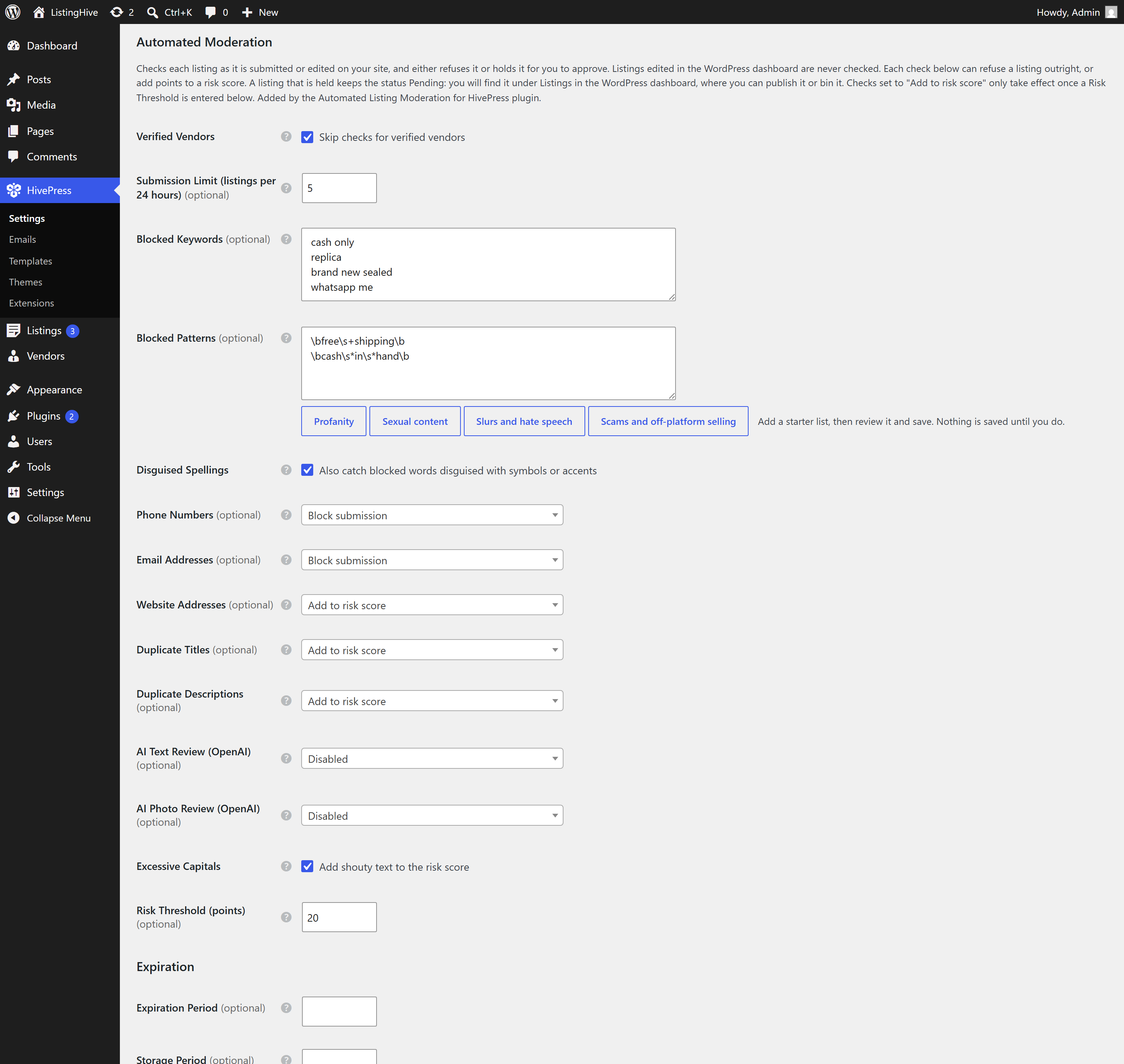
- Everything is configured under
HivePress > Settings > Listings > Automated Moderation, with the OpenAI key on theIntegrationstab.
And this is what a vendor sees when something trips a check:
I have tested this fairly hard on staging and across all six official themes, but every site is different, so if something gets blocked that clearly should not have been, drop a reply and I will take a look. That kind of report is genuinely the most useful thing you can send me on this one, because a false positive is invisible to me and very annoying to your vendors.
Feature ideas welcome as always. 
Hope some of you find it useful!
Cheers,
Chris 
P.S. If this extension saved you time or money, consider buying me a coffee! Sharing these tools for free takes a lot of time and resources, and your support helps me keep doing it for the community.



