Hello,
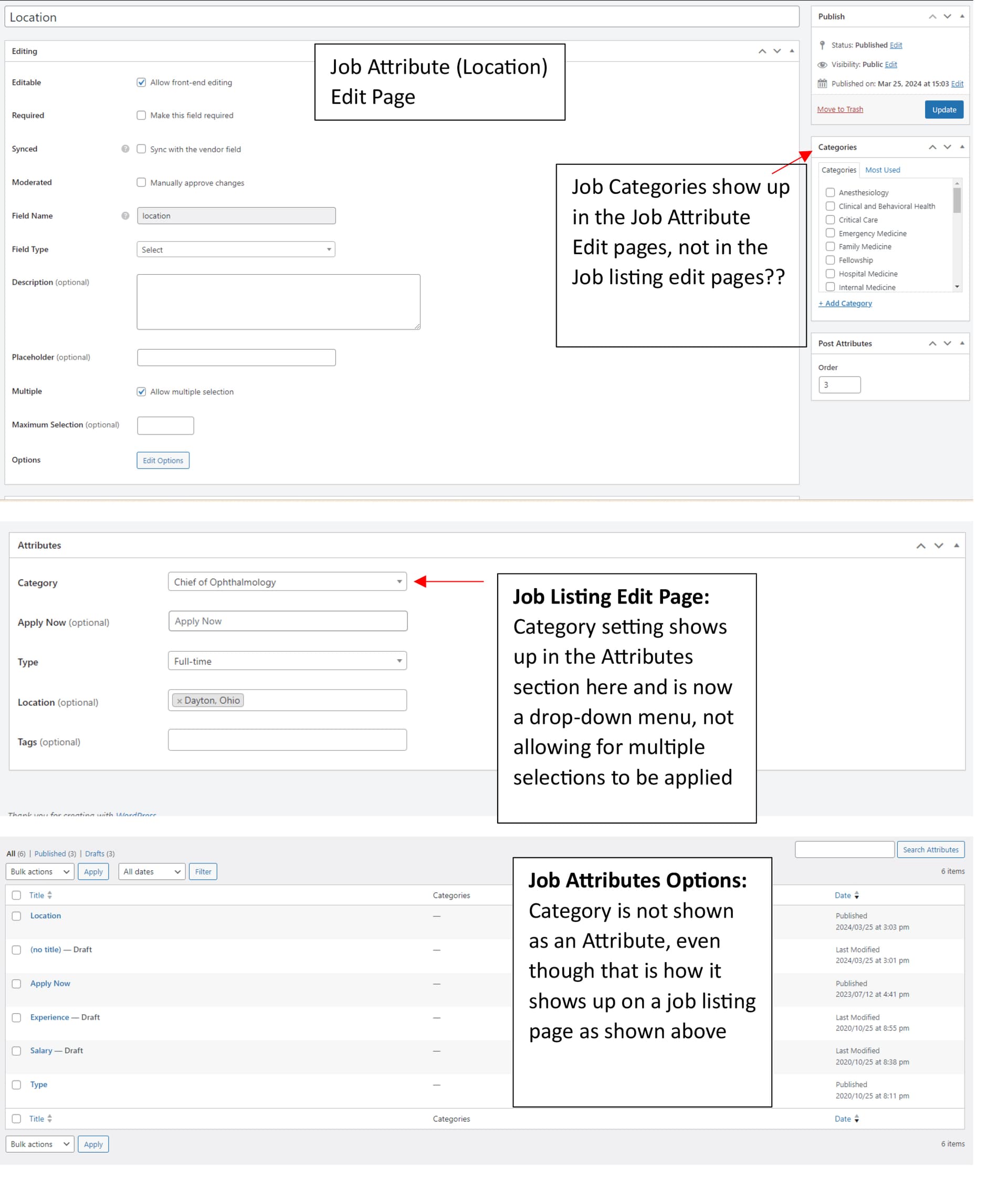
I haven’t manually added a new job listing in several months in my job portal (using JobHive Theme) and I have noticed that I cannot access the category setting in the job listing editing section anymore. The category option shows up on the Job Attribute edit pages which is weird. The category option that does show up on the job listing editing pages is now in the Attribute section as a drop-down menu, which it used to appear as a checkbox option so I could apply multiple categories to a job listing, but now I can only apply one option. Even though it shows the category option as an Attribute now, that does not show up in the actual Attribute section. It is not making sense. Please see the provided screenshots to show what I’m describing. I hope you can see what I’m talking about. I am also hopeful the job categories option can show up in the job listing editing pages the way it used to. It also used to be available when you did the “Quick Edit” option on the main job listing page, but that is gone as well. Thank you for your assistance.
Hi,
The reason why you see categories in the Attributes section is because you can make each attribute category-specific. For example, if you created an attribute that you want to show only in category “A”, then you can simply set this category for this attribute and it will be applied solely to that category.
In the Listing edit page, you cannot choose more than one category because the one listing cannot be displayed in multiple categories. You have to choose one (when adding a new one).
Let me know if that helped
This topic was automatically closed 30 days after the last reply. New replies are no longer allowed.