How can I set a default value for a listing attribute and hide it from listing creation

Hello,

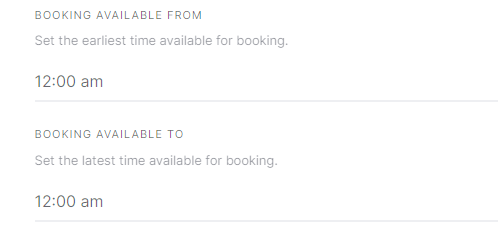
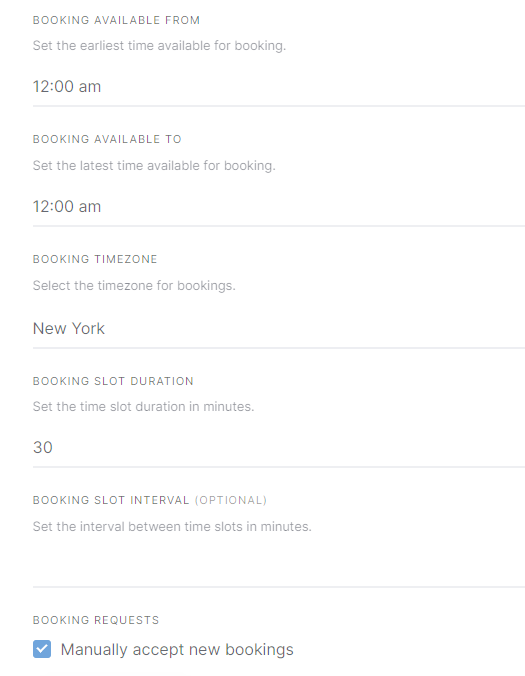
I am looking to set a default value and hide the following listing attributes so they can’t be edited by the user and won’t be shown to them when creating a listing.

BOOKING AVAILABLE FROM
BOOKING AVAILABLE TO
BOOKING SLOT DURATION
BOOKING SLOT INTERVAL

I would also like to have BOOKING REQUESTS always checked for “Manually accept new bookings” and hide that as well.

Thanks for all the help,
Tom

1 Like

Please try this PHP snippet but please note that it can require further customization

add_action('hivepress/v1/models/listing/create', function($listing_id) {
	if(hivepress()->get_version( 'bookings' )){
		update_post_meta($listing_id, 'hp_booking_slot_duration', 10);
		update_post_meta($listing_id, 'hp_booking_min_time', 0);
		update_post_meta($listing_id, 'hp_booking_max_time', 0);
		update_post_meta($listing_id, 'hp_booking_slot_interval', 10);
		update_post_meta($listing_id, 'hp_booking_moderated', true);	
	}
});

add_filter(
	'hivepress/v1/models/listing/attributes',
	function( $attributes ) {
		if ( isset($attributes['booking_slot_duration']) ) {
			$attributes['booking_slot_duration']['editable'] = false;
		}
		
		if ( isset($attributes['booking_min_time']) ) {
			$attributes['booking_min_time']['editable'] = false;
		}
		
		if ( isset($attributes['booking_max_time']) ) {
			$attributes['booking_max_time']['editable'] = false;
		}
		
		if ( isset($attributes['booking_slot_interval']) ) {
			$attributes['booking_slot_interval']['editable'] = false;
		}
		
		if ( isset($attributes['booking_moderated']) ) {
			$attributes['booking_moderated']['editable'] = false;
		}

		return $attributes;
	}
);

The default values worked great thank you for that but the filter doesn’t seem to be hiding the attributes. I added the add_filter code to functions.php

I found the issue with the filter! It was missing the ,1000 at the end of the filter


add_action('hivepress/v1/models/listing/create', function($listing_id) {
	if(hivepress()->get_version( 'bookings' )){
		update_post_meta($listing_id, 'hp_booking_slot_duration', 10);
		update_post_meta($listing_id, 'hp_booking_min_time', 0);
		update_post_meta($listing_id, 'hp_booking_max_time', 0);
		update_post_meta($listing_id, 'hp_booking_slot_interval', 10);
		update_post_meta($listing_id, 'hp_booking_moderated', true);	
	}
});

add_filter(
	'hivepress/v1/models/listing/attributes',
	function( $attributes ) {
		if ( isset($attributes['booking_slot_duration']) ) {
			$attributes['booking_slot_duration']['editable'] = false;
		}
		
		if ( isset($attributes['booking_min_time']) ) {
			$attributes['booking_min_time']['editable'] = false;
		}
		
		if ( isset($attributes['booking_max_time']) ) {
			$attributes['booking_max_time']['editable'] = false;
		}
		
		if ( isset($attributes['booking_slot_interval']) ) {
			$attributes['booking_slot_interval']['editable'] = false;
		}
		
		if ( isset($attributes['booking_moderated']) ) {
			$attributes['booking_moderated']['editable'] = false;
		}

		return $attributes;
	},
	1000
);

Thank you for all the help,
Tom

3 Likes

This topic was automatically closed 30 days after the last reply. New replies are no longer allowed.

I need to remove the queries “booking slot duration” & “booking slot interval” and assign both queries constant values (60 & 0, respectively) so that all users will have the same two values.

Hi,

Please check the solution in this topic.

Hi Guys,

Can anyone please help me to fix the minimum allowable booking time in the Booking extension form to 60 mins please.

I would like to remove the option of setting different minimum time periods and lock as 60 mins.

Thank you!

Hi,

Please check the solution in this topic.

Hello,

Hope everyone is doing well.

i have a small question, why this snippet does not set the booking_max_quantity to 10 ?

add_action('hivepress/v1/models/listing/create', function($listing_id) {

	if(hivepress()->get_version( 'bookings' )){

		update_post_meta($listing_id, 'hp_booking_max_quantity', 10);

	}});

add_filter( 

       'hivepress/v1/models/listing/attributes',

	function( $attributes ) {

		if ( isset($attributes['booking_max_quantity']) ) {

			$attributes['booking_max_quantity']['editable'] = false;

		}

		return $attributes;

	},

	1000); 

and if i want the booking_max_quantity to equal the quantity of items instead of 10 what should i add?

thank you so much! :slight_smile:

Hi,

Thanks for the details. Please make sure that you do not have any restrictions on booking categories, as shown in this documentation: How to restrict booking to specific listing categories - HivePress Help Center. We also recommend creating a new listing and testing this snippet on it, as auto-drafts may have been saved in old listings, which may cause it to not work.

Additionally, please clarify what exactly you mean by “items” in this sentence: “I want the booking_max_quantity to equal the quantity of items instead of 10.” Then we can provide a solution or a workaround.

Hello! Here’s a clarification: when I use this snippet, the booking_max_quantity is automatically set to 20 because I hard-coded it, which works perfectly. However, is there a way to dynamically set booking_max_quantity equal to the quantity the user specifies when creating the listing, instead of hard-coding “20”?

This is the snippet :

add_action('hivepress/v1/models/listing/create', function($listing_id) {
	if(hivepress()->get_version( 'bookings' )){
		
		update_post_meta($listing_id, 'hp_booking_max_quantity', 20);
			
	}
});

add_filter(
	'hivepress/v1/models/listing/attributes',
	function( $attributes ) {
	
		if ( isset($attributes['booking_max_quantity']) ) {
			$attributes['booking_max_quantity']['editable'] = false;
		}
		
		return $attributes;
	},
	1000
);

This is the quantity that the user specified in the listing:

This is the booking_max_quantity value set by the snippet:

All I need is for booking_max_quantity to be automatically equal to the Quantity.

Hi,

Please note that if you are using Bookings and Marketplace, you need to disable the quantity feature and use only the guests feature. The quantity feature does not work with the Bookings extension, only with Marketplace. As for your snippets, it should work as expected, booking_max_quantity will be 20 and will not be available for editing by the user.

Sounds good, do you know or have the documentation to obtain the value of the Quantity of a listing?

Hi,

Sorry for the delay. Our developer will provide general guidance soon.

1 Like

no worries thank you

Thanks for your patience.

The easiest way is renaming the Maximum Guests per Booking label to Quantity using Loco Translate plugin and removing the custom Quantity field, then users can simply flll in this field when they add a listing. If there’s another reason for hiding the default field and using a custom Quantity field’s value, you can accept the listing object as the second parameter of the function and get any custom field value this way:

add_action('hivepress/v1/models/listing/create', function($listing_id, $listing) {
	$quantity=$listing->get_quantity();
}, 1000, 2);

Please note that Quantity is probably not available on the listing creation yet, so it may be better to use the hivepress/v1/models/listing/update hook instead and check if the quantity is already set for a listing.
Hope this helps

1 Like

It works very well thank you!